How to Turn on Running Boards: Ford F150 Power Activation
To turn on the running boards on a Ford F150, navigate to settings on the instrument cluster display controls, select ‘Vehicle Settings,’ then ‘Running Boards,’ and choose the desired setting. On most 2015-and-newer F-150s with factory power-deployable running boards, this menu is the master on/off switch. The Ford F150 is a popular pickup truck known for its power and reliability.
One of the vehicle’s convenient features is its power running boards, which automatically extend and retract to assist with getting in and out of the truck. The process is simple if you are wondering how to turn on the running boards on a Ford F150.
By accessing the settings on the instrument cluster display controls, you can activate the running boards and adjust the settings to meet your preferences. We will provide you with a step-by-step guide on how to turn on the running boards on a Ford F150 for a seamless and convenient experience.
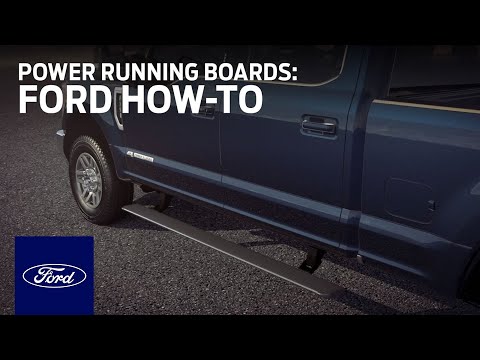
Activating The Power Running Boards
To activate the power running boards on the Ford F150, use the instrument cluster display controls on the steering wheel to navigate to the settings menu. From there, select the running boards option and choose your desired setting.
Activating the Power Running Boards
Have you ever struggled to access your Ford F150’s cabin? Power running boards are the perfect solution, providing both style and convenience when getting in and out of your truck. This section will explore different methods for activating the power running boards on your Ford F150.
Using the Instrument Cluster Display Controls on the Steering Wheel
One of the simplest ways to activate your Ford F150’s power running boards is by using the instrument cluster display controls on the steering wheel. These controls allow you to customize the settings and ensure a seamless experience every time you enter or exit your vehicle.
To begin, locate the buttons on your steering wheel that correspond to the instrument cluster display controls. Press the appropriate button to access the display menu, where you can navigate through different options, including the power running board settings.
Using the Power-Deployable Running Boards Settings
Once you have accessed the instrument cluster display controls, navigate to the power-deployable running boards settings. Here you can switch the boards between Auto, Off, and Out (extended). Auto lets each board deploy only on the side where a door opens, which is called door-specific operation. If your truck does not show a Running Boards menu, the boards may be controlled by the override button in the cab instead, or your trim may not have been built with power boards from the factory.
Using the Upfitter Switch
In addition to the instrument cluster display controls, many F-150s have an override button for the power running boards. Depending on the model year and trim, this button sits on the center console, the dashboard, or near the headlight switch. It is not the same thing as the upfitter switches, which are auxiliary switches used for aftermarket accessories.
To use the override button, press it once to toggle the boards between Auto and the stowed or deployed position. On some trucks you hold the button for a few seconds instead. When the override is active, the boards stay where you put them and stop responding to door openings until you press the button again. This is the setting to use for a car wash, deep snow, or off-roading so the boards do not cycle against an obstacle.
Activating the power running boards on your Ford F150 is a straightforward process. Whether you prefer using the instrument cluster display controls on the steering wheel or the upfitter switch, these methods allow you to customize your running boards’ functionality to suit your needs. So, enhance your vehicle’s accessibility and style with the touch of a button and enjoy the convenience of power running boards on your Ford F150.
Model-Year and Trim Differences
Power running boards are not standard across the F-150 lineup. They are typically optional or included on higher trims such as Platinum, King Ranch, and Limited, and they have been available on Lariat and some Raptor configurations depending on the model year. On trucks that did not come with them from the factory, adding power boards after the fact means buying an aftermarket kit and wiring a controller, which is a bigger job than flipping a setting. If your truck was built without power boards, the Running Boards menu and the override button will not be present.
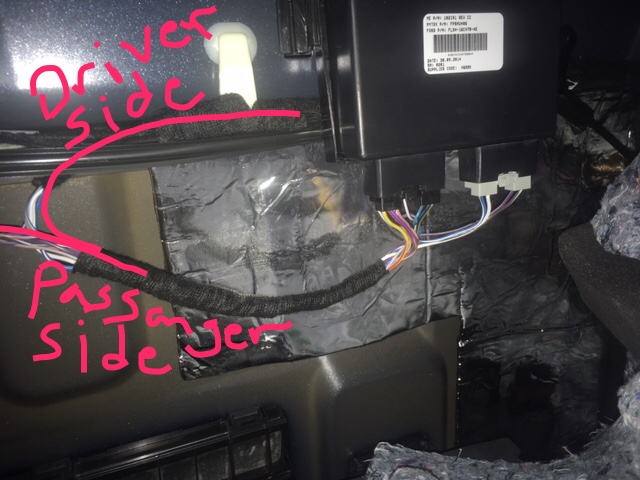
Deactivating The Power Running Boards
To turn the running boards on or off on your Ford F150, follow these simple steps:
1. Using the instrument cluster display controls on the steering wheel, select “Settings. ”
2. Then, select “Vehicle Settings” and choose “Running Boards. ”
3. Finally, select the desired setting for your running boards.
Using The Power-deployable Running Boards Settings
To deactivate the power running boards on your Ford F150, you can use the power-deployable running board settings. Here’s how you can do it:
- Start by locating the settings menu on your vehicle’s instrument cluster or infotainment system.
- Navigate to the advanced settings option and select it.
- Scroll down to the vehicle settings and choose it.
- Once inside the vehicle settings, look for the power running boards option.
- Select the power running boards option to access the different settings.
- Choose Auto to keep them deploying with the doors, Off to keep them stowed, or Out to keep them extended.
Using the power-deployable running board settings allows you to easily deactivate the running boards whenever necessary. Whether you want to turn them off temporarily or permanently, this method provides a convenient way to control your Ford F150’s running boards.
Using The Upfitter Switch
Another way to deactivate the power running boards on your Ford F150 is by using the override button. This control lets you stop the boards from cycling without digging through the settings menu. Follow these steps to turn off the running boards using the override button:
- Locate the override button for the power running boards. It is usually near the dashboard, the center console, or the headlight switch, depending on your model year and trim.
- Press the button once, or hold it for a few seconds if your truck requires it, to switch the boards out of Auto mode.
- Confirm the boards stay stowed when you open a door. Press the button again to return them to Auto when you are done.
By utilizing the upfitter switch, you can easily turn off the power running boards without the need to access your vehicle’s infotainment system. This method offers a quick and straightforward way to disable the running boards whenever desired.
Resetting The System
If you encounter any issues with your Ford F150’s power running boards or need to reset the system, follow these steps:
- Turn off the ignition of your vehicle.
- Open the driver’s side door and keep it open throughout the entire process.
- Turn on the ignition without starting the engine.
- Wait for a few seconds.
- Press the power running board control switch located on the driver’s side door panel three times within five seconds.
- Close the driver’s side door and wait for a few seconds.
- Open the driver’s side door and wait for the boards to complete a full extend and retract cycle.
By resetting the power running board system, you can troubleshoot any potential issues or errors. This method helps ensure that the running boards function properly and maintain their optimal performance.
Now that you know how to deactivate the power running boards on your Ford F150, you have the flexibility to control when they are in use. Whether you prefer to have them disabled temporarily or permanently, these methods provide you with convenience and ease of management.
Troubleshooting: Boards Won’t Deploy or Retract
Fuse and Reset Checks
If the boards stay retracted or stuck, start with the fuse for the running board module. Check your owner’s manual for the exact fuse number and location, since it varies by model year. Pull the fuse, inspect it, and replace it if it is blown. Then run the reset procedure above. If the boards still do not move, a dealer scan can pull the fault code from the running board control module.
Manual Extension if the Motor Fails
If a motor has failed, the board on that side may stay stuck in one position. Do not force it by hand, because the linkage and pinch points can injure you and damage the motor further. In most cases the fix is a replacement motor or linkage assembly, which is a dealer or qualified mechanic job.
Frequently Asked Questions On How To Turn On Running Boards Ford F150
How Do You Turn On A Ford Running Board?
To turn on a Ford running board, follow these steps: 1. Locate the settings on your instrument cluster display. 2. Use the controls on your steering wheel to navigate to ‘Settings.’ 3. Select ‘Vehicle Settings’ and then ‘Running Boards.’ 4. Choose your desired setting for the running boards. If your truck has an override button instead of a menu entry, press it to toggle the boards back into Auto mode. Note: If you’re looking to turn off Ford power running boards, the process is the same. Simply select the desired setting to disable the running boards.
Choose your desired setting for the running boards. Note: If you’re looking to turn off Ford power running boards, the process is the same. Simply select the desired setting to disable the running boards.
How To Deploy Running Boards F150?
To deploy running boards on an F150, start by locating the power running board switch or override button inside the vehicle. Activate it to extend the running boards outward, or set them to Auto so they deploy on the side where a door opens. To deactivate, switch the control off or back to Auto. Make sure to follow the specific instructions in your vehicle’s manual for accurate deployment.
How Do You Reset The Power Running Board On An F150?
To reset the power running board on an F150, first check the fuse for the running board module, then use the instrument cluster display controls to select ‘Settings,’ then ‘Vehicle Settings,’ and choose ‘Running Boards.’ Select a desired setting to reinitialize the system. If the boards still will not move, the reset procedure using the driver’s side door switch three times within five seconds is the next step, followed by a dealer scan if the fault returns.
How Do You Turn Off Ford Power Running Boards?
Maintenance, Battery Drain, and Weight Limits
Power running boards need periodic cleaning and lubrication of the hinges and pivot points, especially in winter when road salt and grit build up. A board that is slow or noisy is usually dirty rather than broken. Because the boards draw current every time a door opens, a weak battery can cause them to move slowly or stop partway. Respect the weight limit listed in your owner’s manual, and do not use the boards as a step for heavy loads or as a jacking point.
Safety Tips and Common Mistakes
- Keep hands, feet, and clothing clear of the board while it is deploying or retracting. The hinge area is a pinch point.
- Watch children and pets around the truck when a door opens, since the board can deploy without warning in Auto mode.
- Do not stand on the board while it is moving, and do not exceed the weight limit.
- Switch to Off or use the override button before a car wash, deep snow, or off-roading so the boards do not cycle against an obstacle.
- Do not force a stuck board by hand. Check the fuse and reset first, then see a dealer if the fault returns.
To turn off Ford power running boards, go to the vehicle’s settings. Use the instrument cluster display controls on the steering wheel to select ‘Settings’ and then ‘Vehicle Settings.’ From there, choose ‘Running Boards’ and select Off to keep them stowed, or use the override button to take them out of Auto mode temporarily. Off is the setting to use for car washes, snow, and off-roading.
Conclusion
To activate and enjoy the convenience of running boards on your Ford F150, simply follow the steps outlined in this blog post. By turning on your power running boards, you can effortlessly access your vehicle and enhance its style. Whether you’re getting in or out of your cab, these running boards provide both practicality and aesthetics.
Say goodbye to the hassle of climbing in and out of your truck, and enjoy the benefits of easy access with your Ford F150 running boards.
Related posts:
 How Far Can You Drive Without an Alternator? Real Distances
 What Color Is Avalanche for Ford? The Definitive 2026 Guide
 How to Replace Rear Sliding Window Ford F150: The Ultimate Guide
 How Many O2 Sensors Does a Ford F150 Have
 What is 4A on F150: Unleashing the Power of 4A in Your Ford F150
 What Are Cam Phasers F150
How Much is a Windshield for a Ford F150: Find the Best Price Now!
What Are Cam Phasers F150
How Much is a Windshield for a Ford F150: Find the Best Price Now!
 Best Aftermarket Radio For 2013 Ford F150: Expert Picks
 Best Floor Jack for F150
 How to Get a Spare Tire off a Ford F150
 5 Best Ford F150 Bed Covers: Expert Picks & Quality Tested
 Best Tuners for Ford F150 EcoBoost to Boost Performance