How to Program a Key Fob for a Ford F150
But here’s the good news: you can do it yourself, and it’s easier than you might think. Imagine the convenience of having a fully functional key fob at your fingertips, ready to unlock your truck with a simple click. Plus, programming your key fob can save you time and money compared to a visit to the dealership.
Stick around, and you’ll discover a straightforward guide to programming your Ford F150 key fob, empowering you with the knowledge to handle this task confidently.
Key Steps
- Sit in the driver’s seat and close all doors
- Insert the key into the ignition
- Turn the key from OFF to RUN 8 times within 10 seconds (end in RUN position)
- Wait for the door locks to cycle (lock/unlock) — this confirms programming mode is active
- Press any button on the new key fob within 8 seconds
- Wait for the locks to cycle again (confirmation)
- Repeat step 5 for any additional fobs
- Turn ignition to OFF to exit programming mode
- Test all key fobs to confirm they work
⚠️ Note: For 2015 and newer F-150s with push-button start, dealer tools or special programmers (like FORScan) are typically required.
Key Fob Basics
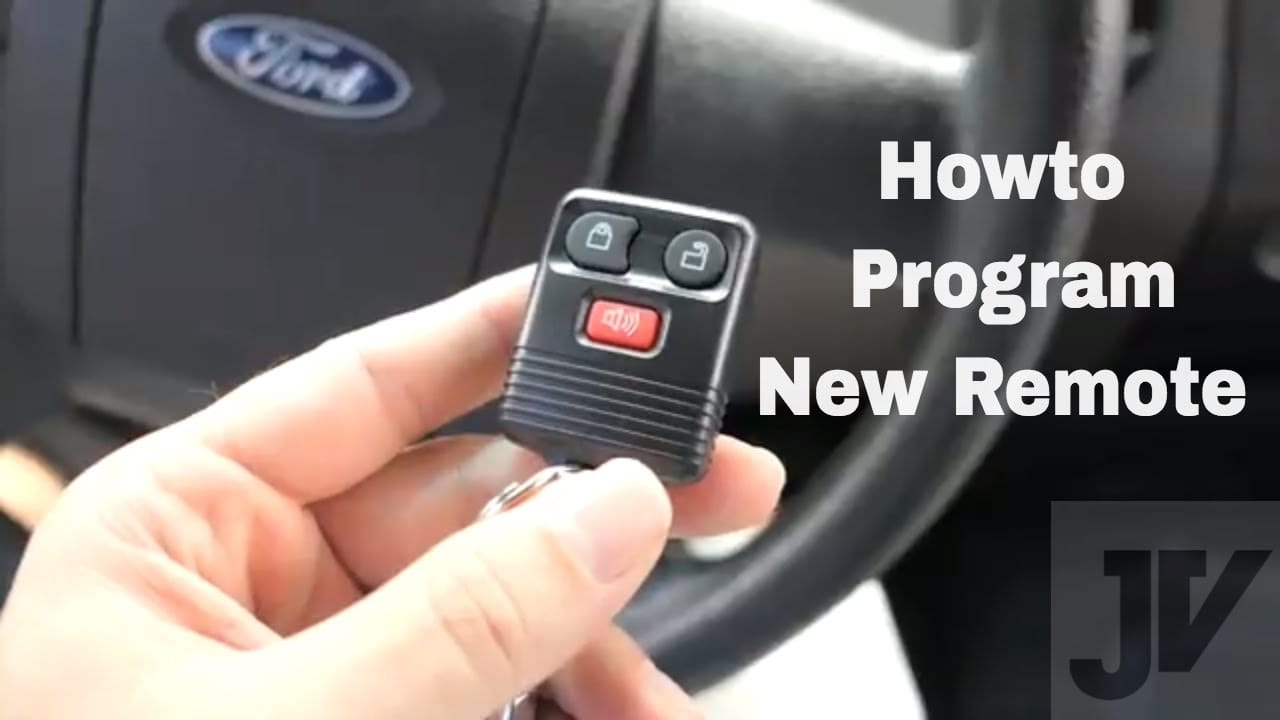
Programming a key fob for a Ford F150 involves a few simple steps. Start by entering the vehicle and closing all doors. Turn the ignition from off to run eight times. The doors will lock and unlock to signal programming mode.
Press any button on the key fob to program it.
Functions And Features
A key fob is a small, handy device. It helps control your Ford F150 from afar. It can lock and unlock doors. You can also start the engine with it. Some fobs can open the trunk, too. All this with just a push of a button. It makes life easier and saves time. Always keep it close for quick access. The fob is your car’s best friend.
Common Issues
Sometimes, the key fob may not work. The battery could be dead. Replace it if needed. The fob might lose its connection. Reprogram it to fix this. Ensure no metal blocks the signal. Keep the fob clean and dry. Avoid dropping it to prevent damage. Sometimes, it just needs a reset. A quick check solves many problems.

Preparation Steps
Begin by finding the owner’s manual. It has key fob instructions. Get a small screwdriver. It helps open the fob. Find a new battery, too. This keeps the fob working well. You may need a spare key. It’s for testing later.
Batteries help the fob work. Check if the battery is old. If it is, replace it. A fresh battery is best. Ensure the battery fits snugly. A loose battery may cause problems. Check if the fob lights up. If not, the battery might be dead.
Programming Process
Put the key into the ignition. Turn the key from “OFF” to “RUN” eight times. Do this within ten seconds. The doors should lock and unlock. This means the car is ready to program. Only then, press any button on the key fob. The doors will lock and unlock again. This confirms the fob is programmed.
Press the lock button on the key fob. Hold it for one second. Then, press the unlock button. Hold it for one second. Repeat this process twice. Make sure the car recognizes the fob. The doors will lock and unlock again. This means the FOB is synchronized.
Troubleshooting Tips
Programming a key fob for a Ford F150 involves simple steps. Begin with all doors closed and the ignition off. Insert and remove the key eight times within ten seconds, ending with the key in the ignition. Press any button on the fob to sync it with the truck.
When Programming Fails
Sometimes, the key fob may not work. Battery issues are common. Check if the battery is dead. Replace it if needed. Another reason is incorrect programming steps. Ensure all steps are followed correctly. Distance matters too. Stay close to the vehicle when programming.
Common Mistakes
People often make mistakes when programming a key fob. One mistake is not reading the manual. The manual has all the needed steps. Another mistake is rushing through the process. Take time to follow each step. Lastly, using the wrong key fob can cause issues. Ensure the key fob is compatible with the Ford F150 model.
Maintaining Your Key Fob
Programming a key fob for your Ford F150 is simple. Insert the key into the ignition and turn it on. Press the “unlock” button on the fob within 20 seconds to sync it.
Battery Replacement
The key fob needs a strong battery to work well. Always use the right type of battery. Check your car manual for details. If your fob stops working, the battery might be weak. Open the fob carefully with a small tool. Replace the old battery with a new one. Make sure the new battery is in the right position. Close the fob properly to avoid any damage.
Cleaning And Care
Keep the key fob clean and dry to last longer. Wipe it gently with a soft cloth. Avoid using water or harsh cleaners. These can harm the fob. Store it in a safe place to prevent scratches. Avoid dropping it on hard surfaces. Handle with care to keep it working properly.

Frequently Asked Questions
How Do You Program A Ford F150 Key Fob?
To program a Ford F150 key fob, insert the key into the ignition. Turn it from “Off” to “Run” eight times within 10 seconds. End in “Run” position, then press any button on the key fob. Wait for a confirmation sound.
Repeat for additional fobs.
What Tools Are Needed For Programming?
No special tools are required to program a Ford F150 key fob. You only need the ignition key and the new key fob. Ensure you have all existing and new fobs during the programming process. The vehicle’s onboard computer does the rest.
Can I Program A Key Fob Myself?
Yes, you can program a Ford F150 key fob yourself. Follow the simple steps outlined in your vehicle’s manual. It involves turning the key in the ignition and pressing a button on the fob. No professional assistance is needed, making it a cost-effective solution.
How Long Does Programming A Key Fob Take?
Programming a Ford F150 key fob typically takes just a few minutes. The process involves turning the ignition key and pressing a button on the fob. If done correctly, you’ll hear a confirmation sound within seconds. The entire procedure is quick and straightforward.
Conclusion
Programming a Ford F150 key fob is simpler than you think. Follow the steps carefully for success. Always keep your owner’s manual handy. It helps with troubleshooting. Practicing patience is key for this process. Have all tools ready before starting.
Safety first. Ensure the vehicle is in park. Check the key fob’s battery. It should be fully charged. Double-check each step as you go. Avoid rushing the process. You’ll soon have a working key fob. Enjoy the convenience of your newly programmed key.
Stay safe and happy driving!
Related posts:
 How Far Can You Drive With A Dead Battery
 how much is a replacement key for Ford F150
 What is a Ford Csp : Everything You Need to Know
 How To Identify A Ford Transmission: Tips and Techniques
 How to Reset Tpms Ford F150: Quick and Easy Steps
 How to Bypass O2 Sensor on Ford F150: A Foolproof Guide
 Which F150 Has Adaptive Cruise Control
 How Much are Ford F150 Brake Pads? Find the Best Prices Here!
 Does 30 Oz Yeti Fit in Cup Holder? Find Out Now!
 How Much is a Leveling Kit for F150? Find the Best Deals!
 What Is The F150 Sport Package
 How to Fix Active Air Dam System Fault Ford F150