How to Remote Start Ford F150 With Key Fob
With the Ford F150’s remote start feature, you can turn this dream into reality, all with just a simple press of a button on your key fob. If you’ve ever wondered how to take full advantage of this convenient feature, you’re in the right place.
In this guide, you’ll discover how to remotely start your Ford F150 using your key fob, making your mornings smoother and more comfortable. Whether you’re looking to heat the cabin or cool it down before you hop in, this easy-to-follow method will enhance your driving experience. Keep reading to learn the steps and tips to unlock this modern marvel right from your fingertips.
Key Steps
- Make sure the vehicle is locked
- Press the lock button once on the key fob
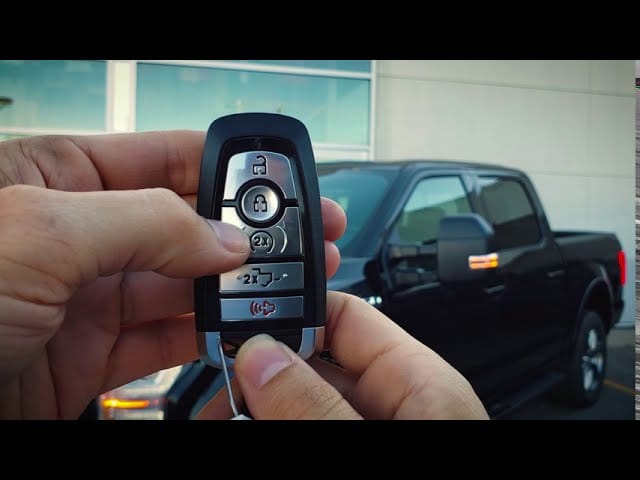
- Press the remote start button (⟳ or 2X) twice within 3 seconds
- The parking lights will flash, and the engine will start
- The engine will run for 5 to 15 minutes depending on your settings
- To turn off the engine remotely: Press the remote start button again
Benefits Of Remote Starting
Remote starting your Ford F150 is very helpful. It helps warm up the car on cold mornings. This makes the inside nice and cozy before you get in. In hot weather, it cools the car down. You can start the air conditioner early. This makes your ride more comfortable.
Another benefit is security. Start your truck without being inside. This keeps you safe from bad weather or danger. Also, it saves time. Warm up or cool down the car while doing other tasks. This means no waiting in the car.
These features make remote starting a good choice. It offers comfort and safety. Try it out and enjoy these benefits.

Key Fob Features
The key fob has many buttons. Each button has a job. The lock button locks the car doors. The unlock button opens them. The remote start button starts the engine. Press it twice to start. The panic button makes the car horn beep loudly. It helps in emergencies.
The key fob works from a distance. It works within 300 feet. Beyond this, it may not work. The key fob batteries can run low. Low batteries affect its range. Sometimes, buildings can block signals. This can limit its use.
Preparation Steps
Battery power is very important for the key fob. Weak batteries make it hard to start the car. Open the key fob and look at the battery. Is it old? Replace it if needed. Check the battery in the car too. This helps with a smooth start.
Safety first before starting the car. Make sure the doors are closed. Check if the gear is in park. Ensure no one is near the car. This keeps everyone safe. Look around the car for anything dangerous. Safety is very important for your car and you.

Step-by-step Activation
First, make sure the key fob is in your hand. Press the unlock button on the key fob once. This will unlock the doors. Check if the doors are unlocked before proceeding. The vehicle is now ready for the next step.
Look for the remote start button on your key fob. It usually has a circular arrow symbol. Press this button two times. Do it quickly. The car should start after the second press. If not, try again.
The engine should now be running. Check for any signs like engine noise or exhaust smoke. Look at the lights. They may flash once. The car is ready to drive. Enjoy the ride in your Ford F150!
Troubleshooting Common Issues
Remote starting a Ford F150 with a key fob requires checking battery charge and ensuring the vehicle is in park. Press the lock button, then the remote start button twice for activation.
Failed To Start
Sometimes, the Ford F150 may not start with the key fob. This can be frustrating. First, check if the fob has fresh batteries. Weak batteries cause problems. Ensure the fob is close to the car. Being too far away can prevent starting. Also, verify if the car is in park mode. The vehicle won’t start if it’s not. These simple checks can solve starting issues.
Signal Interference
Signal interference can block the key fob’s signals. Tall buildings can cause this issue. Other devices can also interfere. Cell phones or radios can block signals. Move the fob closer to the car. This can improve the signal. Avoid areas with high interference. Parking lots may have less interference. These steps can help ensure a smooth start.
Safety Considerations
Ensuring safety while remote starting your Ford F150 with a key fob is crucial. Keep the vehicle in a well-ventilated area to prevent exhaust buildup. Always engage the parking brake and ensure the gear is in park before starting.
Avoiding Carbon Monoxide Risks
Carbon monoxide is very dangerous. It can hurt people. Always start your Ford F150 in an open space. Never start it in a closed garage. This keeps everyone safe. Fresh air is important. Carbon monoxide can build up fast in closed spaces.
If you start your truck inside, open the garage door. Let the air flow. This helps keep the air clean. Always think about safety first.
Ensuring Secure Parking
Park your truck in a safe place. This stops thieves. Make sure the truck is in a secure area. Never leave it running in unsafe places.
Lock the doors of your Ford F150. Even when you are nearby. Check your surroundings. Stay alert. Safety is very important.
Advanced Features
Ford offers a special app for your smartphone. You can control your F150 from anywhere. This app lets you remote start your truck. It’s easy and fun to use. It also shows your car’s location on a map. You can check if the doors are locked or unlocked. This makes driving safer and more convenient. The app is free to download. You only need to register your vehicle. Once set up, it works like magic.
You can change how your key fob works. Adjust the settings for remote start. Choose the length of time your engine runs. Set it to be short or long. Change the climate inside your truck. Decide if you want heat or cool air. This makes your truck comfortable before you get in. You can do this easily. Just follow the steps in your manual. The settings are simple to understand.

Frequently Asked Questions
How Do I Remote Start My Ford F150?
To remote start your Ford F150, press the lock button once. Then, press the remote start button twice. Your vehicle should start and run for a preset amount of time. Ensure your key fob is within the operating range of your vehicle for a successful remote start.
What Is The Range Of The Key Fob?
The key fob typically works within a range of approximately 300 feet. This range can vary based on environmental factors and obstructions. Ensure there are no large obstacles between you and your vehicle for optimal performance. Always check your vehicle’s manual for specific details.
Can I Extend The Remote Start Run Time?
Yes, you can extend the remote start run time by performing the remote start sequence again before the initial run time ends. Each activation adds a certain amount of time. Check your vehicle’s manual for the exact duration and limitations of extending the run time.
Does Remote Start Affect Fuel Consumption?
Remote starting your vehicle uses fuel while the engine runs. However, it can improve fuel efficiency by warming up the engine before driving. This results in smoother operation and potentially better fuel economy. Consider using remote start responsibly to balance convenience and fuel consumption.
Conclusion
Starting your Ford F150 remotely is simple with the key fob. Follow the steps carefully for a smooth start. Make sure the vehicle is in a safe location. This feature adds convenience to your daily routine. Keep your key fob handy always.
Remember, practice makes it easier over time. Enjoy the comfort of a pre-warmed or cooled truck. It’s a handy feature for all seasons. Stay safe and enjoy your drive.
Related posts:
 How Do Ball Joints Work: A Comprehensive Guide
 How Do I Know If My Clutch Cable Has Gone
 Can Spark Plugs Really Break Glass
 How Big of Tires Can I Fit on My F150? A Comprehensive Guide
 How Can I Protect My Windshield From Rock
 How Do Spark Plugs Break Windows
 How Far Can I Drive With A Bad Alternator
 How Far Can I Drive With A Blown Water Pump
 How Far Can I Drive With A Broken Serpentine Belt
 How Far Can You Drive With A Dead Battery
 How Far Can You Drive Without An Alternator
 How To Put Down Nissan Altima Back Seats