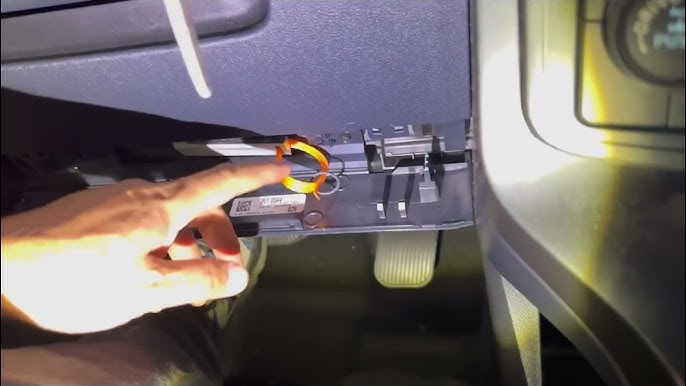

Ford F150 Factory Code: How to Find Your Keyless Entry Code
Many Ford F150 owners find themselves in a bind when they can’t locate their factory code. Imagine being locked out of your truck, unable to use the keypad, or wanting to set a personal entry code but hitting a roadblock.
Here’s the catch: “factory code” on an F150 can mean three different things. Most owners searching for it want the 5-digit keyless entry code for the door keypad. But it can also mean the paint code on the door jamb sticker, or an engine, axle, or transmission code on the safety compliance label. This guide focuses on the keyless entry code first, then covers the others, with generation-specific locations so you check the right spot on your truck the first time.
Key Steps
- Check the Owner’s Manual Packet (look for a card or sticker)
- Look Inside the Glove Box or Under the Dashboard
- Locate the Smart Junction Box (SJB) under the Driver’s Side Dash
- Find the White Label with a 5-Digit Factory Code
- Use a Flashlight to Read the Code Clearly
- Optionally, Retrieve the Code with an OBD-II Scanner (if supported)
- Note and Store the Code in a Safe Place

What “Factory Code” Means on a Ford F150
Before you start hunting, confirm which code you actually need:
- Keyless entry code — a 5-digit number that unlocks the doors and lets you program personal codes on the keypad. This is what most people mean.
- Paint code — a short alphanumeric code on the door jamb sticker, used to match touch-up paint.
- Engine, axle, and transmission codes — listed on the safety compliance certification label, used for parts and service.
The rest of this guide covers the keyless entry code, with a quick paint code reference near the end.
Open the driver’s door. Look on the side of the door panel. The factory code sticker might be there. It is usually a small sticker. The numbers are important. Make sure you write them down.
Check inside the glove box. Sometimes the code sticker is there. It could be on the inside wall. Keep your eyes sharp. It might be hidden.
If your F150 has a trunk, open it. Look around the edges. The code sticker might be near the latch. It can also be on the side panels. Check carefully not to miss it.
Using The Owner’s Manual
The owner’s manual is a useful tool. It often has a section for the factory code. This code is crucial for your Ford F150. Check the index at the back of the book. Look for words like “factory code” or “keyless entry.” This helps you find the right page quickly.
Sometimes, the code is on a sticker inside the manual. This sticker is usually easy to spot. If you can’t find it, try calling your dealer. They can offer more help. Keeping the manual safe is important. This helps you find the code when needed.
Checking With The Dealership
The VIN is like a car’s unique fingerprint. It’s a special number. You can find it on the dashboard. It’s also on the driver’s side door. Give this number to the dealership. They will help you with your request. The VIN helps them find the right information.
You need to show that you own the car. Bring your car title or registration. Show your driver’s license, too. These documents prove you are the owner. The dealership will need these to help you. It’s important to have all papers ready.
Utilizing The OBD-II Scanner
Finding the factory code for your Ford F150 is simple. You need a compatible OBD-II scanner. Not all scanners work with Ford vehicles. Some popular models include BlueDriver, Innova, and Autel. These scanners read the car’s computer. They can show the factory code. Ensure your scanner supports Ford protocols. Check the scanner’s manual for compatibility.
Start by connecting your scanner to the car’s OBD-II port. It’s usually under the dashboard. Turn on the scanner and the car. Follow the scanner’s instructions to access the factory code. Select “Read Codes” from the scanner menu. Wait for the scanner to display the code. Write down the code for future use.
Online Resources And Forums
Discovering the factory code for your Ford F150 becomes easy with online resources and forums. These platforms offer tips, guides, and advice from fellow Ford owners. Enthusiasts share experiences, helping you locate the code without hassle.
Helpful Websites
Find factory codes for the Ford F150 on helpful websites. Some sites offer step-by-step guides. Others provide forums for discussions. Experts share their knowledge there. Pictures and videos might help too. Always check the information’s accuracy. Verify through multiple sources. Websites like Ford’s official site can be useful. Community sites sometimes have good tips. Explore different resources for the best results.
Community Tips And Tricks
Online communities have valuable tips. Members often share tricks they use. Some have tried methods that worked well. Ask questions to learn more. Share your findings too. Feedback from others is helpful. Consider their advice seriously. Local groups might have specific insights. Join forums related to the Ford F150. Participate actively for better information.
F150 Paint Code Location (Quick Reference)
If you’re actually after the paint code, skip the BCM. Open the driver’s door and look at the safety compliance certification label on the door jamb. The paint code is a short two-character alphanumeric value, often labeled “PNT” or “EXT PNT.” You can also find it on the vehicle certification label inside the door. Give that code to a paint supplier or the dealership parts counter to match your truck’s factory color exactly.
Programming Your Own Personal Code
Once you have the factory code, you can set a personal 5-digit code that’s easier to remember. Enter the factory code on the keypad, then within five seconds press the 1/2 button and enter your new 5-digit code. The locks will cycle to confirm. You can store multiple personal codes on most F150s — repeat the process for each one. The factory code itself can’t be changed; it stays in the BCM permanently, which is why you should keep it written down even after setting a personal code.

Security Considerations
Keep your factory code a secret. Only share it with trusted people. Never write it down where others can see. Use a safe place to store it. This helps prevent unauthorized access to your car. A safe car is a happy car.
Be careful of people asking for your code. Scammers may try to trick you. Always verify who is asking for this important information. Do not share your code online or in public places. Stay smart, stay safe.

Frequently Asked Questions
Where Can I Find the Ford F150 Factory Code?
The factory keyless entry code for your Ford F150 is a 5-digit number. It’s printed on a card in the owner’s manual packet, on a label on the Smart Junction Box (2004–2008) or Body Control Module (2009 and newer), or you can display it on the cluster with two programmed keys on supported trims. A Ford dealership can also retrieve it from the BCM with proof of ownership.
How Do I Reset My Ford F150 Code?
To reset your Ford F150 code, first find the factory code. Enter this code on the keypad. Then, press the 1/2 button and enter your new five-digit code. Ensure the new code is different from the factory code. This will set your personalized code for the keyless entry system.
Can I Change My Factory Code For Ford F150?
No, you cannot change the factory code for your Ford F150. The factory code is permanently programmed into your vehicle’s system. However, you can set a personalized code for your convenience. Use the factory code to do this, and follow the instructions in the owner’s manual.
What If I Forget My Ford F150 Factory Code?
If you forget your Ford F150 factory code, check your owner’s manual or glove box for the label. You can also contact your local Ford dealership for assistance. They might ask for proof of ownership before providing the factory code.
Always keep your code stored safely.
Key Takeaways
- “Factory code” on an F150 usually means the 5-digit keyless entry code, not the paint or engine code.
- Check the owner’s manual card first, then the SJB (2004–2008) or BCM (2009+) label under the driver’s side dash.
- Two programmed keys can display the code on the cluster on many 2011+ trucks, but XL and XLT without a factory keypad often don’t support it.
- FORScan reads the code directly from the BCM and is the best DIY tool for the job.
- A dealership can retrieve the code with proof of ownership, usually for a diagnostic fee.
- If the BCM was replaced, the original code may be gone for good and the module may need reprogramming.
Conclusion
Finding the factory code for your Ford F150 is simple. Follow the steps in this guide. You’ll gain valuable insights. Check the owner’s manual first. It’s a great starting point. Still can’t find it? Look at the driver’s side door.
The code might be there. Don’t forget the glove box. It often holds crucial information. Lastly, contact your Ford dealer. They can assist. Now, you can access your truck’s features easily. Enjoy the confidence of knowing your Ford F150 better.
Related posts:
 How Far Can You Drive Without an Alternator? Real Distances
 What Color Is Avalanche for Ford? The Definitive 2026 Guide
 How to Disengage 4WD in Ford F150: Easy Steps to 2H
 Ford F150 Power Steering Assist Fault: Fix by Year, Codes & Cost
 What Lug Pattern is a Ford F150: Unveiling the Perfect Fit for Your Ride
 Does My F150 Have Remote Start? 3 Easy Ways to Check
 Does 2016 F150 Have Apple CarPlay? SYNC 3 vs SYNC 2 Guide
 Best 6X8 Speakers for Ford F150: Tested & Reviewed
 Best Adjustable Hitch for F150
 How to Change Battery in F150 Key Fob
 5 Best Ford F150 Bed Covers: Expert Picks & Quality Tested
 Best Tuners for Ford F150 EcoBoost to Boost Performance