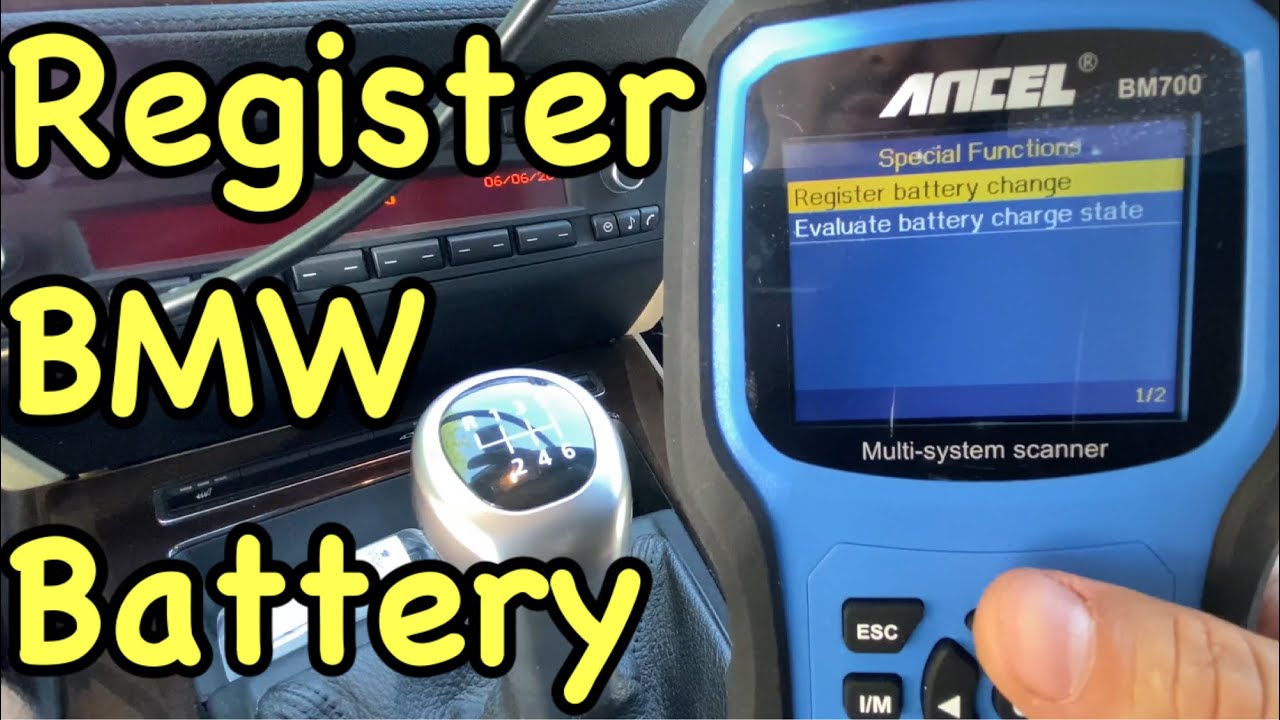
How To Register BMW Battery For Free: Real $0 DIY Guide
Have you ever wondered how to register your BMW battery for free? Many BMW owners miss this important step. They don’t realize it can keep their car running smoothly. Registering the battery helps your car’s computer know exactly what’s going on. This can save you time and money.
Imagine getting a new battery and not telling your car about it. It could lead to problems later. You might get warning lights or even a weak engine. You wouldn’t want that, right?
Here’s a fun fact: Most people don’t know they can register their BMW battery without spending a dime. You can easily do it from home. Excited to learn how? Let’s dive in and explore the simple steps you need to follow!
Benefits of Registering Your BMW Battery

When your BMW’s computer knows the exact age and capacity of the battery, it can adjust charging voltage and current to match. That means less strain on the alternator, a battery that reaches its full service life, and fewer electrical gremlins. Registration also keeps your service records consistent, which matters if you ever need warranty or goodwill support from a dealer. Here is what registration actually does for you:
Registering your BMW battery can make a big difference. It can help your battery perform better and last longer. Who doesn’t want their car to run like a dream? Plus, registration can keep your warranty safe. That means if anything goes wrong, the dealership is more likely to help you out. Think of it as a spa treatment for your car! Below is a simple table explaining the benefits:
Registration vs Coding Explained
Registration tells the car a new battery of the same type and capacity is installed, so it can reset the charging profile. Coding goes further: it tells the car the battery is a different type (AGM vs flooded) or a different Ah capacity. If you fit a like-for-like battery, registration alone is enough. If you change type or capacity, you need coding too, and free tools often cannot do that step.
The IBS and DME Connection
The intelligent battery sensor (IBS) sits on the negative terminal and constantly measures current, voltage, and temperature. It sends that data to the DME (digital motor electronics), which decides how hard to charge. Registration resets the IBS/DME baseline so the computer stops treating your new battery like the old, tired one.
| Benefit | Details |
|---|---|
| Improved Performance | Longer battery life and better efficiency. |
| Warranties | Protects you if something unexpected happens. |
| Service | Dealerships provide better support. |
So, registering your battery can keep everything running smoothly. Plus, it might save you a few headaches later on!
Which BMWs Actually Need Registration
Not every BMW needs this step. Use the table below as a rough guide, and check your owner’s manual or a diagnostic tool to confirm for your specific model.
| BMW Era / Model | Needs Registration? | Notes |
|---|---|---|
| Pre-mid-2000s, no IBS | No | Simple battery swap |
| Mid-2000s onward with IBS | Yes | Registration required |
| Same type and Ah as old battery | Registration only | No coding needed |
| Different type or Ah | Registration + coding | Free tools may not support coding |
Step-by-Step Guide to Registering Your BMW Battery for Free

The genuinely free route is BMW’s own ISTA/Rheingold diagnostic software, which you can download and run on a laptop with an ENET cable. You can also borrow a scanner from a friend or a local parts store, or use the free tier of an app that supports battery registration. Below is the real walkthrough, plus what to check before you start.
Before you touch any software, confirm two things: the new battery’s type (AGM or flooded lead acid) and its amp-hour (Ah) rating. If both match the old battery, you only need registration. If either is different, you need coding as well, and that is a separate procedure. Write both numbers down before you connect anything.
There are also other ways to register your battery:
- ISTA/Rheingold (free download): the same software dealers use. Connect a laptop via an ENET cable to the OBD-II port, select the battery registration service function, and follow the prompts.
- Borrowed scanner: many independent shops and parts stores will let you use a Foxwell or similar tool that supports BMW battery registration.
- Free app tiers: some apps let you read fault codes and view battery data for free, but the registration write step usually sits behind a paid unlock. Check before you rely on one.
ISTA/Rheingold Walkthrough (The Real Free Method)
Install ISTA on a laptop, connect the ENET cable to your car’s OBD-II port, and turn the ignition on without starting the engine. Open ISTA, let it identify the vehicle by VIN, then go to Vehicle Management > Service Functions > Body > Power Supply > Battery. Choose Register Battery Replacement, confirm the battery type and Ah rating, and let the routine run to completion. Do not interrupt it or switch off the ignition mid-write.
Tools and Resources Needed for Registration

List of necessary equipment, like OBDII scanners or smartphones. Recommended apps and software for enhancing the registration process.
You do not need to buy anything if you already own a laptop and can borrow or buy a cheap ENET cable. Here is what each option actually costs you in practice:

Tool/App Purpose OBDII Scanner Connects to your BMW for battery registration. BMW Battery App Guides you through the registration process. Smartphone Downloads apps and keeps you connected!
Having these tools makes registration a breeze. It’s like having a superhero sidekick, but without the cape! Don’t forget, a little preparation goes a long way!
How to Verify Registration Worked
Do not assume it worked just because the tool said done. Reconnect your scanner or ISTA and check live data from the IBS: battery voltage with the engine off, registered battery capacity, and any stored fault codes. If the registered capacity matches your new battery and no battery-related faults return after a short drive, the registration took. Start-stop working again is another good sign.
Troubleshooting Common Registration Issues
Typical problems encountered during the registration process. Solutions to resolve registration errors and ensure successful completion.
Most failures come down to three things: a weak laptop battery or unstable connection during the write, the wrong battery type or Ah value entered, or a cable that drops communication mid-routine. Before you start, charge your laptop, keep the car on a stable power supply if possible, and double-check the numbers on the battery label against what you enter.
- Check all your information. Make sure it’s complete and correct.
- Clear your browser cache and try again.
- Use a different browser or device if problems continue.
By following these steps, you can overcome registration problems and successfully register your BMW battery.
What Happens If You Skip It
Skipping registration is not catastrophic on day one, but it catches up with you. The charging system overcharges or undercharges the new battery, which shortens its life. You may also see start-stop stop working, comfort access become unreliable, or unexplained warning lights appear. None of that is worth avoiding a ten-minute job.
What are common registration issues?
Typical problems include missing data, website errors, and login issues. Make sure you enter everything accurately to avoid these hurdles.
Frequently Asked Questions about BMW Battery Registration
A compilation of common queries and answers regarding battery registration. Clarifications on misconceptions and general best practices.
Many people ask questions about battery registration for their BMWs. Understanding these can help clear up confusion. Here are some common questions and their answers:
Do I need to register my new BMW battery?
Only if your BMW has an intelligent battery sensor (IBS) and a start-stop system or smart charging. Most BMWs from roughly the mid-2000s onward do. Older models without IBS do not need registration at all, and simply swapping the battery is enough.
Can I register the battery myself?
Yes, you can. There are easy steps to follow. You can also use a scanner tool or an app to do it.
What happens if I don’t register the battery?
The car keeps charging the new battery as if it were the old, worn one. That can shorten battery life, cause start-stop to stop working, trigger comfort access issues, and in some cases contribute to parasitic drain or warning lights.
How often should I register my battery?
Only when you replace the battery. There’s no need to do it regularly if the battery stays the same.
Remember, keeping your battery registered helps your BMW run smoothly!
Conclusion
Registering your BMW battery for free is realistic if you use ISTA/Rheingold with an ENET cable, borrow a scanner, or check whether your app’s free tier covers the write step. Confirm your battery type and Ah rating first, register only if your car has IBS, and verify the job by checking live battery data afterward. Skip the guesswork, and your new battery will thank you with a longer, healthier life.
Related posts:
 ZF 8HP Transmission Problems: Variants, Costs & Fixes
 Which BMW Has 3 Rows? X7, iX, and X5 Explained
 BMW Stalls When Stopping: Causes, Codes, Costs & Fixes
 BMW Garage Door Opener: HomeLink Programming & Fixes
 What BMW Has the B58 Engine? Full Model List, Years, and Outputs
 BMW Restraint System Malfunction: Causes, Codes & Fixes
 How To Decode BMW VIN: Step-by-Step Guide With Examples
 How To Check BMW Transmission Fluid Level (Dipstick & Sealed)
 How To Connect To BMW WiFi: Step-By-Step Guide (2025)
 Bmw Leaking Coolant But Not Overheating: Causes & Fixes
 BMW Limp Mode: Causes, OBD-II Codes & Fixes Explained
 F150 Jump Seat Console Organizer: Fitment Chart & Top Picks