How to Change F150 Battery
Is your Ford F150 struggling to start, or have you noticed the headlights dimming? These could be signs that your battery needs a change.
Don’t worry; swapping out your F150 battery is easier than you might think. You don’t need to be a mechanic to get the job done. With a few simple tools and a bit of guidance, you can replace it yourself and save money on labor costs.
Imagine the satisfaction of knowing you’ve tackled this task on your own, avoiding unnecessary trips to the mechanic. By the end of this guide, you’ll have the confidence to handle your F150’s battery change with ease and efficiency. Ready to get started? Let’s dive into the step-by-step process and empower you with the skills to keep your truck running smoothly.
Key Steps
- Park the Truck and Turn Off the Engine
- Open the Hood
- Locate the Battery
- Disconnect the Negative (-) Terminal First
- Disconnect the Positive (+) Terminal
- Remove the Battery Hold-Down Clamp or Bracket
- Lift Out the Old Battery Carefully
- Place the New Battery in the Tray
- Secure the Battery with the Hold-Down Clamp
- Connect the Positive (+) Terminal First
- Connect the Negative (-) Terminal
- Close the Hood and Start the Truck
Safety Precautions
Always wear gloves and goggles for protection. Batteries contain acid. Acid is dangerous. Keep the area well ventilated. Avoid sparks and flames. They can cause explosions. Disconnect the negative cable first. This prevents short circuits. Keep tools away from battery terminals. This avoids accidental contact. Store tools safely. Ensure children and pets are far away. Battery replacement is not a game. Safety comes first. Be careful and stay alert.

Tools And Materials
Changing a battery needs some tools. A wrench is important. It helps to remove bolts. Gloves keep your hands clean. Safety is key. Safety glasses protect your eyes. Batteries can leak. A battery terminal cleaner helps clean connections. A replacement battery is needed. Make sure it’s the right size. A socket set can be handy. It fits the bolts well. A wire brush removes rust. These tools make work easy.
Locating The Battery
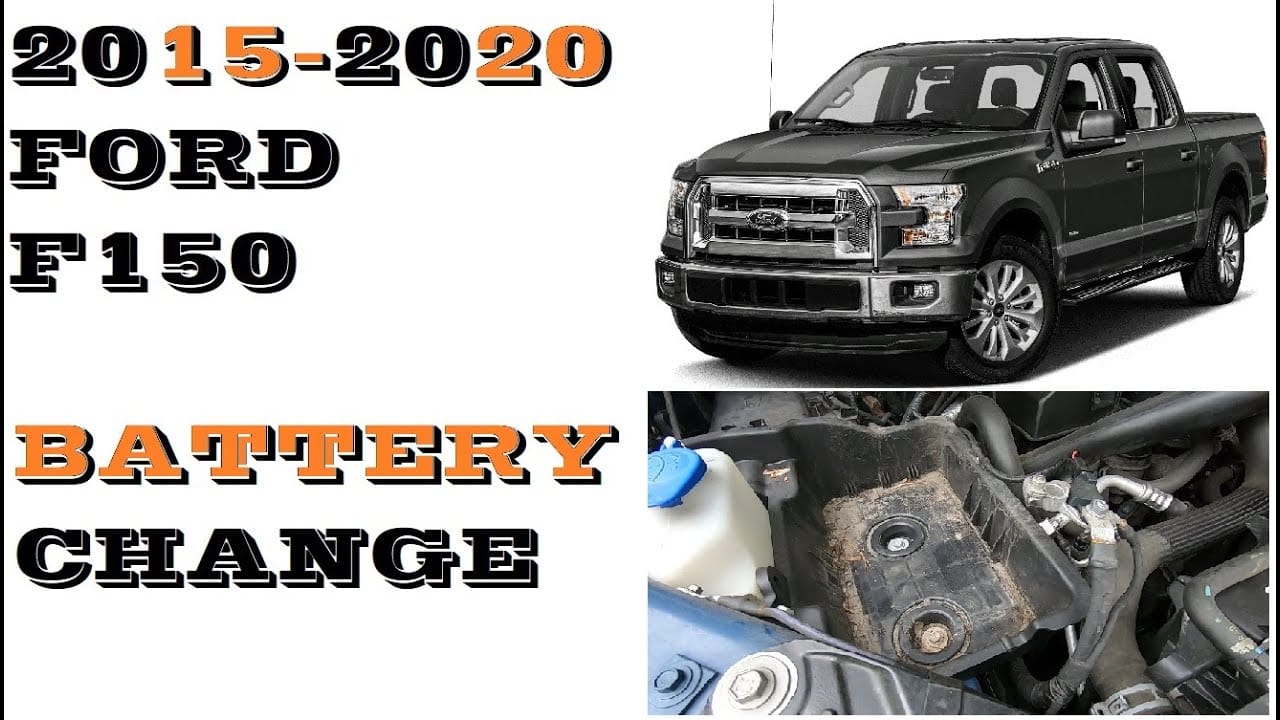
The battery in an F150 is under the hood. Open the hood using the lever inside. Look near the front for a large black box. This is your battery. It has two cables attached, one red and one black. The red cable is the positive side. The black cable is the negative side. Ensure the engine is off before touching the battery.
The battery is usually on the driver’s side. Sometimes, it might be on the passenger’s side. Check your car’s manual to be sure. The battery is heavy, so be careful when handling it. Always wear gloves for safety. Never touch both terminals at the same time. This can be dangerous. Make sure you have the right tools before starting.
Removing The Old Battery

Start by turning off the engine. This is very important. Open the hood and find the battery. Use a wrench to loosen the nut on the negative terminal. Remove the cable from the battery. Do the same for the positive terminal. Keep the cables away from each other. This prevents any sparks. Make sure the cables do not touch the battery.
Check if the battery has a strap or clamp. These hold the battery in place. Use a wrench to remove any bolts or screws. Carefully lift the battery out of the tray. Batteries are heavy, so use both hands. Place the battery in a safe spot. Make sure it won’t fall or spill. Dispose of the old battery properly. Many places recycle batteries.
Installing The New Battery
The new battery must sit securely in the tray. Ensure it matches the size and shape of the old one. Align the positive and negative terminals correctly. The battery should not move around. Use the clamps to hold it tight.
Connect the positive terminal first. Use a wrench to tighten it. Then, attach the negative terminal. Make sure both are tight. Loose connections can cause problems. Check if the battery is stable. If not, adjust it again. Always be careful with the terminals. Do not touch them with metal objects.
Testing The New Battery
First, ensure the new battery is securely in place. Connect the positive cable to the positive terminal. Then, attach the negative cable to the negative terminal. Make sure all connections are tight. Loose connections can cause problems later. Next, turn on the ignition. Listen for the engine’s sound. A strong sound means the battery is good. If the engine struggles, recheck the connections. Also, check for any warning lights on the dashboard. These lights can indicate a battery issue. Finally, test all the car’s lights. Bright lights mean the battery is working well. Dim lights might suggest a problem.
Disposing Of The Old Battery
Old batteries can harm the environment. Proper disposal is important. Always wear gloves when handling batteries. Safety first. Find a local recycling center. They take old batteries. It’s free and safe. Some auto shops also offer this service. Check with them. Never throw batteries in the trash. It’s dangerous. It can cause fires. Protect the planet. Follow local rules for disposal. Ask for help if needed. Batteries contain chemicals. Recycle responsibly. Help keep the Earth clean.
Tips For Battery Maintenance
Keep your battery clean and dry. Dirt can drain its power. Check for cracks or leaks often. These can cause serious damage. Check the battery’s charge level. This prevents sudden breakdowns. Use a multimeter to test the battery. A good battery should show around 12.6 volts. Replace the battery if it is below 12 volts.
Secure battery connections tightly. Loose connections can stop the car. Store your car in a cool place. Heat can harm the battery. Avoid using electronics when the engine is off. This drains the battery quickly. Charge the battery regularly if the car is not in use. This keeps it healthy. Drive your car often. Short trips are bad for the battery.
Frequently Asked Questions
How Do I Know My F150 Battery Needs Replacing?
If your F150’s battery struggles to start the engine or shows corrosion, it might need replacing. Frequent jump-starting, dim headlights, or a slow crank are clear indicators. Regular checks ensure optimal performance and longevity. Consider professional testing for a precise diagnosis.
What Tools Are Needed To Change a F150 Battery?
To change your F150 battery, you’ll need safety gloves, a wrench set, and a battery terminal cleaner. These tools ensure safe and efficient removal and installation. Properly equipped, you’ll avoid damage to the battery or vehicle components during the process.
Where Is The Battery Located In An F150?
In the F150, the battery is located under the hood, typically on the driver’s side. It’s easily accessible for maintenance or replacement. Check your vehicle’s manual for exact placement, as it can vary between models and years.
How Long Does It Take To Change The Battery?
Changing an F150 battery usually takes about 30 to 60 minutes. This includes removing the old battery, cleaning terminals, and installing the new one. Preparation and having the right tools ready can help speed up the process significantly.
Conclusion
Changing an F150 battery is simple with the right steps. First, gather your tools. Next, safely remove the old battery. Carefully place the new battery in its spot. Tighten the connections. Always check that everything is secure. This process helps keep your truck running smoothly.
Regular battery checks extend its life. Save money by doing it yourself. Feel confident in your ability. Your F150 deserves the best care. Follow these steps, and drive worry-free. Enjoy the journey with your reliable truck. Keep learning and maintaining your vehicle.
Related posts:
 How Do Ball Joints Work: A Comprehensive Guide
 How Do I Know If My Clutch Cable Has Gone
 Can Spark Plugs Really Break Glass
 How Big of Tires Can I Fit on My F150? A Comprehensive Guide
 How Can I Protect My Windshield From Rock
 How Do Spark Plugs Break Windows
 How Far Can I Drive With A Bad Alternator
 How Far Can I Drive With A Blown Water Pump
 How Far Can I Drive With A Broken Serpentine Belt
 How Far Can You Drive With A Dead Battery
 How Far Can You Drive Without An Alternator
 How To Put Down Nissan Altima Back Seats