How to Turn On Blind Spot Monitor Ford F150: By Year & Trim
To turn on the blind spot monitor on a Ford F150, the exact steps depend on your truck’s model year and infotainment system. On most 2015-and-newer trucks with SYNC 3 or SYNC 4, you press the steering wheel’s right-hand arrow buttons to reach Settings > Driver Assistance > Blind Spot and toggle it on. On older trucks with MyFord Touch or a basic information display, you press the Info button until "Blind Spot" appears, then press Reset to switch BLIS on or off. Some trucks also have a physical BLIS button on the dash or door panel. The sections below walk through each version so you can find your exact setup.
Introducing blind spot monitoring to your Ford F150 can greatly enhance your safety on the road. The blind spot monitor is designed to detect vehicles that may have entered your blind spot zone, which is on both sides of your vehicle extending rearward.
By activating the blind spot monitor, you will receive alerts when a vehicle is detected in your blind spot, allowing you to make safer lane changes. We will guide you on how to turn on the blind spot monitor on your Ford F150, ensuring you can enjoy the benefits of this important driving aid.
Understanding Blind Spot Monitor
On a Ford F150, the blind spot monitor is turned on through the information display or touchscreen rather than a single universal button. The menu path is Settings > Driver Assistance > Blind Spot, and the system is usually on by default until someone switches it off. If you cannot find the option at all, that is a strong sign your truck was not built with BLIS rather than a sign the system is broken.
Definition Of Blind Spot Monitor
Blind Spot Monitor, also known as Blind Spot Information System (BLIS), is an innovative safety feature in vehicles that helps drivers detect and avoid potential hazards in their blind spots.
How Blind Spot Monitor Works
Blind Spot Monitor uses advanced radar or sensor technology to monitor the areas around the vehicle that are typically difficult for the driver to see. It scans the blind spot zones on both sides of the vehicle and alerts the driver when another vehicle is detected.
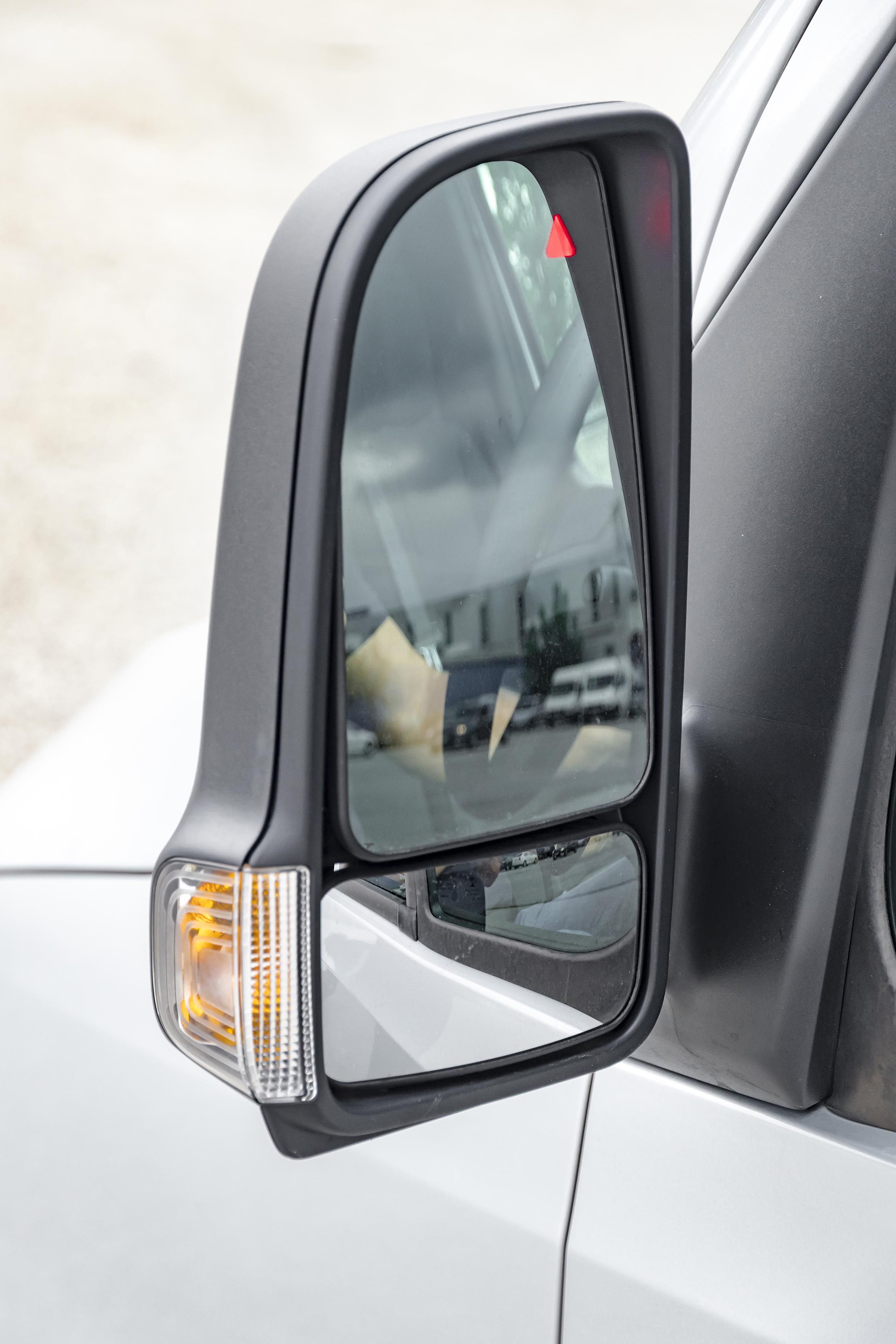
This alert is usually in the form of a visual indicator, such as a light or icon on the side mirror, or an auditory signal like a beep or chime. The purpose of these alerts is to inform the driver that it may not be safe to change lanes or make a maneuver due to the presence of another vehicle in the blind spot.
When the Blind Spot Monitor detects a vehicle in the blind spot zone, it helps the driver make safer decisions on the road by providing them with crucial information about their surroundings. This technology enhances situational awareness and reduces the risk of accidents caused by blind spot-related factors.
Step-by-step Guide: Turning On Blind Spot Monitor For Ford F150
Learn how to turn on the Blind Spot Monitor for your Ford F150 with this step-by-step guide. By following these instructions, you can enhance your safety on the road and avoid potential accidents.
Do you want to enhance your safety while driving? The Blind Spot Monitor system in your Ford F150 can help you keep an eye on vehicles that may be lurking in your blind spots. In this step-by-step guide, we will show you how to turn on and adjust the Blind Spot Monitor system for your Ford F150, giving you peace of mind on the road.
Locating The BLIS Button Or Menu Option
Where you activate BLIS depends on your truck’s generation. Many 2009-2014 F150s with MyFord Touch use the Info and Reset buttons on the steering wheel or instrument cluster. Most 2015-2020 trucks with SYNC 3 use the touchscreen path Settings > Driver Assistance > Blind Spot. Most 2021-and-newer trucks with SYNC 4 use Features > Driver Assistance > Blind Spot on the touchscreen, and some trims also allow a quick toggle through the instrument cluster menu. A small number of trucks have a dedicated BLIS button on the dash or driver’s door panel, marked with two cars and a yellow triangle. If you do not see the option in any of these places, your truck likely does not have the hardware.
Activating The Blind Spot Monitor
Once you have found the correct menu or button for your model year, follow these steps to activate the Blind Spot Monitor:
- Start the truck or turn the ignition to the Run position. The system only responds when the vehicle is powered.
- Open the correct menu for your truck: Settings > Driver Assistance > Blind Spot on SYNC 3, Features > Driver Assistance > Blind Spot on SYNC 4, or press Info until "Blind Spot" shows on older displays.
- Toggle the setting to On, or press Reset on older trucks. A confirmation appears on the display.
- Check that the BLIS indicator lights in both side mirrors flash briefly when you start the truck. That confirms the system is live.
- If the menu option is greyed out, see the troubleshooting section below before assuming the system is faulty.
Adjusting Blind Spot Monitoring Settings
Customizing the Blind Spot Monitoring settings according to your preference is a breeze. Here’s how you can adjust the settings:
- Open the settings menu on your F150’s touchscreen or instrument cluster.
- Navigate to Driver Assistance or Safety.
- Select Blind Spot to reach the customization options.
- Adjust alert intensity, turn the audible warning on or off, and enable or disable Cross Traffic Alert, which is the related feature that warns you about vehicles approaching from the sides when you are reversing.
- On trucks equipped for towing, you can also add a trailer and enter its length so BLIS extends coverage behind the trailer.
Maintenance Tips To Keep BSM Reliable
- Wipe the rear corner sensors behind the bumper whenever you wash the truck.
- Remove snow, ice, and mud buildup in winter, since BLIS can shut off when the sensors are blocked.
- Avoid mounting bike racks, bumper guards, or stickers over the rear corners.
- Keep the side mirror indicator lenses clean so you can see the alerts.
- After any rear-end repair, confirm the sensors were recalibrated.
BSM Not Working? Troubleshooting Checklist
Greyed-out Or Missing Menu Option
If the Blind Spot option is greyed out, the truck is usually telling you the system cannot run right now. Common causes include a sensor fault, a dirty or obstructed sensor, or a trailer configuration that exceeds the supported length. If the option is missing entirely, your truck most likely was not built with BLIS. Confirm by checking for the mirror indicator lights and the window sticker.
System Fault Warning And Sensor Obstruction
A "Blind Spot System Fault" or "Sensor Blocked" message usually points to the rear corner sensors, which sit behind the rear bumper on each side. Mud, snow, ice, dirt, bumper stickers, bike racks, and aftermarket bumper accessories are the most common culprits. Clean both rear corners with a soft cloth and water, remove any obstructions, and restart the truck. If the message clears, you are done. If it returns, the sensor or its wiring may need attention.
When You Need Dealer Recalibration
After a rear bumper repair, replacement, or collision, the radar sensors often need to be recalibrated so they aim correctly. This is a dealer or qualified shop job, not a DIY fix, because it requires specific targets and equipment. If your BLIS worked before a bumper repair and does not work after, recalibration is the most likely missing step. Ask the shop that did the repair whether the sensors were recalibrated, and have a Ford dealer perform it if not.
Trailer Blind Spot Monitoring Setup
If your F150 is equipped for towing, BLIS can extend its coverage to include a trailer. In the Driver Assistance menu, select the trailer option and choose the trailer you have set up, or add a new one. You will be asked to enter the trailer’s length, and the system uses that measurement to shift the blind spot zone rearward so it covers the trailer rather than just the truck. Trailer coverage only works within certain length limits, and it disables automatically if the trailer is too long, if the trailer is not properly configured, or if the system detects a fault. If trailer BLIS stops working after you hitch up, recheck the trailer length entry first before assuming something is broken.
Is BSM Standard? Trim And Model Year Availability
BLIS availability varies by trim and year, which is why some owners cannot find the menu option. As a general rule, XL and XLT trucks built before the mid-2010s often had BLIS as part of an optional package, while Lariat, King Ranch, Platinum, and Limited trims have typically included it as standard. From roughly the 2018 model year onward, BLIS became more widely standard across the F150 lineup, and the 2021 redesign brought it to more trims still. The fastest way to confirm your truck has it is to look for the small radar-style indicator lights in both side mirrors and to check the window sticker or VIN through a Ford dealer. If the hardware is not present, no menu setting will turn it on.
With these simple steps, you have successfully turned on and adjusted the Blind Spot Monitor system for your Ford F150. Drive confidently knowing that your vehicle is equipped with advanced technology that helps you stay aware of your surroundings and prevents potential accidents. Stay safe on the road with the help of your Ford F150’s Blind Spot Monitor!

Frequently Asked Questions On How To Turn On Blind Spot Monitor Ford F150
How Do I Turn On My Blind Spot Monitoring?
To turn on your blind spot monitoring, follow these steps: 1. Go to the settings on your vehicle’s information display. 2. Select Driver Assistance. 3. Toggle the Blind Spot option to turn it on. 4. The system will now detect vehicles in your blind spot and alert you to their presence.
Make sure to consult your vehicle’s manual for specific instructions tailored to your model.
How Do You Turn On A Blis Ford?
On Ford vehicles with the older information display, press the Info button until "Blind Spot" is shown, then press Reset to toggle BLIS off or back on. On SYNC 3 and SYNC 4 trucks, use the touchscreen path Settings > Driver Assistance > Blind Spot instead, since the Info and Reset buttons do not control BLIS on those systems.
Where Is The Bsm Button?
There is no universal BSM button. On most F150s, BLIS is controlled through the touchscreen or instrument cluster menu under Driver Assistance. A small number of trucks have a dedicated button on the dash or driver’s door panel marked with two cars and a yellow triangle.
Does Ford F150 Have Blind Spot Monitoring?
Not on every F150. BLIS has been available since the 2009 model year, but it was optional on lower trims like the XL and XLT for many years and only became standard across more of the lineup later. Higher trims such as Lariat, King Ranch, Platinum, and Limited have generally included it as standard equipment. If your truck does not have the hardware, the menu option will not appear and it cannot be added with a software update alone.
Conclusion
To activate the blind spot monitor on your Ford F150, simply follow the steps mentioned in the blog post. By turning on the blind spot monitor, you enhance your safety on the road by detecting vehicles in your blind spot and avoiding potential collisions.
Stay aware and drive with confidence knowing that your blind spot monitor is activated and ready to assist you. Take control of your driving experience and enjoy the added security provided by this innovative feature.
Related posts:
 What Color Is Avalanche for Ford? The Definitive 2026 Guide
 How to Replace Rear Sliding Window Ford F150: The Ultimate Guide
 How Many O2 Sensors Does a Ford F150 Have
 What is 4A on F150: Unleashing the Power of 4A in Your Ford F150
 What Are Cam Phasers F150
How Much is a Windshield for a Ford F150: Find the Best Price Now!
What Are Cam Phasers F150
How Much is a Windshield for a Ford F150: Find the Best Price Now!
 Best Aftermarket Radio For 2013 Ford F150: Expert Picks
 Best Floor Jack for F150
 How to Get a Spare Tire off a Ford F150
 How To Reset Oil Life 2018 Ford f150: Easy Peasy
 5 Best Ford F150 Bed Covers: Expert Picks & Quality Tested
 Best Tuners for Ford F150 EcoBoost to Boost Performance