How to Reset PCM on Ford F150: Easy Steps for Success
To reset the PCM on a Ford F150, you have three real options: a battery disconnect hard reset, an OBD2 scanner soft reset, or a Forscan KAM (Keep Alive Memory) reset. The battery method is the most common DIY approach, but it also wipes your adaptive learning strategy, so the truck will need a proper drive cycle before it runs normally again.
The quickest hard reset is to open the hood, disconnect the negative battery cable, wait about five minutes, then turn on the headlights to drain the capacitors. Reconnect the terminal and the PCM’s KAM is cleared. Be aware that this also resets your radio presets, seat memory, and SYNC settings on most F-150 trims.
What The PCM Does And Why A Reset Matters
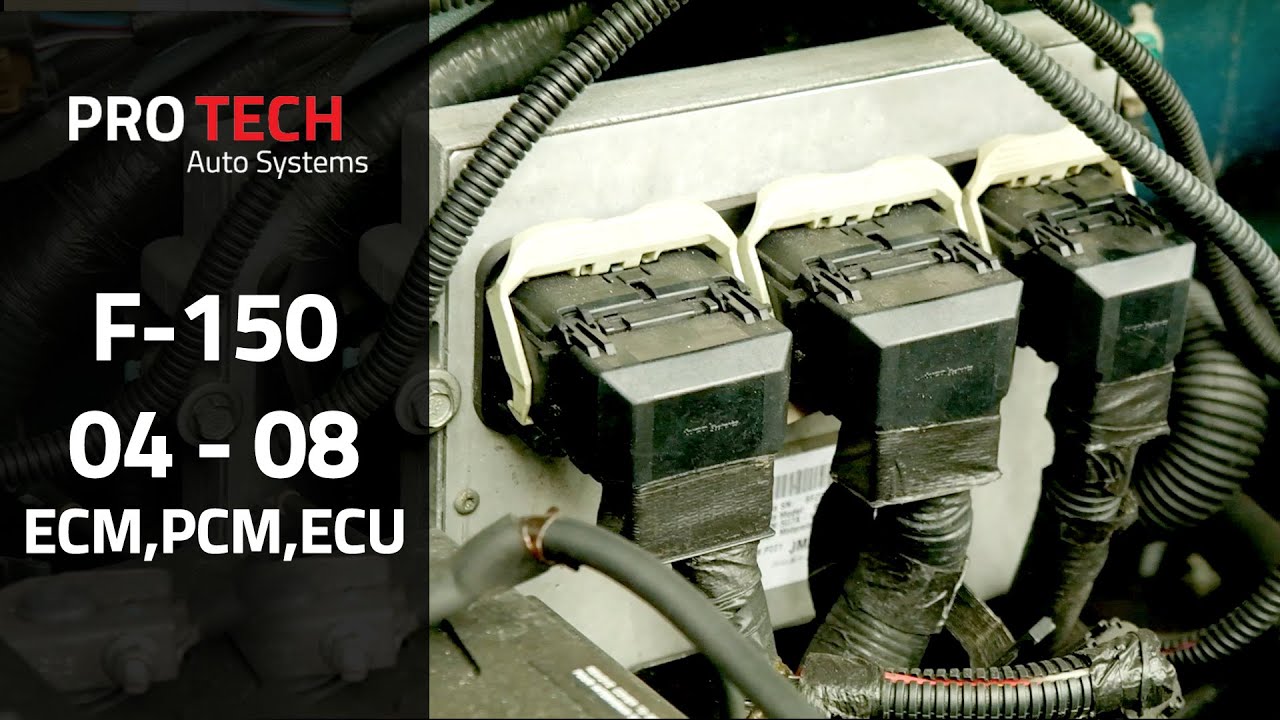
The PCM, or powertrain control module, is the computer that runs your engine and transmission. It manages fuel injection, ignition timing, shift points, and emissions strategy. It also stores adaptive learning data in Keep Alive Memory (KAM) so it can adjust to your driving habits over time.
A reset clears that KAM and any stored diagnostic trouble codes (DTCs). The PCM then reverts to its factory base calibration and begins relearning. This is useful after repairs, after a battery replacement, or when the truck is behaving oddly because of corrupted adaptive data.
PCM vs ECU vs TCM
These terms get used interchangeably, but they are not the same thing. The ECU (engine control unit) manages the engine. The TCM (transmission control module) manages the transmission. On most modern F-150s, the PCM is a combined unit that handles both, which is why a PCM reset also resets transmission shift adaptation.
On older trucks (roughly 1997-2003), the PCM and TCM were often separate modules. On 2004+ F-150s they are typically integrated. This matters because a battery disconnect on a newer truck resets both engine and transmission learning, while on an older truck it may only affect the engine side.
Signs You Actually Need A PCM Reset (And When You Don’t)
A reset is worth trying if you have just replaced a sensor, battery, or alternator, if the check engine light came on after a repair, if the transmission is shifting harshly after a battery swap, or if the idle is rough and no codes are stored. These are all cases where adaptive data may be stale.
Do not reset the PCM to “fix” a persistent check engine light. If a DTC keeps returning after a reset, that is a real fault, not a glitch. Resetting will only clear the code temporarily and can mask a failing oxygen sensor, mass airflow sensor, throttle position sensor, or a transmission issue that needs actual diagnosis.
Before You Start: Tools, Safety, And What You’ll Lose
You will need a wrench or socket for the negative battery terminal, safety glasses, and ideally a memory saver if you want to keep radio presets and seat memory. On 2015+ trucks, disconnecting the battery can trigger a PATS (Passive Anti-Theft System) relearn, and on some models the anti-theft system may need to be re-armed. Airbag warning lights can also appear briefly after a battery disconnect.
What you lose with a hard reset: radio presets, seat and mirror memory, SYNC pairing and settings, clock, and on some trims, the auto up/down window calibration. None of these are permanent, but budget ten minutes to reset them afterward.
Resetting the PCM can be done by following a few simple steps, such as opening the hood, locating the car battery, removing the negative battery cable, waiting for a few minutes, reconnecting the terminal, and turning on the headlights to drain any remaining power in the capacitors. Once completed, your PCM will be reset and ready to function optimally.
Methods To Reset Pcm
After you remove the negative cable, the PCM still holds residual power in its capacitors for a short time. Waiting five minutes is the minimum. Turning on the headlights with the battery disconnected drains that residual power faster and more completely. Some technicians also press the brake pedal for the same reason.
Using Battery Disconnection
Disconnecting the car battery is a simple yet effective method to reset the PCM. Here’s how you can do it:
- Open the hood and locate the car battery.
- Remove the negative battery cable.
- Wait for approximately five minutes to allow the capacitors to discharge.
- Turn on the headlights to completely drain any residual power.
- Reconnect the negative terminal of the battery.
Note that clearing DTCs is not the same as a full KAM reset. Many consumer scanners only clear codes. To actually reset adaptive learning, you need a tool that supports a PCM reset or KAM clear function, which usually means a mid-range or professional-grade scanner.
Method 3: Forscan KAM Reset For Specific Cases
Forscan is a free Windows-based diagnostic tool that works with a compatible OBD2 adapter. It can perform a true KAM reset on most F-150 model years, which is more precise than a battery disconnect because it does not disturb other modules. Connect the adapter, open Forscan, go to the PCM module, and look for the KAM reset or adaptive learning reset service function. Follow the on-screen prompts.
- Connect the scan tool to the vehicle’s data port, usually located under the dashboard.
- Turn on the ignition without starting the engine.
- Select the “PCM reset” or “Clear fault codes” option on the scan tool.
- Follow the prompts on the screen to initiate the PCM reset process.
- Wait for the scan tool to complete the reset process.
Using a scan tool ensures a more precise and controlled reset of the PCM, especially if you want to diagnose and clear specific fault codes.
Consulting A Professional
2004-2008: PCM and TCM integrated on most models. Battery disconnect resets both. Under-hood fuse box location varies by trim. Expect a rough idle for the first few drive cycles after reset.
2009-2014: SYNC and MyFord Touch introduced. Battery disconnect wipes SYNC pairing and settings. PATS relearn is more common. Forscan support is strong for this generation.
2015-2020: Aluminum body, more modules on the CAN bus. Battery disconnect can trigger multiple warning lights (airbag, ABS, traction control) that clear after a short drive. Forscan is the safest reset method for this generation.
Step-by-step Guide To Reset Pcm Using Battery Disconnection
In this step-by-step guide, we will walk you through the process of resetting the PCM on your Ford F150 using the battery disconnection method. This method is commonly used to clear any stored codes or errors in the Powertrain Control Module (PCM) and can help resolve certain performance issues. Below, we have outlined the exact steps you need to follow to successfully reset the PCM using this method.
Open The Hood
A common Ford relearn drive cycle: start cold, idle for 2-3 minutes, drive at 25-30 mph for 3 minutes, accelerate to 45-50 mph for 5 minutes, then 60-65 mph for 5 minutes, then decelerate and coast to a stop. Repeat 2-3 times over separate trips. Avoid hard acceleration during relearn.
Disconnect The Negative Battery Cable
If you need to pass an emissions test after a reset, the readiness monitors must complete first. Most F-150s need 50-100 miles of mixed driving, at least one cold start, one full warm-up, and a sustained highway cruise. Do not clear codes again right before a test, or the monitors will reset and you will fail on readiness alone.
Wait For 5 Minutes
After disconnecting the negative battery cable, it is essential to wait for about five minutes. This waiting period allows the residual power in the system to drain completely, ensuring a more effective reset of the PCM.
Turn On The Headlights
Now that the battery is disconnected, it’s time to drain any remaining power in the capacitors. To do this, turn on the headlights of your Ford F150. Leave them on for a couple of minutes. This step helps ensure that any stored power in the capacitors is depleted.
Reconnect The Negative Battery Cable
After waiting for a few minutes, turn off the headlights. Now, it’s time to reconnect the negative battery cable. Place the cable back onto the battery terminal and use a wrench or socket to tighten the bolt securely, ensuring a proper connection.
Step-by-step Guide To Reset Pcm Using A Scan Tool
Resetting the Powertrain Control Module (PCM) of your Ford F150 can help resolve various issues and optimize the performance of your vehicle. One effective method to reset the PCM is by using a scan tool. This step-by-step guide will walk you through the process of resetting the PCM using a scan tool, ensuring a smooth and successful reset.
Plug The Scan Tool Into The Vehicle’s Data Port
To begin the PCM reset process, you will need a compatible scan tool. Locate the vehicle’s data port, which is usually found underneath the dashboard on the driver’s side. Plug the scan tool into the data port, ensuring a secure connection. This will allow the scan tool to communicate with the PCM and perform the necessary functions.
Clear The Fault Codes
Once the scan tool is connected to the vehicle’s data port, it’s time to clear any fault codes that may be stored in the PCM. This will ensure a clean slate for the reset process. Access the menu on your scan tool and navigate to the “Clear Fault Codes” option. Select this option and wait for the scan tool to clear the fault codes from the PCM.
Follow The Instructions On The Scan Tool
After clearing the fault codes, the next step is to follow the instructions provided on the scan tool. Each scan tool may have a slightly different interface and set of options, so it’s important to carefully read and follow the instructions. The scan tool will guide you through the process of resetting the PCM, ensuring that all necessary steps are completed accurately.
As you follow the instructions, make sure to pay attention to any prompts or additional steps the scan tool may require. This will ensure that the PCM reset process is done correctly, minimizing the chances of encountering any issues.
By following this step-by-step guide, you can easily reset the PCM of your Ford F150 using a scan tool. Remember to use a compatible scan tool and carefully follow the instructions provided to ensure a successful reset. Resetting the PCM can help resolve various issues and optimize the performance of your vehicle.
Importance Of Professional Assistance
Professional assistance is crucial when it comes to resetting the PCM on a Ford F150. By seeking expert help, you can ensure that the process is done correctly and efficiently, avoiding any potential damage to your vehicle’s computer system. Save yourself the trouble and rely on professionals for this important task.
When it comes to resetting the PCM on your Ford F150, seeking professional assistance is of utmost importance. Resetting the PCM requires technical expertise and knowledge of the specific procedures involved. This ensures that the reset is done correctly, avoiding any potential damage to your vehicle’s systems.
Avoiding Damage To The Vehicle
Resetting the PCM involves disconnecting the battery and performing certain steps to clear the system’s memory. Any misstep during this process can lead to damage to the vehicle’s electronic components. Professional assistance ensures that the proper precautions are taken and the reset is performed accurately, minimizing the risk of causing harm to your vehicle.
Ensuring Proper Reset
Properly resetting the PCM is essential to address any performance issues or error codes that you may be experiencing. A professional technician has the necessary tools and expertise to execute the reset procedure accurately. They can also diagnose any underlying issues that may be causing the need for a reset, ensuring a comprehensive solution to the problem.
Diagnosing Underlying Issues
While resetting the PCM can sometimes resolve certain performance issues, it is important to identify and address any underlying problems to prevent future complications. Professional assistance allows for a thorough diagnosis of your Ford F150, ensuring that any hidden issues are identified and appropriately addressed. This enables you to enjoy optimal performance and reliability from your vehicle.
Frequently Asked Questions Of How To Reset Pcm On Ford F150
How Do I Reset My Ford F-150 Computer?
To reset your Ford F-150 computer, follow these steps: 1. Press and hold the Seek up and audio unit Power buttons simultaneously until the screen goes black. 2. Wait for the system reset to complete. 3. Press the audio unit Power button to switch the system on.
Remember to remove the negative battery cable for a few minutes to clear the PCM memory after repairs.
How Do I Reset My Ford Pcm?
To reset your Ford PCM, follow these steps: 1. Open the hood and locate the car battery. 2. Remove the negative battery cable and wait for about five minutes. 3. Turn on the headlights to discharge any remaining power in the capacitors.
4. Reconnect the battery terminal. 5. Your PCM is now reset. Note: Make sure to use a fully compatible scan tool to clear any fault codes.
How Do I Factory Reset My Pcm?
To factory reset your PCM, follow these steps: 1. Open the hood and locate the car battery. 2. Disconnect the negative battery cable and wait for about five minutes. 3. Turn on the headlights to drain any remaining power in the capacitors.
4. Reconnect the negative terminal. 5. Your PCM is now reset. Note: It’s important to use a fully compatible scan tool to clear any fault codes before resetting the computer.
How Do I Reset My F150?
To reset your F150, follow these steps: 1. Press and hold the Seek up and audio unit Power buttons simultaneously until the screen goes black. 2. Wait for the system reset to complete. 3. Press the audio unit Power button to switch the system on.
Alternatively, you can reset the PCM (Powertrain Control Module) by: 1. Opening the hood and locating the car battery. 2. Removing the negative battery cable. 3. Waiting for around five minutes. 4. Turning the headlights on with the battery disconnected to drain power from the capacitors.
5. Putting the terminal back on again. Please note that it’s recommended to use a compatible scan tool to clear the fault codes for a complete computer reset.
Conclusion
To reset the PCM on your Ford F150, follow these simple steps. First, open the hood and locate the car battery. Remove the negative battery cable and wait for about five minutes. During this time, turn the headlights on to drain any remaining power in the capacitors.
After five minutes, reattach the terminal and start the vehicle. This process will clear the PCM’s memory and ensure optimal performance. Remember to always consult your vehicle’s manual or seek professional assistance when working with the PCM.
Related posts:
 How Far Can You Drive Without an Alternator? Real Distances
 What Color Is Avalanche for Ford? The Definitive 2026 Guide
 How to Replace Rear Sliding Window Ford F150: The Ultimate Guide
 How Many O2 Sensors Does a Ford F150 Have
 What is 4A on F150: Unleashing the Power of 4A in Your Ford F150
 What Are Cam Phasers F150
How Much is a Windshield for a Ford F150: Find the Best Price Now!
What Are Cam Phasers F150
How Much is a Windshield for a Ford F150: Find the Best Price Now!
 Best Aftermarket Radio For 2013 Ford F150: Expert Picks
 Best Floor Jack for F150
 How to Get a Spare Tire off a Ford F150
 5 Best Ford F150 Bed Covers: Expert Picks & Quality Tested
 Best Tuners for Ford F150 EcoBoost to Boost Performance