Does My Ford Have Remote Start? 3 Fast Ways to Check
Yes, you can easily determine if your Ford vehicle has remote start by checking the model’s features or consulting the owner’s manual. Remote start availability varies by model and trim level, but it’s usually offered as an optional or standard feature on newer Ford vehicles. The fastest way to confirm is to check your key fob, then the FordPass app, then your VIN — in that order.
You can also confirm remote start compatibility by contacting a Ford dealership or using the VIN to access the vehicle’s specifications online. Understanding your vehicle’s capabilities ensures that you can conveniently start your Ford remotely when needed. Additionally, being aware of this feature helps you make the most of your vehicle’s functionality and convenience.
Quick Answer: 3 Ways to Tell If Your Ford Has Remote Start
Use this order: check the key fob for a remote start button and try the press sequence, open the FordPass app and look for the Remote Start tile, then decode your VIN or window sticker. If all three come up empty, your Ford likely does not have factory remote start.
The Convenience Of Remote Start In Ford Cars
Remote start is a convenient feature that allows you to start your car’s engine from a distance, ensuring the interior is cooled down or warmed up before you even step inside. Ford cars with remote start capability offer a heightened level of convenience for drivers, making it easier to adapt to various weather conditions. Let’s explore the benefits of remote start and the technology behind it in Ford vehicles.
Benefits Of Remote Start
Convenience: With remote start, you can start your Ford car from the comfort of your home or office, allowing the interior to reach your desired temperature before you even step inside. This is especially beneficial during extreme weather conditions.
Safety: Remote start can enhance safety by allowing you to warm up the car in a well-lit area before entering, providing better visibility and security.
Extended Engine Life: Starting the car’s engine remotely allows the lubricants to circulate, ensuring smoother operation and potentially extending the engine’s lifespan.
Remote Start Technology In Ford Vehicles
Key fob or Smartphone App: Ford vehicles equipped with remote start can be activated using a key fob or a dedicated smartphone app, providing easy access to the feature.
Integration with Climate Control: Remote start in Ford cars seamlessly integrates with the climate control system, allowing you to set the preferred temperature before entering the vehicle.
Security Features: Ford’s remote start technology often includes security measures such as engine immobilization to prevent unauthorized use.
Understanding Remote Start
How Remote Start Works
Remote start is a convenient feature that allows you to start your Ford vehicle from a distance, using a remote control or a smartphone app. When activated, the system initiates the engine and pre-conditions the cabin temperature, providing a comfortable environment even before you enter the car.
Components Of Ford Remote Start System
The Ford remote start system consists of several key components that work together to provide the desired functionality:
- Remote control or smartphone app: Lets you activate remote start from a distance.
- Control module: Acts as the brain of the system, processing remote start commands and communicating with the engine and climate control systems.
- Key fob or keyless entry system: Provides the authentication and security protocols that ensure only authorized users can start the vehicle.
- Vehicle settings menu: Many Fords let you enable or disable remote start, set run time, and choose climate settings here.
Checking Ford Vehicle Compatibility
Welcome to our guide on checking Ford vehicle compatibility for remote start. Remote start technology has become increasingly popular, providing the convenience of starting your vehicle from a distance.
Before diving into the options available for your Ford vehicle, it’s important to determine if your Ford model is equipped with remote start or if retrofitting is a possibility. Checking compatibility is crucial in ensuring a seamless integration of remote start functionality with your Ford vehicle.
Decode Your VIN or Window Sticker
Your VIN identifies your exact vehicle, and a VIN decoder or Ford dealer can pull the original equipment list, including whether remote start was installed at the factory. The window sticker, if you still have it or can request a reprint, lists optional packages and features by name. Look for terms like Remote Start, Remote Engine Start, or a package that includes it. This confirms factory equipment without a dealer visit.
Ford Models With Remote Start
If you’re uncertain whether your Ford vehicle is equipped with a remote start, you can refer to the owner’s manual or visit the official Ford website to check the specifications for your specific model. Many newer Ford vehicles come with remote start as a standard feature, but it’s worth verifying to avoid any potential retrofitting efforts.
Retrofitting Remote Start In Ford Vehicles
In cases where your Ford model doesn’t come with remote start as a standard feature, retrofitting may be an option. Retrofitting remote start involves installing an aftermarket remote start system that integrates with your vehicle’s existing electronics.
However, it’s essential to consult with a professional installer to ensure compatibility and proper installation. Additionally, the availability of retrofitting options may vary depending on the model and year of your Ford vehicle.
Activating And Using Remote Start
Remote start is a convenient feature that allows you to start your Ford vehicle from a distance, whether it’s to warm up the car on a chilly morning or cool it down on a hot day. Let’s dive into how you can set up and use the remote start function for your Ford vehicle.
Setting Up Remote Start
Setting up remote start for your Ford vehicle is a relatively straightforward process. First, ensure that your vehicle is equipped with a remote start feature. Next, check if your key fob has the remote start button. If it does not, you may need to upgrade your key fob by contacting your local Ford dealership.
On a factory fob, the remote start button is usually a circular arrow icon. The common press sequence is lock, then remote start twice — or lock, unlock, lock on some models. The horn may chirp and the lights may flash to confirm the command was received. If nothing happens, the vehicle may not be equipped, the fob battery may be low, or remote start may be disabled in settings.
Once you have confirmed the availability of remote start, you can go through the user manual or contact the dealership for specific instructions on setting it up for your particular Ford model.
Using the FordPass App for Remote Start
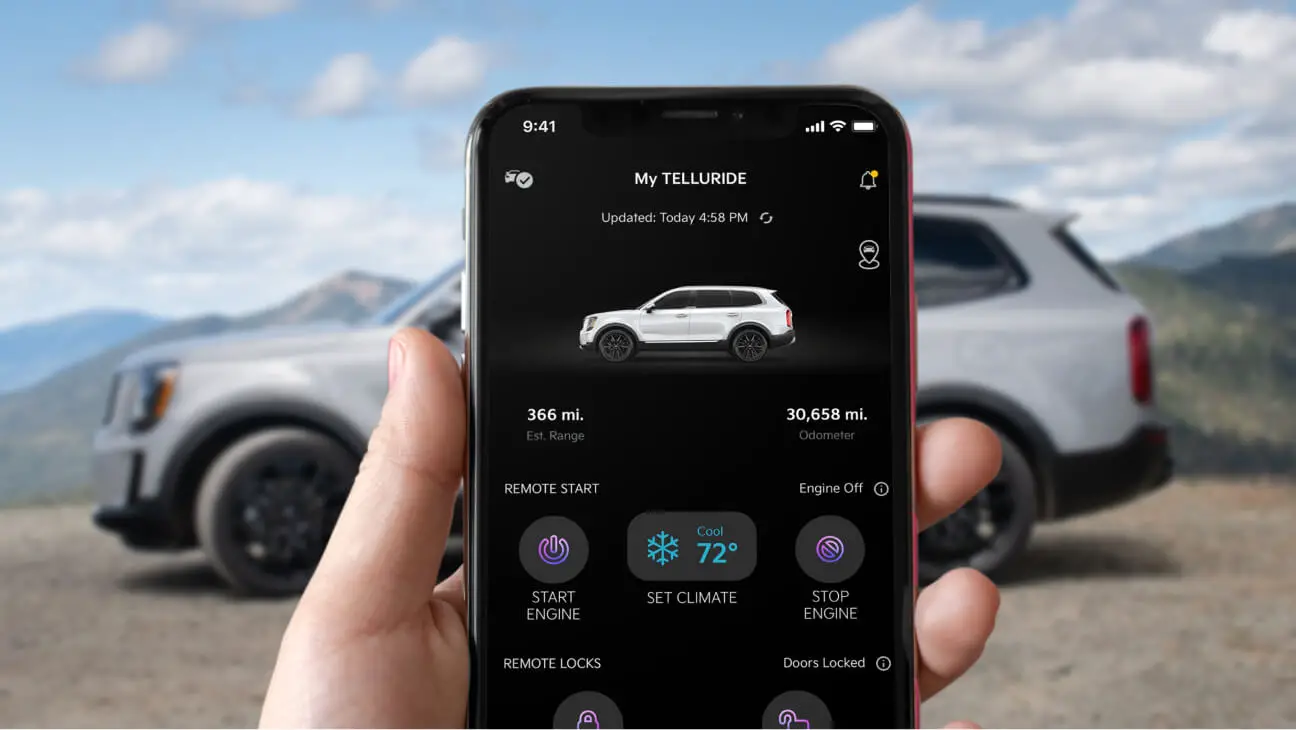
If your Ford vehicle is compatible with the FordPass app, you can also use it to enable remote start. The FordPass app allows you to remotely start your vehicle, lock or unlock the doors, locate your parked vehicle, and access various other features.
To set it up, download FordPass, create or sign in to your Ford account, and add your vehicle by VIN. The app will ask you to confirm the vehicle and may require you to complete activation in the vehicle, often through the SYNC screen or a push-button start sequence. Once enrolled, open the app and look for a Remote Start tile or button on the vehicle dashboard. If the tile is missing or grayed out, your vehicle likely does not have factory remote start, or the feature is not activated.
To utilize the remote start feature through the FordPass app, you will need to ensure that your vehicle is enrolled in the FordPass program and that you have a compatible smartphone. After downloading and setting up the FordPass app, follow the in-app instructions to enable and use the remote start feature.
Factory vs Aftermarket: How to Tell the Difference
Factory remote start integrates with the vehicle’s own systems, works through the FordPass app when equipped, and uses an OEM key fob with a remote start button. Aftermarket systems often use a separate fob or a phone module, may not appear in FordPass, and can be identified by extra wiring, a valet switch, or an antenna module under the dash. If your fob has a Ford logo and a remote start button, it is likely factory. If you have a second small fob or a phone app that is not FordPass, it is likely aftermarket.
Troubleshooting And Maintenance
When it comes to ensuring that your Ford’s remote start system operates smoothly, troubleshooting and maintenance are key. Understanding the common issues with remote start and knowing how to maintain the system can keep your vehicle running seamlessly. Let’s delve into these areas to help you maximize the functionality and reliability of your Ford’s remote start system.
Common Issues With Remote Start
As convenient as remote start systems are, they can sometimes encounter glitches. Here are some common issues that Ford owners may face with their remote start:
- Hood is open or ajar — many Fords will not remote start for safety.
- Low fuel level — the system may disable remote start to protect the engine.
- Check engine light is on — remote start may be blocked until the fault is cleared.
- Vehicle battery is weak or low.
- Remote start is disabled in vehicle settings.
- Unresponsive key fob or weak fob battery.
- Intermittent remote start function or range and signal strength issues.
- Unresponsive key fob
- Inconsistent vehicle starting
- Intermittent remote start function
- Issues with range and signal strength
Maintaining the Remote Start System
To maximize the longevity and efficiency of your Ford’s remote start system, regular maintenance is crucial. Here are some key steps to effectively maintain your remote start system:
- Check the key fob battery regularly and replace it if necessary.
- Inspect the wiring and connections for any signs of damage or corrosion.
- Ensure that the vehicle’s battery is in optimal condition to support remote start functionality.
- Keep the key fob and receiver clean to maintain proper signal transmission.
- Regularly update the firmware of the remote start system as per manufacturer recommendations.
- Confirm remote start is enabled in your vehicle settings and in the FordPass app.

Frequently Asked Questions Of Does My Ford Have Remote Start
What Are The Benefits Of Having Remote Start In My Ford?
Remote start enhances convenience, warms or cools the car in advance, and improves security.
Can I Install Remote Start On My Ford Vehicle?
Yes, Ford offers remote start as an optional feature that can be installed by dealers.
How Do I Know If My Ford Vehicle Has Remote Start?
Check your key fob for a remote start button, look for the Remote Start tile in the FordPass app, or check your vehicle settings and owner’s manual. You can also decode your VIN or window sticker to confirm factory equipment.
Is Remote Start Available For All Ford Vehicle Models?
Remote start is available as an option or standard feature on many Ford vehicle models, but not all. Availability depends on the model, trim level, and model year.
Adding Remote Start to a Ford That Doesn’t Have It
If your Ford did not come with factory remote start, you have two main paths. A Ford dealer can often add or activate factory remote start, which may require a new key fob with the remote start button and a software activation. Cost varies by model and dealer, so get a quote for your VIN. Alternatively, an aftermarket remote start kit can be installed by a professional, but it will not integrate with FordPass the same way and may affect warranty coverage on related components. Always confirm compatibility with your model year before buying.
Determining if your Ford has a remote start can enhance your driving experience. Knowing the options available can provide added convenience and comfort. By understanding the features, you can make the most of your vehicle’s capabilities and enjoy a seamless start to your journeys.
Explore your Ford’s remote start capabilities to optimize your driving experience.
Related posts:
 How Far Can You Drive Without an Alternator? Real Distances
 What Color Is Avalanche for Ford? The Definitive 2026 Guide
 How to Replace Rear Sliding Window Ford F150: Step-by-Step
 How Many O2 Sensors Does a Ford F150 Have? (1997–2024 Chart)
 What Is 4A on F150? 4WD Auto Explained (Trims, Modes, FAQ)
 What Are Cam Phasers F150
How Much is a Windshield for a Ford F150: Find the Best Price Now!
 Best Aftermarket Radio For 2013 Ford F150: Expert Picks
 Best Floor Jack for F150
 How to Get a Spare Tire off a Ford F150
 5 Best Ford F150 Bed Covers: Expert Picks & Quality Tested
 Best Tuners for Ford F150 EcoBoost to Boost Performance