BMW Garage Door Opener: HomeLink Programming & Fixes
Have you ever struggled to program your BMW garage door opener? You’re not alone! Many people find it tricky, but it doesn’t have to be that way. Think about the last time you wanted to park your car quickly but had to fumble with the keypad. Frustrating, right? What if I told you that programming your garage door opener can be easy and fun?
This article is the ultimate guide to programming your BMW garage door opener. We will walk you through each step. You can finally enjoy the convenience of a smoothly operated garage door. Imagine driving straight into your garage without any hassles!
Ready to unlock your garage door with ease? Let’s dive in and learn how to make your life simpler!
The Ultimate Guide to Programming Your BMW Garage Door Opener
Want to learn how to program your BMW garage door opener? This guide breaks it down step-by-step. It helps you understand the basics of your car and garage door system, covers which BMW models have HomeLink built in, and shows you how to fix the most common failures. Did you know that many people forget to clear old codes before adding new ones? This simple error can cause frustration. Follow this guide for a smooth setup and enjoy the convenience of opening your garage from the driver’s seat.

Requirements for Programming
List of tools and accessories needed for the programming process. Safety precautions to take before starting.
| Tools and Accessories | Safety Precautions |
|---|---|
| Owner’s manual | Wear safety glasses |
| Garage door opener | Keep fingers away from moving parts |
| Step ladder | Ensure the area is clear |
Before diving into programming, gather a few things. You will need your owner’s manual, the garage door opener remote (if you still have it), and a step ladder to reach the motor unit. You will also want to locate the Learn button on your garage door motor — it is usually a small colored button on the back or side of the unit near the antenna wire. Safety first: wear safety glasses, keep fingers clear of any moving parts, and make sure the area around the door is clear before you start testing. Happy programming!
Which BMW Models Have HomeLink (and Where the Buttons Are)
HomeLink is BMW’s built-in garage door opener system, and it has been standard on most BMWs sold in North America since roughly the mid-2000s. It is not the same as ConnectedDrive or a phone app — it is a dedicated set of buttons that talk directly to your garage door motor.
| Model / Era | HomeLink | Button Location |
|---|---|---|
| Most BMWs 2006 and newer | Standard | Rearview mirror |
| 3 Series (E90, F30, G20) | Standard on most trims | Rearview mirror |
| 5 Series (E60, F10, G30) | Standard on most trims | Rearview mirror |
| X3, X5, X7 | Standard on most trims | Rearview mirror or overhead console |
| i3, i4, iX | Standard | Rearview mirror |
| Older BMWs (pre-2006) | Often not equipped | N/A |
If your BMW does not have HomeLink, you can still use a clip-on visor remote or a key fob paired directly to the motor. Check your owner’s manual or the mirror itself — three small buttons in a row are the giveaway.
Step-by-Step Programming Instructions
Detailed programming steps for various BMW models. Troubleshooting common issues during programming.

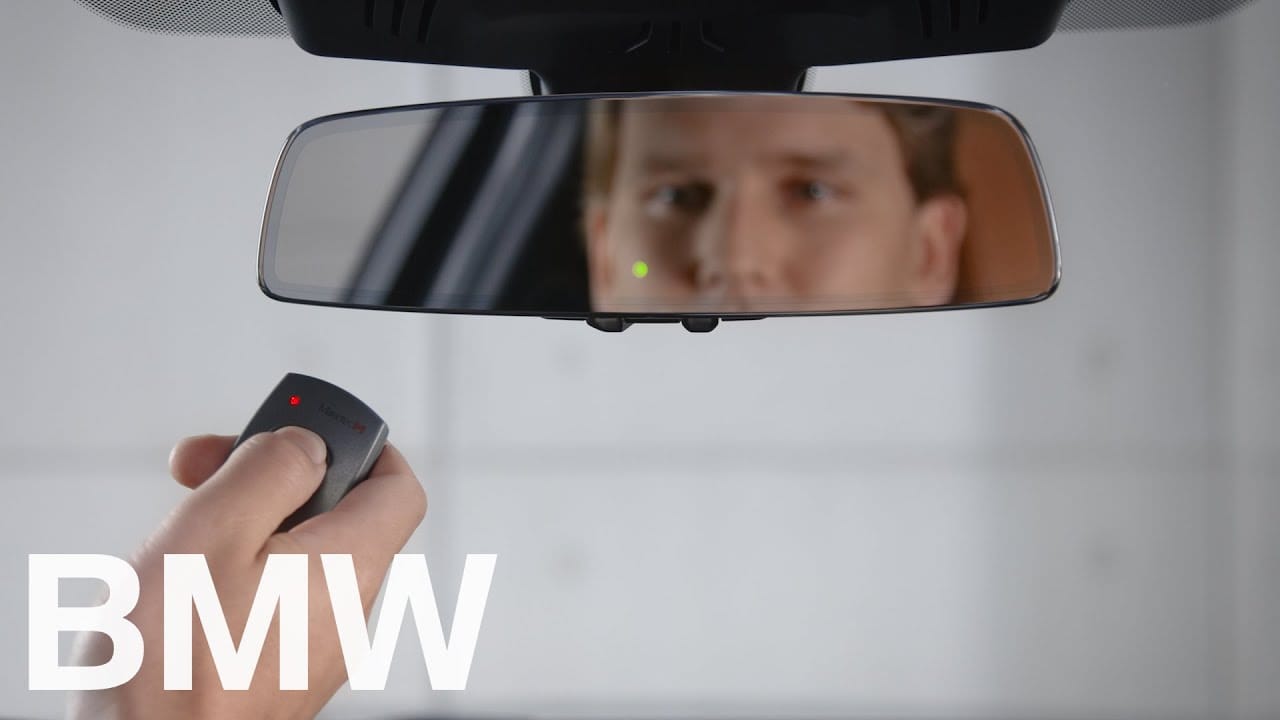
Programming your BMW’s garage door opener starts with finding the HomeLink buttons. On most BMWs they live in the rearview mirror, though some models place them in the overhead console or the driver’s-side sun visor. Press and hold the two outer buttons for about 20 seconds until the indicator light starts blinking slowly — this clears any old codes. Then pick the button you want to use and hold it while you press and hold your existing garage remote about 1 to 3 inches away. The light will blink fast, then go solid or slow-blink depending on whether your opener uses a rolling code or a fixed code. If it stays solid, you still need to press the Learn button on the motor to finish pairing. For specific models like the 3 Series or X5, the exact button location and blink pattern are listed in your car’s manual.
Programming Without the Original Remote
Lost the original garage remote? You can still pair HomeLink using the motor’s Learn button directly. Park within range of the garage, then press and hold the HomeLink button you want to use for about 20 seconds until the indicator blinks slowly. Release. Now press the Learn button on the garage door motor — its indicator light will come on for roughly 30 seconds. Within that window, press and hold your HomeLink button again until the motor light blinks or clicks. Test the door. This method works on most rolling code openers and skips the remote entirely.
| BMW Model | Programming Steps |
|---|---|
| 3 Series | Press the “Learn” button on the opener, then hold the BMW button. |
| X5 | Sync the opener by pressing and holding the BMW button until the light flashes. |
Using the BMW Key Fob for Garage Door Operation

How to program the garage door opener using the key fob. Advantages of using the key fob for convenience.
You can also pair your BMW key fob or a spare remote with the garage door motor directly, without going through the car. Press the Learn button on your garage door motor — the indicator light on the motor will come on for about 30 seconds. Within that window, press and hold the button on your key fob or remote that you want to use. The motor light will blink or click to confirm the pairing. This is handy when you want a second remote, or when the HomeLink buttons in the car are already taken up by other doors. Convenience is king — one button, one door.
Advantages of Using the Key Fob Easy access to your garage No more bulky remotes Your garage door opens before you even say “Open sesame!”
Common Problems and Solutions
Identification of frequent issues users experience. Practical solutions to resolve these problems effectively.
Programming your BMW garage door opener can be tricky, and most failures come down to one of a few specific causes. If the HomeLink light blinks but the door never moves, you likely have a rolling code opener that still needs the motor’s Learn button pressed. If it worked before and stopped, check for a new LED or CFL bulb in the garage — these emit interference on the same frequency as your remote and can kill the signal. If the door only opens when you are right against it, the antenna wire on the motor may be too short or hidden behind metal. And if nothing lights up at all, the HomeLink system may need a full reset before you try again. Work through these one at a time instead of guessing.
Fixing LED Bulb and Newer Motor Interference
If your HomeLink used to work and suddenly does not, the most common culprit is a new LED or CFL bulb in the garage door motor’s light socket. These bulbs emit radio interference on the same frequency as your remote and can drown out the signal. The fix is simple: swap back to an incandescent bulb, or use an LED bulb specifically labeled as garage-door-opener compatible or shielded. Newer garage motors with Wi-Fi or smart-hub radios can also cause interference — try moving the motor’s antenna wire away from the logic board and letting it hang straight down. If range is still poor after that, the antenna wire itself may be too short, and a longer replacement wire is a cheap fix.
| Problem | Solution |
|---|---|
| Doesn’t respond | Change batteries |
| Blinking lights | Check the connection |
| Code not working | Reprogram the device |
With these tips, you’ll have your opener working smoother than a buttered banana! And remember, if you ever feel stuck, there’s plenty of online help out there. So, no stress, just program and impress!
Maintaining Your BMW Garage Door Opener
Tips on keeping the opener functioning optimally. Signs that indicate maintenance is needed.

To keep your BMW garage door opener working well, a few easy habits go a long way. Replace the batteries in any handheld remotes once a year, and wipe the HomeLink buttons with a dry cloth — dust and fingerprints can affect the touch-sensitive pads on some models. Test the door monthly and watch for slow response, partial range, or random openings. If you recently swapped to LED bulbs in the garage and range dropped, switch back to incandescent or shielded LED bulbs. A well-cared-for opener is like a happy dog — ready to follow your commands.
Security: Fixed Code vs. Rolling Code
Older garage door openers use a fixed code — the same signal every time you press the button. Anyone with a code grabber can capture that signal and replay it later, which is a real security risk. Rolling code systems, used on almost all openers made since the early 1990s, change the code every time the door is used, so a captured signal is useless. If your motor is fixed code, the best upgrade is a new motor or a rolling code receiver module that pairs with your existing HomeLink. Either way, clear old codes from HomeLink whenever you move house or lose a remote, and never leave a paired remote in a car parked outside.
| Tip | Sign of Need |
|---|---|
| Check batteries | Opener is slow to respond |
| Keep it clean | Buttons stick or jam |
| Inspect the motor | Unusual noises |
Remember, a well-cared opener is like a happy dog—ready to follow your commands!
Resources and Tools for Further Assistance
Recommended online resources and forums for BMW owners. Contact information for professional assistance or dealership support.
Finding help for your BMW garage door opener is easy. Many online resources can guide you. Here are some useful options:
- BMW Forums: Join discussions with other BMW owners. Here, you can ask questions and share tips.
- YouTube Tutorials: Watch videos that show how to program your garage door opener step-by-step.
- Official BMW Website: Visit this for manuals and customer support.
If you prefer professional help, contact your local BMW dealership. They can provide support for your specific model. Don’t hesitate to reach out for any assistance!

Where can I find support for my BMW garage door opener?
Check out forums and YouTube for tips. You can also contact the BMW dealership for direct help.
Conclusion
Programming your BMW garage door opener is easy and rewarding. You learned the steps to connect your car and garage door safely. Remember to check compatibility and follow instructions carefully. Now it’s time to give it a try! For more tips, explore our guides on car features. Happy driving and enjoy your convenient garage access!
FAQs
What Specific Steps Do I Need To Follow To Program My BMW Garage Door Opener Using The Vehicle’s Remote Control?
Sit in your car with the ignition on. Press and hold the two outer HomeLink buttons for about 20 seconds until the indicator light blinks slowly, then release — this clears old codes. Pick the button you want to use and hold it. Within 30 seconds, press and hold the button on your existing garage remote 1 to 3 inches from the mirror. The light will blink fast, then go solid. If your opener uses a rolling code, press the Learn button on the garage motor and then press your HomeLink button twice within 30 seconds to finish pairing. Test by pressing the HomeLink button.
Are There Any Compatibility Issues Between Certain BMW Models And Various Garage Door Opener Brands I Should Be Aware Of?
Yes. BMWs built roughly from the mid-2000s onward generally include HomeLink, but older models and some base trims do not. On the garage side, openers that use rolling codes (most LiftMaster, Chamberlain, Genie, and Craftsman units made after the early 1990s) need the motor’s Learn button pressed during pairing, while older fixed-code openers pair directly from the remote. If your opener is very old or uses a proprietary frequency, HomeLink may not be able to learn it at all — in that case you would need a HomeLink-compatible bridge or a newer motor.
How Can I Troubleshoot If My BMW Garage Door Opener Isn’t Working After Attempting To Program It?
Start with the simplest checks. Confirm the HomeLink indicator light responds when you press the button — if it does not, the system needs a reset. If it lights up but the door does not move, your opener is probably rolling code and you skipped the Learn button step on the motor. If it worked before and stopped, look for a new LED bulb in the garage or a recently added device on the same frequency. If range is poor, extend or reposition the antenna wire on the motor so it hangs straight down and is not buried behind metal. Only after those checks should you consider a full reset and reprogram.
What Tools Or Devices Do I Need To Successfully Program My BMW garage Door Opener?
You need your BMW (with the HomeLink buttons in the mirror, overhead console, or visor), your existing garage door remote if you have one, a step ladder to reach the motor, and access to the Learn button on the garage door motor. A second person helps but is not required. Have your owner’s manual nearby in case your model uses a different button layout.
Is There A Difference In Programming Procedures For BMW Vehicles Equipped With Different Types Of Keyless Entry Systems Or Features?
Yes, there is a difference in programming procedures for BMW cars with different keyless entry systems. Some cars use a basic key fob, while others use advanced systems that can start the car from your phone. Each system has special steps we need to follow to set it up. So, if you have a BMW, make sure to check which keyless entry system it uses before programming it.
Related posts:
 ZF 8HP Transmission Problems: Variants, Costs & Fixes
 Which BMW Has 3 Rows? X7, iX, and X5 Explained
 BMW Stalls When Stopping: Causes, Codes, Costs & Fixes
 What BMW Has the B58 Engine? Full Model List, Years, and Outputs
 BMW Restraint System Malfunction: Causes, Codes & Fixes
 My BMW App Not Working? Symptom Checker & Quick Fixes
 How To Decode BMW VIN: Step-by-Step Guide With Examples
 How To Check BMW Transmission Fluid Level (Dipstick & Sealed)
 How To Connect To BMW WiFi: Step-By-Step Guide (2025)
 Bmw Leaking Coolant But Not Overheating: Causes & Fixes
 BMW Limp Mode: Causes, OBD-II Codes & Fixes Explained
 F150 Jump Seat Console Organizer: Fitment Chart & Top Picks