
How to Tell If Your F150 Has Adaptive Cruise Control (By Year & Trim)
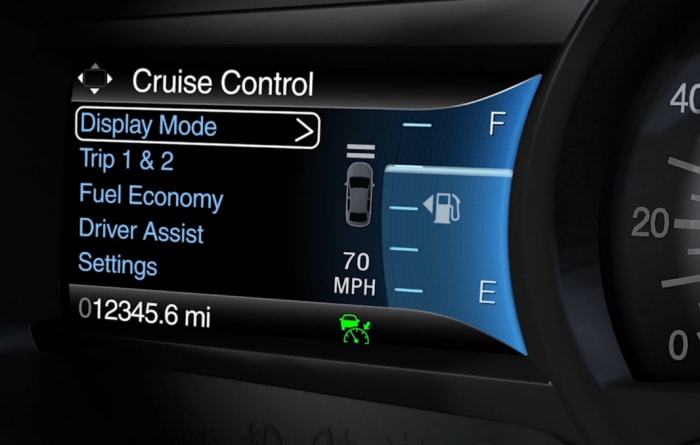
To tell if your F150 has adaptive cruise control, look for a white icon resembling a speedometer with a vehicle on top or an arc with a small triangle pointing through it. This icon will appear in your cluster display or on your Head-Up Display when the system is turned on. On 2021-and-newer trucks, the same icon is often shown alongside a small set of horizontal bars that represent your chosen gap distance, which plain cruise control never displays.
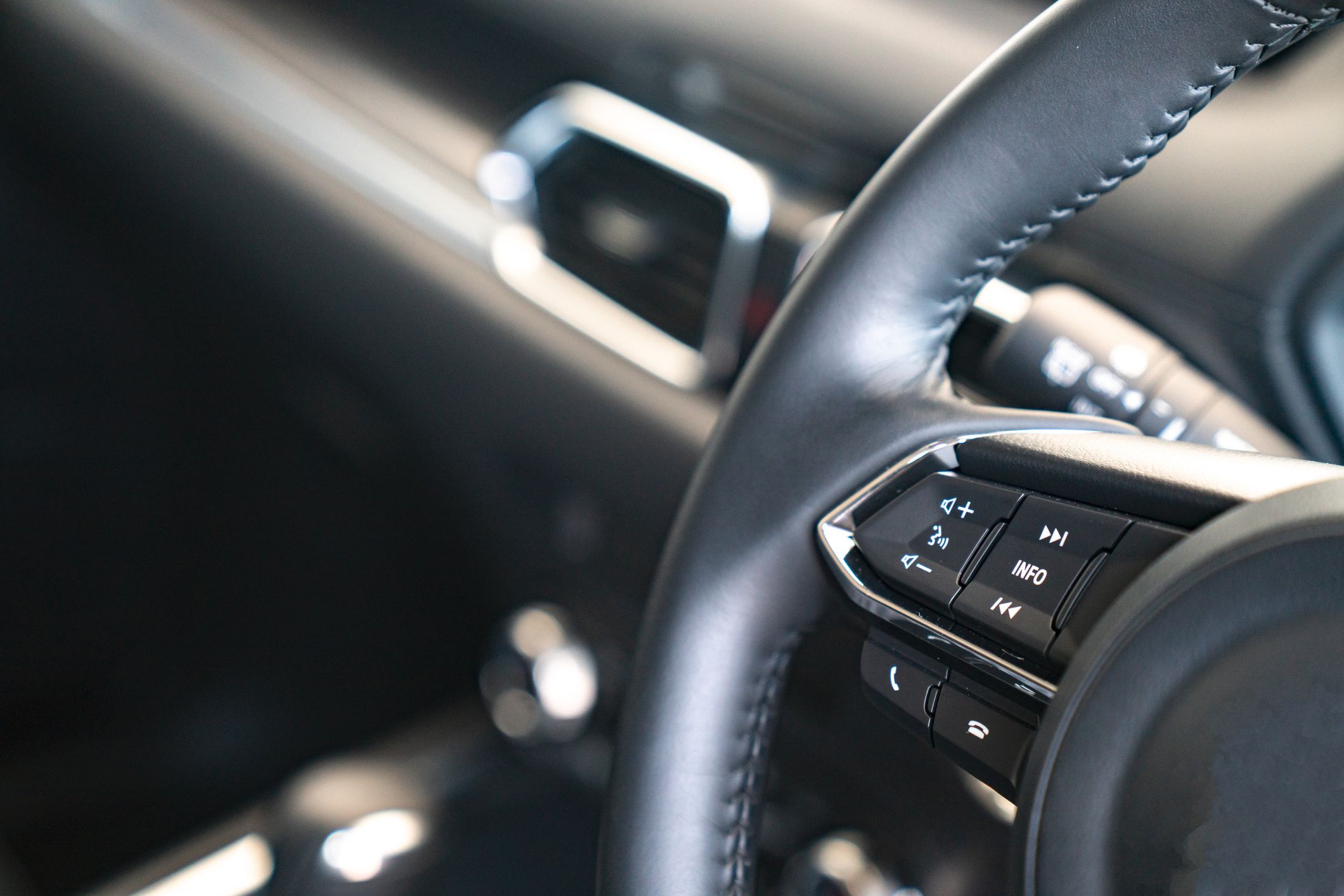
Alternatively, check the position of the cruise control buttons. On 12th-gen (2009–2014) and 13th-gen (2015–2020) trucks, base cruise control uses a single large ON/OFF or CAN button, while adaptive cruise control adds a separate gap distance button (often marked with a car-and-bars icon) plus a SET+/SET– rocker. On 14th-gen (2021+) trucks, the left spoke carries a dedicated ACC button with the car-and-bars icon, and the gap button sits directly below it. If you only have ON/OFF, RES, SET+, and SET– with no gap button anywhere, you have standard cruise control.
Credit: www.caranddriver.com
What Adaptive Cruise Control Looks Like on an F-150
To check if your F150 has Adaptive Cruise Control, look for the white Adaptive Cruise Control icon on your cluster display or Head-Up Display. The icon can resemble a speedometer with a vehicle on top or an arc with a small triangle pointing through it.
Check The Cluster Display
If you’re wondering whether your Ford F150 has adaptive cruise control, one of the first places to check is the cluster display. Once you turn on the system, look for a white icon that represents adaptive cruise control. This icon may resemble a speedometer with a vehicle on top or an arc with a small triangle pointing through it. Spotting this icon on your cluster display indicates that your F150 is equipped with adaptive cruise control.
Check The Head-up Display
Another way to determine if your F150 has adaptive cruise control is by checking the head-up display, if your vehicle is equipped with this feature. When you turn on the adaptive cruise control, keep an eye out for the same white icon as mentioned earlier. It should appear on the head-up display, providing a clear indication that your F150 has adaptive cruise control.
Look For The Adaptive Cruise Control Icon
Aside from the cluster display and head-up display, you can also identify adaptive cruise control by the button itself. Look for a car icon with horizontal bars in front of it — that is the gap-distance button, and it only exists on trucks with ACC. It sits on the left steering-wheel spoke, usually just below the main cruise button. If your truck has that button, it has adaptive cruise control.
How To Set Up And Use Adaptive Cruise Control
If you’ve recently purchased a Ford F150 and are wondering if it comes equipped with Adaptive Cruise Control, we’ve got you covered. Adaptive Cruise Control is an advanced feature that automatically adjusts your vehicle’s speed to maintain a safe distance from the car ahead of you. In this section, we’ll discuss how to set up and use this convenient feature to enhance your driving experience.
Setting Up Adaptive Cruise Control
Setting up Adaptive Cruise Control on your F150 is a straightforward process. Follow these steps to activate this feature:
- Start your vehicle and locate the cruise control buttons on the left-hand side of the steering wheel.
- Press the ON button to activate the cruise control system.
- Look for the adaptive cruise control icon on your cluster display or Head-Up Display — a speedometer with a vehicle on top, or an arc with a small triangle pointing through it.
- If the icon appears with gap-distance bars beneath it, your truck is equipped with ACC. If you only see a plain cruise icon with no bars, you have standard cruise control.
Using Adaptive Cruise Control
Now that you’ve set up Adaptive Cruise Control, let’s dive into how to use it effectively:
- When driving, activate cruise control by pressing the ON button.
- Set your desired speed with the + and – buttons.
- Press the gap distance button (car-and-bars icon) to cycle through following distances — typically four settings from closest to farthest.
- The cluster will show the set speed and the gap bars you selected. Your F150 will now hold that speed and automatically adjust to the vehicle ahead.
Understanding How It Works
Adaptive Cruise Control uses sensors and radar technology to detect the distance between your vehicle and the one in front. It then adjusts your speed accordingly to maintain a safe following distance. The system can slow down or accelerate your F150, depending on the flow of traffic.
It’s essential to note that Adaptive Cruise Control is not a substitute for attentive driving. Always keep your hands on the steering wheel and be prepared to take control of the vehicle if necessary.
Safe 2-Minute Test Drive to Confirm ACC
Find a road with light traffic and a steady speed limit. Press ON, accelerate to your target speed, and press SET. If the truck has ACC, the cluster will show the set speed plus gap-distance bars, and a small vehicle icon will appear when the system detects a car ahead. Press the gap button and watch the bars change. If no gap button exists and no bars ever appear, the truck has standard cruise control only. Keep your hands on the wheel and be ready to brake at all times.
Now that you know how to set up, use, and understand Adaptive Cruise Control in your F150, enjoy a more relaxed and safer driving experience on the road.
ACC vs BlueCruise and Common Troubleshooting
BlueCruise is Ford’s hands-free highway system, and it builds on top of ACC rather than replacing it. A truck can have ACC without BlueCruise, but it cannot have BlueCruise without ACC. If your ACC stops working, the most common causes are a blocked or dirty radar sensor in the front bumper, a fogged or obstructed front camera behind the windshield near the mirror, or a recent windshield replacement that requires camera recalibration. A dealer or a shop with the right equipment can recalibrate the camera and radar.
Which F-150 Years, Trims, and Packages Include ACC
If you own a Ford F150 and you’re wondering if your vehicle is equipped with Adaptive Cruise Control (ACC), you’ve come to the right place. ACC is a fantastic feature that can make your driving experience more convenient and enjoyable. In this section, we will discuss how to identify Ford models with ACC, so you can easily determine if your F150 has this advanced technology.
Identifying Ford Models With Acc
The fastest way to confirm ACC is to check the window sticker (Monroney label). Look under Optional Equipment for Adaptive Cruise Control, Co-Pilot360 Assist, Co-Pilot360 Assist 2.0, or Ford Co-Pilot360 Active 2.0. On 2021-and-newer trucks, ACC is often bundled into Co-Pilot360 Assist 2.0 rather than listed on its own. You can also decode the VIN at Ford’s own VIN lookup or a window-sticker service to pull the original build sheet, which lists the same option codes.
You can also confirm the feature in the FordPass app. Open the app, select your vehicle, and tap the vehicle details or feature list. ACC-equipped trucks will show adaptive cruise control (and, on newer models, BlueCruise) among the listed driver-assist features. If it is not listed there and there is no gap-distance button on the wheel, the truck does not have ACC.
Summary
In summary, if you’re curious about whether your Ford F150 has Adaptive Cruise Control, you can easily identify it by checking your cluster display or Head-Up Display for the ACC icon. Alternatively, you can look at the cruise control buttons on the left-hand side of your steering wheel. By following these simple steps, you can determine if your F150 is equipped with this convenient and innovative technology.
Can You Add ACC Aftermarket?
Adding factory ACC to a truck that was not built with it is possible but expensive and involved. It typically requires the radar sensor, the correct steering-wheel switch pack, wiring, and programming, plus a dealer visit to enable the feature in the modules. Because ACC ties into braking and safety systems, an incorrect install can affect warranty coverage and calibration. For most owners, buying a truck that already has the feature is far cheaper and safer than retrofitting it.
Credit: www.westwayford.com

Credit: www.ford.com
Frequently Asked Questions On How To Tell If Your F150 Has Adaptive Cruise Control
What Model Of F150 Has Adaptive Cruise Control?
ACC availability depends on year and trim. As a rough guide: on 2015–2020 trucks it was optional on XLT and above, most commonly bundled into Co-Pilot360 Assist. From 2021 onward it became far more widespread, standard or optional on Lariat and above and available on many XLTs through Co-Pilot360 Assist 2.0. The only reliable confirmation for a specific truck is the window sticker, VIN build sheet, or FordPass feature list.
How Do I Know If I Have Adaptive Cruise Control?
To determine if you have Adaptive Cruise Control, look for a white icon on your cluster display or Head-Up Display. The icon may resemble a speedometer with a vehicle on top or an arc with a small triangle pointing through it.
Does 2023 F150 Xlt Have Adaptive Cruise Control?
Not necessarily. Many 2023 XLTs were built with ACC, but it depended on whether the truck was ordered with Co-Pilot360 Assist 2.0. Check the window sticker or FordPass feature list to confirm your specific truck.
What Year Did Ford Introduce Adaptive Cruise Control?
Ford first offered adaptive cruise control in the early 2000s on select models, and it reached the F-150 later that decade. On the F-150 specifically, ACC became a commonly ordered option from the 2015 model year onward.
Conclusion
To determine if your F150 has adaptive cruise control, look for a white adaptive cruise control icon on your cluster display or head-up display. This icon may resemble a speedometer with a vehicle on top or an arc with a small triangle pointing through it.
Another way to tell is by examining the cruise control buttons. Regular cruise control will have a large “CAN” button on the left side, while adaptive cruise control will have a scanner on the top and the “CAN” button on the bottom.
By identifying these features, you can easily determine if your F150 is equipped with adaptive cruise control.
Quick Checklist
- Gap-distance button (car-and-bars icon) on the left steering-wheel spoke — the single strongest sign of ACC.
- ACC icon in the cluster or HUD, shown with gap-distance bars.
- Window sticker lists Adaptive Cruise Control, Co-Pilot360 Assist, or Co-Pilot360 Assist 2.0.
- VIN build sheet or FordPass feature list confirms adaptive cruise control.
- Radar sensor in the front bumper and camera behind the windshield are present and clean.
Related posts:
 How Far Can You Drive Without an Alternator? Real Distances
 What Color Is Avalanche for Ford? The Definitive 2026 Guide
 How to Disengage 4WD in Ford F150: Easy Steps to 2H
 Ford F150 Power Steering Assist Fault: Fix by Year, Codes & Cost
 What Lug Pattern is a Ford F150: Unveiling the Perfect Fit for Your Ride
 What Are Cam Phasers F150
How Much is a Windshield for a Ford F150: Find the Best Price Now!
 Best Aftermarket Radio For 2013 Ford F150: Expert Picks
 Best Floor Jack for F150
 How to Get a Spare Tire off a Ford F150
 5 Best Ford F150 Bed Covers: Expert Picks & Quality Tested
 Best Tuners for Ford F150 EcoBoost to Boost Performance