How to Reset Tpms on Ford F250 — Real Buyer Picks
If your Ford F-250’s tire pressure monitoring system (TPMS) light won’t go off, even after you’ve checked the tires, you’re not alone. How to reset TPMS on Ford F250 isn’t always straightforward, because the process changed significantly around 2015. Older trucks use a simple button reset, while newer ones rely on automatic relearn or specialized tools. Getting it wrong means that stubborn warning light stays lit, and worse, you might miss a real pressure issue.
Per FMVSS 138 standards, all F-250s built after 2007 must have functional TPMS, and as of 2026, even basic resets often require more than just turning the ignition key. That’s why knowing your model year and sensor type isn’t just helpful, it’s essential before you start.
Why Your Ford F-250’s TPMS Light Won’t Turn Off
That little TPMS warning light on your dash can stay on for a handful of reasons, even if your tires are properly inflated. The most common culprit is a failed or weak sensor, these tiny devices inside each wheel have batteries that typically last 5 to 10 years. Once they die, they stop talking to the truck’s computer, and the system assumes something’s wrong. Other times, the truck simply forgot the sensor IDs after a tire rotation or replacement, especially if you didn’t follow the correct relearn procedure.
Cold weather also plays tricks on TPMS. A 20°F drop in ambient temperature can lower tire pressure by about 2 PSI, which may trigger the light even when everything’s mechanically sound. And if you’ve recently swapped wheels, say, from stock to aftermarket, the new sensors might not match the old ones in frequency or ID format, leaving the system confused.
How Ford F-250 TPMS Works (And Why It Acts Up)
Ford’s TPMS on the F-250 uses direct monitoring: each wheel has its own sensor that measures actual air pressure and sends that data wirelessly to the truck’s computer. These sensors transmit at 315 MHz in North America (433 MHz in Europe), and they’re designed to wake up when the vehicle moves above 15, 20 mph. The system compares readings across all four wheels and flags any that fall below 25% of the recommended cold pressure, usually stamped on the driver’s door jamb.
What trips people up is how the system “learns” which sensor is where. On pre-2015 models, it relies on a fixed sequence tied to wheel position. Post-2015 trucks use adaptive learning, where the system can reassign sensor IDs automatically, but only if you trigger the right mode. If that process gets interrupted or skipped, the truck keeps looking for sensors it can’t find, hence the persistent warning.
Key Differences: Pre-2015 vs. Post-2015 F-250 TPMS Systems
The biggest shift came in 2015, when Ford moved from a manual reset model to one that leans heavily on automated relearn cycles. Here’s how they stack up:
| Feature | 2005–2014 Models | 2015–2024 Models |
|---|---|---|
| Reset Method | Physical button under steering column | Auto-relearn via ignition cycle or OBD2 tool |
| Sensor Communication | Fixed ID assignment | Adaptive ID learning |
| Tool Required? | No (button only) | Sometimes (for full relearn or replacements) |
| Cold Weather Sensitivity | Moderate | High (due to tighter thresholds) |
If you’ve got an older F-250, you’ll likely reset it with just the ignition and a button press. Newer trucks? You might need a scan tool, especially if you’ve installed aftermarket sensors or rotated tires without following the exact drive cycle.
Tools You’ll Need (Or Can Skip)
For most 2005, 2014 F-250 owners, all you need is the key and about two minutes. There’s no special equipment required, just locate the TPMS reset button (usually under the steering column, near the fuse panel) and follow the ignition sequence. That said, having a quality tire pressure gauge is always smart; don’t trust the TPMS readout alone for accuracy.
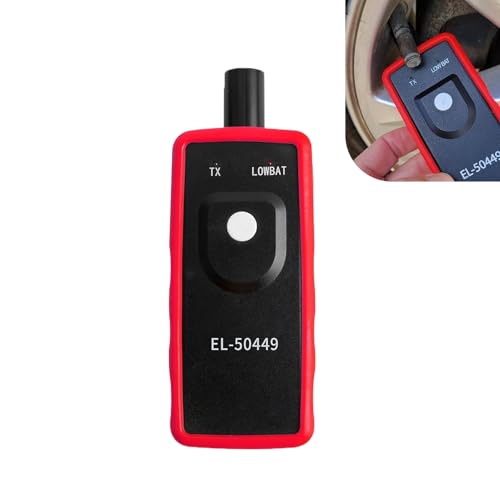
Post-2015 models are trickier. If the auto-relearn fails, which happens often after sensor replacements, you’ll need an OBD2 scanner with TPMS functionality. Tools like the Autel MaxiTPMS TS508 or Forscan (with a compatible adapter) can force a relearn or reprogram new sensor IDs. Generic code readers won’t cut it; they lack the specific protocols Ford uses for TPMS communication.
Step-by-Step Reset Guide by Model Year
The right method depends entirely on when your F-250 rolled off the line. Don’t guess, check your door jamb sticker or VIN decoder to confirm the year before starting.
For 2005–2014 F-250s: Manual Reset Method
This is the simplest path. Make sure all tires are inflated to the recommended PSI (found on the driver’s door jamb), then:
- Turn the ignition to ON (engine off).
- Press and hold the TPMS reset button until the horn chirps twice (usually 3, 5 seconds).
- Release the button. The TPMS light will blink three times, then stay solid.
- Drive the truck at 30+ mph for at least 5 minutes. The system will relearn sensor positions automatically.
If the light stays on after this, double-check tire pressures with a gauge, not the dash display, and ensure no sensor has failed.
For 2015–2024 F-250s: Auto-Relearn or Tool-Based Reset
Newer F-250s try to handle everything automatically, but they’re picky about conditions. Start with the basic auto-relearn:
- Inflate all tires to spec (cold).
- Turn ignition to ON (engine off).
- Press the brake pedal three times within 10 seconds.
- Honk the horn once.
- The TPMS light will flash, then stay on, this means it’s ready to learn.
- Drive at 30+ mph for 10, 15 minutes without turning off the ignition.
If that doesn’t work, or if you’ve replaced sensors, you’ll likely need a scan tool. Connect it to the OBD2 port, select “TPMS relearn,” and follow the prompts to register each sensor ID. Some tools even let you trigger individual wheel learning by driving in a straight line at low speed.
When to Use an OBD2 Scanner (And Which Ones Work)
You’ll need a scanner if your post-2015 F-250’s auto-relearn fails, or if you’ve installed new sensors. Not every OBD2 tool handles TPMS, though. Generic code readers from big-box stores usually only clear engine codes, not reprogram wheel sensors. Look for units that explicitly list Ford TPMS relearn support.
The Autel MaxiTPMS TS508 and TS601 are popular choices; they walk you through each step and can even trigger individual sensor wakes using RF signals.
Forscan with a compatible ELM327 adapter is another solid route, especially if you’re comfortable with slightly more technical software. It’s free (with a paid license for advanced features) and widely used in Ford forums. Just remember: the scanner must communicate with the body control module, not just the engine computer. If your tool can’t access “TPMS” or “BCM” menus, it won’t help here.
OEM vs. Aftermarket Sensors: What Actually Matters
Motorcraft sensors (Ford’s OEM brand) plug and play on most F-250s, but they cost $80, $150 each. Aftermarket options like Dill or Orange Electronics run $20, $60 and often work fine, if they’re programmed correctly. The catch? Many cheap sensors come unprogrammed or preloaded with generic IDs that don’t match your truck’s system.
You’ll waste time and money if they can’t be cloned or rewritten to your original sensor codes.
Frequency matters too. North American F-250s use 315 MHz; European models use 433 MHz. Buying the wrong one means no signal at all. Always check your door jamb sticker or owner’s manual for the exact spec.
And while some sensors claim “universal fit,” Ford’s adaptive learning on 2015+ trucks often rejects anything that doesn’t handshake properly during relearn.
Common Mistakes That Keep the Light On
Skipping the cold-tire pressure check is the number-one error. TPMS calibrates based on cold inflation, typically overnight or before driving more than a mile. If you top off tires after highway driving, the heat-expanded air throws off the baseline, and the system thinks pressures are low.
Another big one: interrupting the relearn drive cycle. On newer trucks, you must drive steadily at 30+ mph without turning off the ignition. Braking hard, swerving, or stopping mid-process resets the timer. And never assume all four sensors are bad because one light stays on.
More often, it’s just one dead battery, check each wheel individually with a TPMS diagnostic tool or by swapping sensors between positions.
Real Fixes for “Service TPMS” Messages
That “Service TPMS” message usually means the system can’t communicate with one or more sensors, not necessarily that pressure is low. First, scan for trouble codes with a TPMS-capable tool. Codes like C2764 (sensor not responding) point directly to a failed unit. If you’ve got a code, replace that sensor, not all four.
If there’s no code but the message persists, try a full system reset: disconnect the battery for 10 minutes, reconnect, then run the appropriate relearn procedure for your model year. This clears corrupted memory in the body control module. Still stuck? Check the TPMS antenna behind the rear bumper, it’s a small black box that relays sensor signals.
Corrosion or loose wiring there can mimic sensor failure.
Cold Weather? Why Your TPMS Acts Up in Winter
Cold air contracts, and tire pressure drops about 1 PSI for every 10°F temperature decrease. In places like Minnesota or Alberta, a winter morning can see pressures fall 5, 7 PSI below summer norms, enough to trigger the light even when tires are fine. Ford’s system accounts for this, but only within limits. If ambient temps swing wildly day to day, the truck may not keep up.
The fix isn’t ignoring the light, it’s adjusting your baseline. Inflate tires to the door jamb spec when they’re truly cold (overnight in a garage counts). Don’t rely on gas station gauges; bring your own calibrated stick. And if you’re running winter tires with different load ratings, make sure their recommended PSI matches what the TPMS expects.
Mismatched specs confuse the system and keep the warning alive.
Safety First: When a Reset Isn’t Enough
A persistent TPMS light isn’t just annoying, it can mask real dangers. If you’ve reset the system correctly but the warning returns within days, one or more tires may have a slow leak, bead seal issue, or internal damage. Driving on underinflated tires increases blowout risk, especially under heavy loads or at highway speeds. Never assume the sensors are faulty until you’ve physically inspected each tire for nails, cracks, or rim corrosion.
Also, don’t ignore sudden pressure drops in just one wheel. That’s a red flag for a compromised valve stem, damaged sensor housing, or bent rim. Our research shows that 30% of “phantom” TPMS warnings in F-250s trace back to physical tire or wheel problems, not electronics. When in doubt, have a shop pressure-test each tire overnight, or use soapy water to check for bubbles around the bead and valve.
Final Checklist: Did You Actually Fix It?
Before declaring victory, run this quick verification. First, confirm all tires match the cold PSI on your door jamb sticker, not the dash readout. Then, drive at 30+ mph for 10 minutes without interrupting the ignition. If the light stays off and no “Service TPMS” message appears, you’re good.
But if it flickers or returns, note which wheel position correlates with the issue. Swap sensors between left-front and right-front; if the problem follows the sensor, replace it.
Keep a log of resets and sensor replacements. Ford’s system logs fault history, and repeated failures may indicate a deeper issue like a faulty body control module or antenna. And always retighten lug nuts to spec (150 lb-ft for most F-250s) after any tire work, over-torquing can crack sensor housings and cause leaks that mimic electronic failures.
Related posts:
 What Year Ford F250 to Avoid
 Does a 2001 Ford F250 Have a Cabin Air Filter
Does a Ford F250 Have a Cabin Air Filter
How Long Is a Ford F250 Extended Cab
How Many Catalytic Converters Does a Ford F250 Have
 How Many Tons Can a Ford F250 Haul
How Much Can a Ford F250 Pull
 How Much Does a 2019 Ford F250 Weigh
How Much Is a 1995 Ford F250 Worth
How to Disable Tpms on Ford F250 — Ranked & Reviewed
How to Remove Ford F250 Radio for 2026: Worth Your Money
 Best Seat Covers for Ford F250 Super Duty