How to Program Ford F150 Key Fob
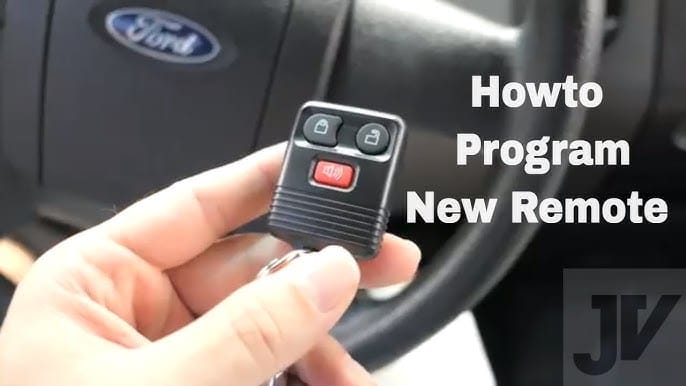
Whether you’re a tech-savvy enthusiast or someone who just wants to simplify their daily routine, learning how to program your Ford F150 key fob is easier than you might think. In this guide, we’ll walk you through the simple steps needed to get your key fob up and running, ensuring your vehicle is secure and your life is just a bit more convenient.
Let’s unlock the secrets to mastering your Ford F150 key fob together!
Key Steps
- Sit in the driver’s seat with all doors closed
- Insert the key into the ignition
- Turn the key from OFF to RUN 8 times within 10 seconds (ending in RUN)
- Wait for the door locks to cycle (lock/unlock) to confirm programming mode
- Press any button on the new key fob within 8 seconds
- Wait for door locks to cycle again (confirmation)
- Repeat step 5 for additional fobs (if needed)
- Turn the ignition to OFF to exit programming mode
- Test all programmed key fobs to ensure they work
Types Of Key Fobs
Traditional key fobs are common. They come with basic features. Press a button to lock or unlock the car. Easy to use. No need for complicated steps. These fobs often have a plastic case. They might have a metal key too. Use it if the battery dies. These fobs are simple yet effective.
Smart key fobs are advanced. No need to press buttons. Just have the fob with you. The car senses it. Doors unlock automatically. Push to start the engine. These fobs are very convenient. They use technology. Easy to carry around. Some people call them keyless entry fobs.

Tools And Materials Needed
Every Ford F150 key fob needs a few tools for programming. A flathead screwdriver helps open the fob. Needle-nose pliers are useful too. These tools make it easy to handle small parts. A keychain loop keeps the fob safe. Using a clean cloth is smart. It protects the fob from scratches. Safety gloves can keep hands safe. Extra keys might be necessary. Always have them ready. These tools make programming simple and safe.
Replacement batteries are essential for the Ford F150 key fob. A new battery powers the fob correctly. CR2032 batteries are the right choice. They fit well in the fob. Always check the battery size before buying. It’s important for a good fit. Extra batteries should be handy. If one fails, use another. Battery life depends on usage. Keep track of it. Fresh batteries ensure the fob works well.
Locating The Programming Port
The Ford F150 has a special spot for programming. This spot is called the programming port. It’s often found under the dashboard. Sometimes, it’s near the steering wheel. Finding this port is the first step. Remember, it might be hidden. Check your vehicle’s manual for help.
Once you know where it is, you need to reach it. Make sure your car is off. Then, gently move aside any covers. Be careful not to break anything. Once the port is visible, you can begin programming. Ensure you have the right key fob. It should match your Ford model.

Step-by-Step Programming Process
Start by sitting inside your Ford F150. Close all the doors. Put the key in the ignition. Turn it from off to on eight times. Do this quickly. On the eighth turn, stop at the on position. The locks should cycle. This means you are now in programming mode.
Press any button on the key fob. The locks should cycle again. This means the key fob is now synchronized. Do this for any additional key fobs. Make sure each key fob gets synchronized.
Remove the key from the ignition. The locks will cycle one last time. This confirms you are out of programming mode. Test each key fob. Ensure all work correctly with the car. You have successfully programmed your key fob.
Troubleshooting Common Issues
Programming a Ford F150 key fob can solve many common issues. Start by ensuring the car doors are closed. Insert the key and switch between ‘off’ and ‘on’ eight times. Wait for the locks to cycle, then press any button on the fob.
Key Fob Not Responding
A key fob can stop working suddenly. Check the battery first. Batteries can be dead or weak. Replace the battery if needed. Ensure it’s inserted correctly.
Signal interference can block the FOB. Move away from electronic devices. Try using the fob again. Distance can be an issue, too. Stand closer to your Ford F150. This might solve the problem.
Error Messages
Error messages can appear on the dashboard. Check the message carefully. It might be a low battery warning. Change the battery if needed. If the error persists, consult the manual. Look for help from a professional if required.
Some messages might be due to programming issues. Reprogram the key fob. Follow the steps from the manual. Ensure all steps are done correctly. This might fix the problem.

Tips For Successful Programming
Keeping the key fob battery fresh is very important. A weak battery might cause programming issues. Use a new battery to avoid any problems. Check the battery regularly to ensure it is in good condition. Batteries can lose power over time. Replace them when they are low. This helps keep the key fob working well.
Always have a spare key fob ready. It helps in emergencies. You won’t be stuck if one fob fails. Keep the spare in a safe place. Make sure it is easy to find when needed. Having a spare saves time and effort. It offers peace of mind too.
When To Seek Professional Help
Signs You Need Assistance: The key fob does not work after several tries. Battery replacement did not help. F150 does not respond to the key fob. You feel unsure about the programming steps. These signs might mean you need help.
Choosing a Reliable Technician: Find a technician with good reviews. Ask friends for advice. Check if they have Ford experience. Choose someone near you. Make sure they offer a warranty. This shows they trust their work. Always ask for prices upfront. Understand what you are paying for.
Frequently Asked Questions
How To Start Programming A Ford F150 Key Fob?
To start, ensure all doors are closed and insert the key into the ignition. Turn the key from “Off” to “Run” eight times within 10 seconds. The door locks will cycle, indicating programming mode is active. Quickly proceed with programming the new key fob.
Can I Program A Ford F150 Key Fob Myself?
Yes, you can program a Ford F150 key fob yourself. Follow the simple steps provided in your vehicle’s manual. Ensure you have all necessary equipment, like the key fob and car keys. This DIY approach saves money compared to dealership services.
What Is The Cost To Program A Ford Key Fob?
The cost to program a Ford key fob varies. Dealerships typically charge between $50 and $100. However, DIY programming can be free if instructions are followed correctly. It’s important to compare prices and check for any additional fees for new fobs.
How Long Does It Take To Program A Key Fob?
Programming a Ford F150 key fob generally takes less than 10 minutes. The process is quick and straightforward if instructions are followed carefully. Make sure to have everything ready before beginning. This ensures a smooth and efficient programming experience.
Conclusion
Programming your Ford F150 key fob is simple. With clear steps, you can do it. Ensure your vehicle is ready. Follow the instructions carefully. You’ll have a functioning key fob in no time. No need for expensive services. Enjoy the convenience of your newly programmed key.
Always keep your manual handy for reference. It’s useful for troubleshooting. Share this guide with friends. They might find it helpful too. Happy driving with your Ford F150!
Related posts:
 How Far Can You Drive With A Dead Battery
 how much is a replacement key for Ford F150
 What is a Ford Csp : Everything You Need to Know
 How To Identify A Ford Transmission: Tips and Techniques
 How to Reset Tpms Ford F150: Quick and Easy Steps
 How to Bypass O2 Sensor on Ford F150: A Foolproof Guide
 Which F150 Has Adaptive Cruise Control
 How Much are Ford F150 Brake Pads? Find the Best Prices Here!
 Does 30 Oz Yeti Fit in Cup Holder? Find Out Now!
 How Much is a Leveling Kit for F150? Find the Best Deals!
 What Is The F150 Sport Package
 How to Fix Active Air Dam System Fault Ford F150