How to Reset MyKey on Ford F-150: By Year, Key & Screen
So, you’re wondering how to reset MyKey on your Ford F-150? To reset MyKey on your Ford F-150, you typically need an administrator key and access the MyKey settings through your vehicle’s display screen to clear all MyKeys. This process removes any restrictions previously set, giving you full control back.
It can be a little tricky when you’re dealing with vehicle settings, especially if you’re not sure where to start. But don’t worry, we’re here to walk you through it step by step, making everything super clear and easy to follow.
This guide will show you how to reset MyKey, what to do if you don’t have the admin key, and some helpful tips to get your F-150 back to normal. Let’s dive in and get those settings sorted out!
Key Takeaways
- You usually need an “admin” key to reset MyKey settings on your Ford F-150. The admin key is the one used to set up MyKey, or any key that hasn’t been programmed as a MyKey.
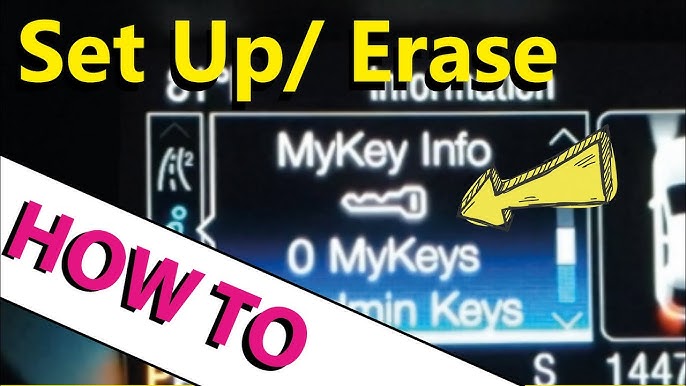
- To reset, go to MyKey settings on your truck’s information display or SYNC screen and select “Clear MyKey,” then press and hold OK until it confirms.
- If you don’t have an admin key, disconnecting the battery for 15 minutes is sometimes suggested, but it rarely clears MyKey because the settings are stored in the key, not just the truck’s memory.
- Your reliable options without an admin key are a Ford dealer or a Ford-capable locksmith, who can clear MyKey and program a new admin key.

What is Ford MyKey and Why Would You Reset It?
Ford MyKey is a cool feature designed to promote safer driving habits, especially for new drivers or when you lend your truck to someone. It lets you program a key to limit certain vehicle features.
For example, you can set a speed limit, control audio volume, or ensure the seatbelt reminder stays on. It’s like having a built-in nanny for your F-150.
You might want to reset MyKey if you’ve bought a used F-150 and the previous owner had set restrictions. Or maybe you lent your truck to a friend, and now you want to remove the limits. Sometimes, you just want to get full control back over your vehicle.
Understanding the “Admin” Key on Your F-150
The “admin key” is super important when it comes to MyKey. It’s the master key, the one that can change or clear all the MyKey settings. Think of it as the parent key that controls all the kids’ keys.
When you first set up MyKey, the key you use to do it becomes the admin key. Any other keys you have can then be programmed as MyKeys with restrictions. If MyKey was already active and you switch it on again with a different key, that key becomes the new admin key. On most F-150s, the admin key is simply the key that has not been programmed as a MyKey.
It’s really important to know which of your keys is the admin key. Often, it’s the one you use most often, or the one that wasn’t previously set to a MyKey profile. Without this key, resetting MyKey can become a bit more challenging.
Before You Start: Admin Key, Model Year, and Display Type
The exact reset steps vary by F-150 model year (roughly 2011 through 2026), by trim (XL, XLT, Lariat, King Ranch, Platinum, Limited, Raptor), and by two hardware details: whether your truck uses a keyed ignition or push-button start, and whether it has the 4-inch information display or an 8-inch/12-inch SYNC 3 or SYNC 4 touchscreen. Find your combination below before you start pressing buttons.
First, start your Ford F-150 using the admin key. With push-button start, press the brake and the start button with the admin key fob inside the truck. With a keyed ignition, turn the key to Run or start the engine. Make sure the truck is fully on, not just in accessory mode, so the menus are active.
Keyed vs Push-Button Start
On keyed-ignition F-150s, the admin key is the physical key you turn. On push-button start trucks, the admin status lives in the key fob, so you must have the correct fob inside the cab for the MyKey menu to unlock. If you only have a MyKey fob, the menu will show “No admin keys found” and you cannot clear anything from inside the truck.
Press the left arrow button on your steering wheel. This will bring up the main menu on your display. From there, scroll through the options until you find “Settings.”
Trucks with the base 4-inch information display use the steering wheel arrow and OK buttons to reach MyKey. Trucks with SYNC 3 (2016-2020) or SYNC 4 (2021+) use the touchscreen under Settings > Vehicle > MyKey. Some newer trucks expose MyKey in both places, so if one path is missing, try the other.
Inside Vehicle Settings, you should find “MyKey.” Select it with the “OK” button. If you don’t see it, check under Driver Assist or scroll the full Settings list, since menu wording shifts between model years.
Look for an option like “Clear MyKey” or “Reset MyKey.” Highlight it. Then, here’s the crucial part: press and hold the “OK” button.
Keep holding it until you see a message on your display confirming that all MyKeys have been cleared. This usually takes about 3-5 seconds. Congrats! Your MyKey settings are now gone.
Using the SYNC Screen (For Models with SYNC)
Some F-150 models, especially newer ones, let you manage MyKey through the SYNC touchscreen.
Start your truck with the admin key. On your SYNC screen, tap “Settings,” then “Vehicle,” then “MyKey.” On SYNC 4, MyKey may sit directly under Settings rather than inside Vehicle.
Inside the Vehicle menu, you should find “MyKey.” Select it. Just like with the steering wheel controls, you’ll see an option to “Clear MyKey.”
Tap on “Clear MyKey” and follow any on-screen prompts. You might need to hold a button on the screen for a few seconds to confirm. Once confirmed, all MyKey settings will be removed from your truck.
Verifying MyKey Is Fully Cleared
After the reset, cycle the ignition off and back on with the same key. Open the MyKey menu again. If it shows no active MyKeys and no restrictions, the clear worked. You can also check that the key now behaves as an admin key by confirming the MyKey menu is still accessible. If restrictions remain, the key you used was not the admin key.

No Admin Key? Your Real Options
This is the most common F-150 MyKey problem, and it usually happens on used trucks where the buyer only received a MyKey fob, or on trucks where a valet or second key accidentally created a MyKey profile. Without the admin key, the standard in-truck reset will not work, and the display will often read “No admin keys found.” Here is what actually works.
Dealer Reset
One method some people suggest is disconnecting the battery. Find your F-150’s battery (usually under the hood). Carefully disconnect the negative terminal (the one marked with a minus sign).
Leave it disconnected for about 15 minutes. This sometimes causes the vehicle’s computer system to clear certain memory settings, including MyKey. After 15 minutes, reconnect the battery.
However, be realistic: MyKey settings are stored in the key itself, so disconnecting the battery rarely clears them. It is worth a try because it is free, but plan on one of the professional options below.
Locksmith and FORScan
A Ford dealership can clear MyKey and program a new admin key using their diagnostic tools. Expect to pay for diagnostic time plus key programming, and bring proof of ownership and all keys you have. A Ford-capable automotive locksmith can often do the same job for less, so call around and confirm they handle MyKey and PATS programming on your model year.
These tools can often override or reset MyKey settings even without the original admin key. They can also program new admin keys for you if needed. This option usually involves a cost, but it’s often the most reliable way to solve the problem permanently.
Considering ForScan
FORScan, paired with an OBD adapter, can read and modify Ford modules and is sometimes used to clear MyKey or program keys. It is not beginner-friendly, and a wrong change can affect other modules, so treat it as a last resort and back up any configuration before you touch it.
However, ForScan is not for beginners. Using it incorrectly can lead to serious issues with your truck’s electronics. If you’re not experienced with vehicle diagnostics and software, it’s best to leave this to professionals. Experts often use it to reset modules or re-program certain features.
Creating a New Admin Key
Sometimes, the best solution is to create a new admin key. If you’re stuck with only MyKeys, getting a new key programmed as an admin key will solve all your problems.
A Ford dealership can program a brand-new key as the admin key, which then lets you clear every MyKey yourself. This is the cleanest long-term fix if you plan to keep the truck. Bring your title or registration and photo ID, since dealers require proof of ownership before programming keys.
Some automotive locksmiths also have the capability to program new keys and make them administrator keys. It’s worth calling around to see if you can find a locksmith who offers this service, as it might be cheaper than a dealership. Just make sure they specialize in Ford vehicles.
Realistic Costs and Time
Dealer and locksmith pricing varies by region and model year, so get a quote before you commit. Dealer visits usually take longer because of scheduling and paperwork, while a mobile locksmith can often finish in under an hour. Either way, bring proof of ownership and every key you have so the new admin key can be programmed correctly.

Troubleshooting Common MyKey Issues
Even with the right steps, you might run into a few snags. Here are some common problems and how to approach them.
“No Admin Keys Found” Message
This message means the key currently in the truck is a MyKey, not an admin key. No amount of menu navigation will clear it. Switch to another key if you have one, or move to the dealer or locksmith options above.
Not Finding MyKey Settings in the Menu
Menu wording shifts between model years. If you can’t find “MyKey,” check under Vehicle Settings, Driver Assist, or the full Settings list, and consult your owner’s manual for your specific year. On SYNC 4 trucks, try both the touchscreen and the instrument cluster menus.
Key Won’t Start the Truck After Reset Attempt
If your truck doesn’t start or acts strangely after trying to reset MyKey, especially after a battery disconnect, don’t panic. Check your battery terminals to make sure they’re clean and securely connected. If issues persist, it’s time to call a professional.
Advantages of Using MyKey (and Why You Might Not Want to Clear It)
While you might be eager to clear MyKey settings, it’s good to remember why they exist. MyKey can be very useful for promoting safe driving.
For instance, if your teenager drives the F-150, MyKey can limit their top speed, prevent them from turning off traction control, and even keep the radio volume at a reasonable level. It can also force seatbelt usage by muting the audio until seatbelts are buckled.
So, before you completely clear MyKey, think about who will be driving the truck. You might find some of its features surprisingly helpful for certain situations or drivers. You can always customize the restrictions instead of clearing them entirely, if you have an admin key.
Protecting Your Admin Key
Since the admin key is so important, it’s a good idea to keep it safe. If you have several keys for your F-150, make sure you know which one is the admin key and keep it separate from any keys you program as MyKeys.
Consider labeling your keys if it helps. For example, mark the admin key as “Master” and others as “MyKey.” This small step can save you a lot of hassle down the road if you ever need to adjust settings or clear them.
If you ever lose your admin key, it’s usually a good idea to get a replacement and have it programmed as an admin key as soon as possible. This prevents someone else from potentially changing your truck’s settings without your knowledge.
Warranty and Legal Notes
Clearing MyKey does not void your Ford warranty, and programming keys through a dealer keeps everything within factory settings. If you use FORScan or a third-party tool and something goes wrong, related repairs may not be covered. For teen drivers and fleet use, check your local laws and your insurer’s rules, since some policies and states treat restricted-key features differently.

Frequently Asked Questions
What are the limitations that MyKey can put on my Ford F-150?
MyKey can set several restrictions on your F-150. These include limiting the top speed, reducing the maximum audio volume, and enforcing seatbelt use by muting the radio until all seatbelts are buckled. It can also prevent turning off stability control and provide earlier low-fuel warnings.
Can I disable the MyKey feature in my Ford F-150 without the admin key?
Disabling MyKey without an admin key is difficult. Your best options are to try disconnecting your battery for 15 minutes (though this isn’t always effective) or, more reliably, visiting a Ford dealership or a specialized automotive locksmith. They have the tools to reset the system.
Can I reset MyKey settings on a 2015 F-150 without replacing the key?
Yes, if you have the administrator key for your 2015 F-150, you can reset MyKey settings without needing to replace any keys. Simply navigate to the MyKey settings in your instrument cluster or SYNC screen and select “Clear MyKey” using your admin key. If you don’t have the admin key, you might need professional help.
How do I know which key is the admin key for MyKey?
The admin key is typically the one that was used to create or first enable MyKey settings, or any key that has not been programmed as a restricted MyKey. If you’re unsure, try each key; only the admin key will allow you to access and clear the MyKey settings menu.
Is there a way to override MyKey restrictions temporarily?
No, there isn’t a temporary override for MyKey restrictions once they’re set to a specific key. The restrictions are tied to that programmed MyKey. To remove them, you must fully clear the MyKey settings using an admin key.
What if my F-150’s display screen isn’t working to reset MyKey?
If your display screen isn’t working, it will prevent you from directly accessing MyKey settings. You’ll need to address the display issue first, or take your F-150 to a Ford dealership. They can diagnose and fix the display, or potentially use their diagnostic tools to reset MyKey even with a non-functional screen.
What if my F-150’s display screen isn’t working to reset MyKey?
If your display screen isn’t working, you can’t reach the MyKey menu from inside the truck. Fix the display first, or take the F-150 to a Ford dealership. Their diagnostic tools can clear MyKey even when the screen is dead.
Conclusion
Resetting MyKey on your Ford F-150 can seem a bit daunting, especially if you’re missing that crucial administrator key. However, by following these steps, you’ll be able to regain full control over your truck’s settings.
Remember, the easiest way is always with the admin key, navigating through your steering wheel controls or SYNC screen. If that’s not an option, don’t lose hope—a visit to a Ford dealership or a trusted locksmith usually resolves the issue.
Now you have all the insider info to tackle MyKey with confidence. Go ahead, clear those settings, and enjoy your F-150 without any unexpected restrictions!
Related posts:
 How Far Can You Drive Without an Alternator? Real Distances
 What Color Is Avalanche for Ford? The Definitive 2026 Guide
 How to Disengage 4WD in Ford F150: Easy Steps to 2H
 Ford F150 Power Steering Assist Fault: Fix by Year, Codes & Cost
 What Lug Pattern is a Ford F150: Unveiling the Perfect Fit for Your Ride
 Does My F150 Have Remote Start? 3 Easy Ways to Check
 Does 2016 F150 Have Apple CarPlay? SYNC 3 vs SYNC 2 Guide
 Best 6X8 Speakers for Ford F150: Tested & Reviewed
 Best Adjustable Hitch for F150
 How to Change Battery in F150 Key Fob
 5 Best Ford F150 Bed Covers: Expert Picks & Quality Tested
 Best Tuners for Ford F150 EcoBoost to Boost Performance