How to Program F150 Garage Door Opener
With your F150’s built-in garage door opener, this can be your reality. Many truck owners have no idea just how simple it is to program this feature, and often miss out on its benefits. But here’s the good news: programming your F150 garage door opener is easier than you might think.
This guide will walk you through the process, step by step, so you can enjoy the seamless convenience that your vehicle offers. Let’s eliminate those rainy-day frustrations and make your daily routine a little smoother.
Key Steps
- Turn the ignition to the ON position (do not start the engine)
- Hold your garage door remote 1–3 inches from the F-150’s Homelink buttons
- Press and hold both the remote button and desired Homelink button simultaneously
- Hold until the indicator light changes from slow to fast blinking (may take up to 30 seconds)
- Release both buttons
- Go to the garage door opener motor unit (on ceiling)
- Press the “Learn” or “Smart” button on the opener (you have 30 seconds)
- Return to the truck and press the programmed Homelink button for 2 seconds
- Repeat pressing (up to 3 times) until the garage door activates
- Test to confirm successful programming

Preparation Steps
Collect the right tools. A ladder is important. You need it to reach the garage door opener. Have a remote handy. You will use it later. Keep a flashlight. It helps in dark spots. A pen and paper are useful too. Write down any codes. Having these tools makes the process smoother. Safety first. Ensure you have all tools ready.
Find the controls on your F150. It’s usually on the ceiling. Look for buttons. They might be labeled as “Learn” or “Program”. Press the right button. This starts the programming. Keep your remote nearby. You’ll need it soon. The controls are crucial. Make sure you understand them. Read the manual if unsure.
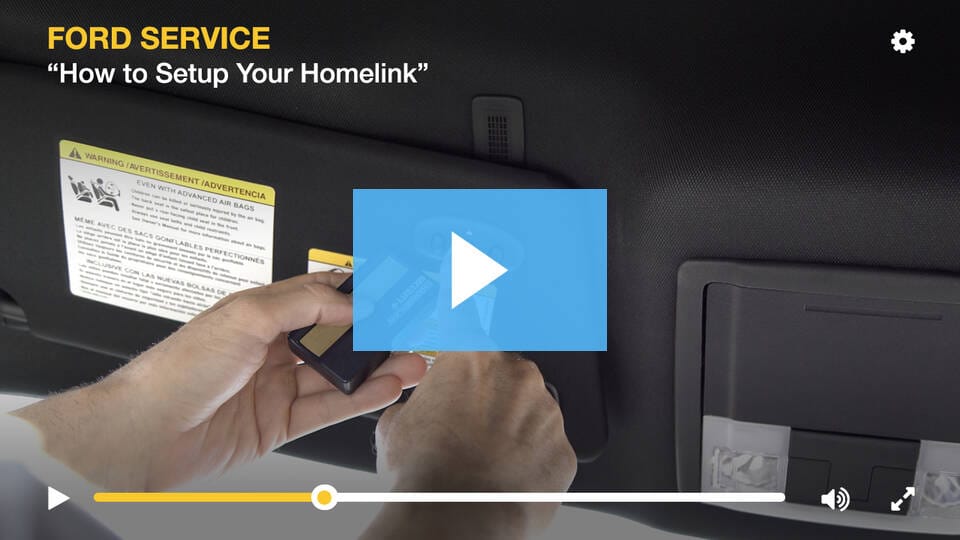
Identify Control Buttons
The HomeLink buttons are inside the car. Look at the overhead console. Three buttons are usually there. Each button can store one garage door code. These buttons are near the rearview mirror. They might have little lights next to them. These lights show when the button is pressed. The buttons are easy to reach from the driver’s seat.
Each button has a special job. Press one button to open the garage. Another button can close it. The third button might be for a gate. Different cars have different setups. Some buttons may need to be programmed. Press and hold to enter programming mode. Watch for flashing lights to know when programming starts. These lights help guide the process.
Programming The Opener
First, find the garage door opener button in your F150. It’s usually above the rearview mirror. Hold this button for a few seconds. Wait until the light flashes. This erases any old codes.
Make sure your garage door is closed. It won’t work if open. Now, your opener is ready for new codes. Safety first. Check the surroundings for any obstructions.
Press and hold the desired button you want to program. At the same time, press the remote button. Keep them pressed until the light blinks slowly. This means it’s in programming mode.
Release both buttons. The light should blink fast now. This confirms that the programming was successful. Test the button to see if it works. If not, repeat the steps.
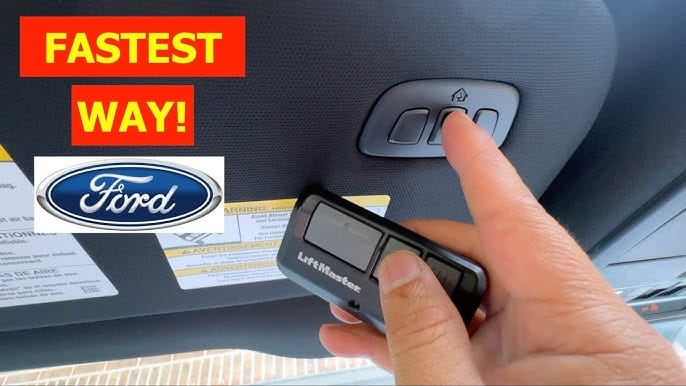
Synchronize With Garage Door
First, grab your garage door remote control. Press the button on the remote. Hold it close to the F150’s garage door opener system. Keep pressing until you see a light flash. This means the remote is communicating with the opener.
After programming, try opening the garage door. Stand at a safe distance from the door. Press the button inside the F150. Watch the garage door. If it moves, your programming is successful. If not, repeat the steps. Patience is key. Practice makes perfect.
Troubleshooting Common Issues
Programming your F150 garage door opener can be simple. Start by clearing the existing codes with the vehicle’s buttons. Next, use your remote to sync with the vehicle system for seamless operation.
Check Battery Levels
Check your battery levels often. Weak batteries cause malfunctions. Change the batteries if the door doesn’t move. Use fresh batteries. Battery life affects performance. Check the battery type. Make sure it’s the correct kind. Check connections t, oo. Loose connections can cause issues.
Reprogramming Steps
Start by resetting the garage door opener. Hold the reset button for 10 seconds. Next, press the learn button. The light will blink. Now, press the button on your remote. Hold it until the light stops blinking. Test your remote. Make sure it works. Repeat steps if needed. Reprogram if the door doesn’t open. Check if the remote light blinks. Follow the steps carefully for success.
Advanced Tips
Each button on your F150 can control a different door. Choose the button you want for each garage door. Press and hold the button. Wait until the light blinks. This means it’s ready to program. Repeat for each door. Make sure you remember which button is for which door. This will help avoid mistakes.
Secure your garage with strong codes. Change codes often to stay safe. Avoid using easy-to-guess codes like 1234. Use the owner’s manual for guidance. Follow the steps to set up strong security. Feel safe knowing your garage is protected. Keep your remote in a safe place. This prevents others from accessing it.
Frequently Asked Questions
How Do I Reset My F150 Garage Door Opener?
To reset your F150 garage door opener, locate the Learn or Reset button on the opener. Press and hold it until the LED light turns off. This will erase all previous codes. You can now reprogram the opener by following the manufacturer’s instructions to sync it with your remote.
Can I Program My F150 Without A Remote?
Yes, you can program your F150 without a remote by using the built-in Homelink system. First, clear existing codes by holding the two outer buttons until the indicator light changes. Then, follow the Homelink instructions in your vehicle’s manual to program it with your garage door opener.
What If My Garage Door Opener Is Incompatible?
If your garage door opener is incompatible, consider purchasing a Homelink-compatible receiver. This device can bridge the gap between your F150’s system and the garage door opener. Alternatively, consult the garage door opener manufacturer for compatibility solutions or an updated model that works with your vehicle.
Why Won’t My F150 Garage Door Opener Program?
If your F150 garage door opener won’t program, check the battery in your remote. Ensure you’re within range of the opener. Verify that e Learn button is pressed correctly. Additionally, consult your vehicle’s manual for specific instructions. If issues persist, seek professional assistance from a qualified technician.
Conclusion
Programming your F150 garage door opener is straightforward. Follow each step carefully. Double-check the instructions in your manual. Ensure your remote and opener are compatible. Test the setup before calling it complete. This saves time and hassle later. Practice makes perfect.
Don’t rush the process. Take your time to understand each part. Your garage door will work smoothly with your F150. Feel the convenience of modern technology. Enjoy the ease and security it offers. Now you can confidently open and close your garage with ease.
Happy driving!
Related posts:
 How Far Can You Drive With A Dead Battery
 how much is a replacement key for Ford F150
 What is a Ford Csp : Everything You Need to Know
 How To Identify A Ford Transmission: Tips and Techniques
 How to Reset Tpms Ford F150: Quick and Easy Steps
 How to Bypass O2 Sensor on Ford F150: A Foolproof Guide
 Which F150 Has Adaptive Cruise Control
 How Much are Ford F150 Brake Pads? Find the Best Prices Here!
 Does 30 Oz Yeti Fit in Cup Holder? Find Out Now!
 How Much is a Leveling Kit for F150? Find the Best Deals!
 What Is The F150 Sport Package
 How to Fix Active Air Dam System Fault Ford F150