How to Change Battery in F150 Key Fob
Knowing how to change the battery in your F150 key fob can save you time, stress, and money. In this guide, you’ll discover just how easy it is to swap out that little power source and get back on the road.
By the end of this article, you’ll feel confident in handling your key fob maintenance like a pro, ensuring you never get stuck at an inconvenient moment. Keep reading, and learn the quick steps to keep your key fob functioning flawlessly.
Key Steps
- Locate the Seam on the Key Fob Case
- Use a Flathead Screwdriver or Coin to Pry Open the Fob
- Carefully Separate the Two Halves
- Remove the Old Battery (typically CR2032 or CR2450)
- Insert the New Battery with the Correct Polarity (+ side up)
- Snap the Key Fob Halves Back Together
- Test the Key Fob to Ensure It Works
Tools And Materials Needed
You need a few tools for changing the battery. A small screwdriver is essential. Use it to open the key fob. Ensure it’s a flathead screwdriver. A new battery is also needed. Check the type before buying. Usually, a CR2032 battery is used. Get it from a store or online.
A clean cloth is helpful. Use it to keep the work area tidy. Have a tray or a small container. It holds screws and the old battery. This prevents loss of small parts. With these tools, you are ready to change the battery.
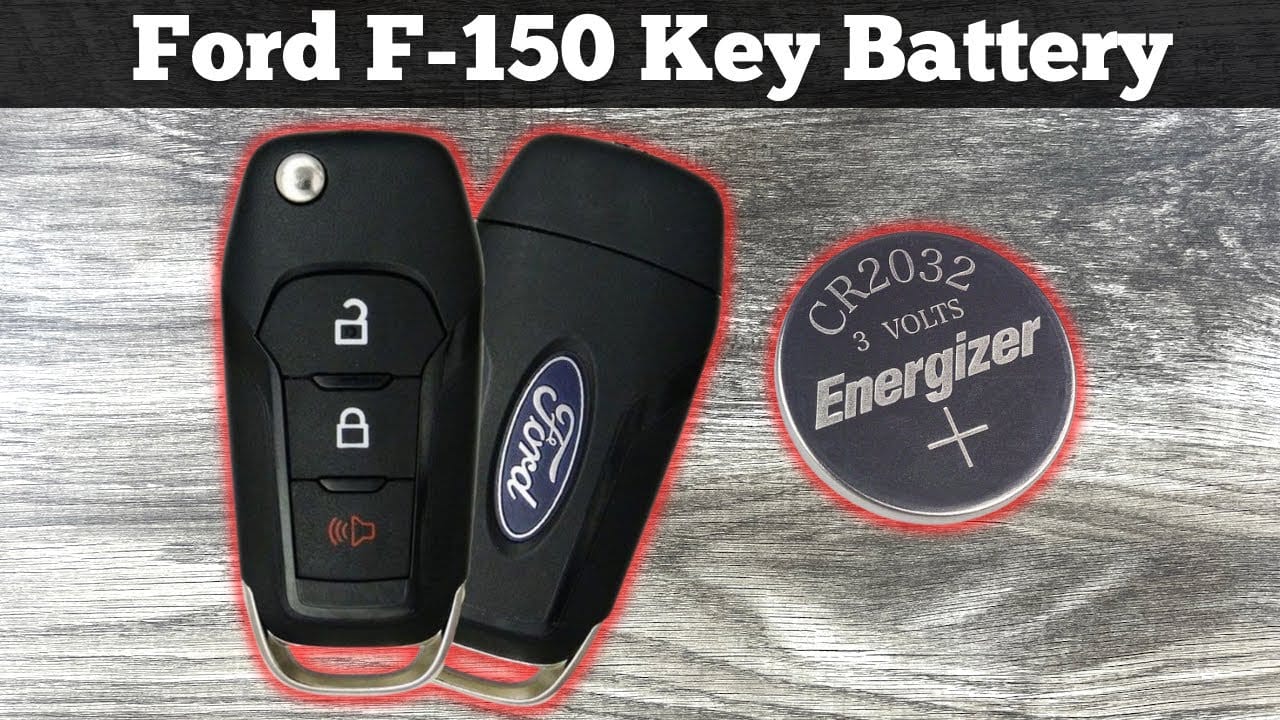
Locating The Key Fob Release
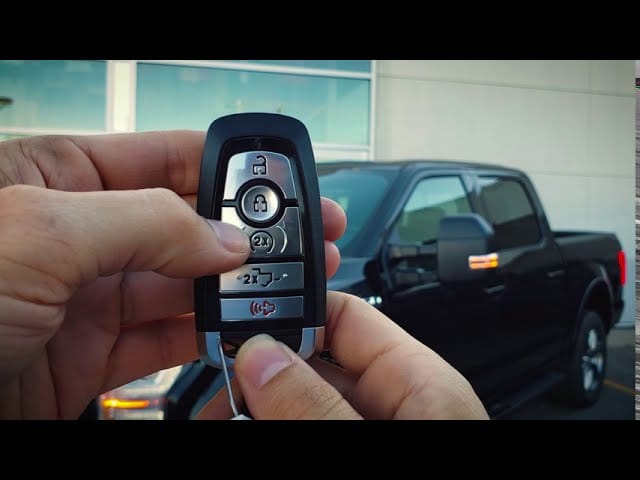
Find the small release button on the key fob. It’s usually on the back. Press this button gently. The key fob will open up. Be careful not to break it. Look for the battery inside. It’s round and shiny. You’ll need to replace it. Make sure the new battery is the same type. Check the old battery for its size. The size is often printed on it. Put in the new battery with the right side up. Close the key fob firmly. The release button helps you open and close easily. Test the key fob to see if it works.
Opening The Key Fob Case
Start by finding the small groove on the key fob. Use a flathead screwdriver for this task. Gently insert it into the groove. Twist the screwdriver carefully. This will open the case. Be gentle to avoid breaking it. You may hear a slight click. This indicates the case is opening. Keep the case halves together. This prevents losing small parts. Remember where each piece belongs. This helps during reassembly. The battery will be visible now. Make sure to note its position. This makes inserting the new one easier. Always handle with care. Fobs can be fragile. Take your time. Patience is key.
Identifying The Battery Type
Changing the battery in your F150 key fob is simple. First, find the battery type you need. Look for small print on the back of your key fob. The battery type is usually printed there. Most F150 key fobs use a CR2032 battery. This is a common type of button cell battery. Check your key fob to be sure. If unsure, check your car manual for guidance.
Buying the right battery is important. The wrong type won’t fit or work. You can buy the battery at most stores. Some auto shops also carry them. Always check the packaging for the correct size. Having the right battery ensures your key fob works well. Now you’re ready to replace it.
Removing The Old Battery
Find a small screwdriver or tool. Open the key fob gently. Locate the battery compartment inside. The old battery will be visible. Carefully remove the battery using the tool. Avoid touching other parts. Check the battery size and type before disposal. Dispose of the old battery safely. Ensure no debris remains in the compartment.
Inspect the compartment for damage. Clean any dirt or dust. Prepare the new battery for insertion. Make sure it matches the old one. Place the new battery in the correct position. Close the key fob securely. Test the key fob to ensure it works. If not, check the placement again. Handle the fob with care to avoid breaking it.
Installing The New Battery
Place the new battery in the slot. Make sure the positive side faces up. Fit the battery snugly into its spot. Check for any loose parts. Press the key fob halves back together. Ensure they click into place.
Test the key fob by pressing a button. If it works, you did it right! If not, recheck the battery placement. Ensure the battery is fresh and not old. Always use the right battery type for the key fob. This keeps it working well.
Reassembling The Key Fob
Reassembling the key fob is simple. Start with the battery. Ensure it fits snugly in its place. Next, align the circuit board correctly. This board connects the buttons to the battery. Then, snap the two halves of the fob together. Make sure all sides are secure. Test the buttons. They should work smoothly. If not, check the alignment again. A correctly assembled fob will work instantly. No need for extra adjustments. Always handle with care to avoid damage.
Testing The Key Fob
First, check if the key fob is working. Press the buttons on it. Do the doors lock or unlock? If not, the battery might be dead. A weak signal is a sign of a failing battery. Stand close to your car. See if the key fob works now. Sometimes distance affects signal strength.
Check the battery strength. Use a battery tester if you have one. It will show how strong the battery is. No tester? Try a simple trick. Swap the battery with one from another device. If the key fob works, the battery is weak. Replace it soon.
Next, inspect the key fob for damage. Look for cracks or broken parts. These can stop the key fob from working right. If it looks damaged, consider getting it fixed or replaced. A well-working key fob makes car access easy.
Troubleshooting Common Issues
Sometimes, the key fob might not work even with a new battery. This can be because of other issues. Check if the buttons are stuck. Dirt can make them sticky. Use a soft cloth to clean them. The circuit board inside might also be damaged. Look for any signs of corrosion or broken parts. If the fob still does not work, it might need reprogramming. This can happen after battery changes. Follow the car manual for steps.
Another problem can be the key fob’s range. If it only works near the car, the signal might be weak. Make sure there are no obstructions like metal objects. These can block the signal. It is also good to check if the battery is placed correctly. A wrong placement can cause problems, too.
Maintaining Your Key Fob
Keeping your F150 key fob in good shape is important. A well-maintained key fob ensures your car locks and unlocks smoothly. Change the battery if it feels slow or unresponsive. You might notice the key fob working from a shorter distance. This is a sign that the battery is weak.
Use a coin to open the key fob. Find the battery inside. Check the battery type before buying a new one. Usually, it’s a CR2032 battery. Replace the old battery with a new one. Put the key fob back together. Test it to make sure it works well. Now, your key fob should work like new again.
Frequently Asked Questions
How Often Should I Change My F-150 Key Fob Battery?
The F150 key fob battery typically lasts 1-2 years. Replace it when the remote starts to malfunction or becomes less responsive.
What Type Of Battery Fits F150 Key Fob?
F150 key fobs usually use a CR2032 battery. Check your key fob manual or current battery for confirmation.
Can I Change The F150 Key Fob Battery Myself?
Yes, you can change the battery yourself. Follow simple instructions to open the fob and replace the battery.
Why Is My F-150 Key Fob Not Working?
If your F150 key fob isn’t working, the battery might be dead. Replace it to restore functionality and performance.
Conclusion
Changing your F150 key fob battery is simple and quick. Just follow the steps carefully for a smooth process. Always have the right tools ready. Keep spare batteries at home for future use. This saves time and prevents last-minute hassles.
A working key fob enhances your car experience. Regular maintenance ensures it lasts longer. Remember, a small task now can prevent bigger issues later. Enjoy the ease of a fully functional key fob. Your F150 deserves the best care. Stay prepared, stay efficient.
Related posts:
 How Far Can You Drive With A Dead Battery
 how much is a replacement key for Ford F150
 What is a Ford Csp : Everything You Need to Know
 How To Identify A Ford Transmission: Tips and Techniques
 How to Reset Tpms Ford F150: Quick and Easy Steps
 How to Bypass O2 Sensor on Ford F150: A Foolproof Guide
 Which F150 Has Adaptive Cruise Control
 How Much are Ford F150 Brake Pads? Find the Best Prices Here!
 Does 30 Oz Yeti Fit in Cup Holder? Find Out Now!
 What is a Cam Phaser in a F150? Unraveling the Mystery
 How Much is a Leveling Kit for F150? Find the Best Deals!
 What Is The F150 Sport Package