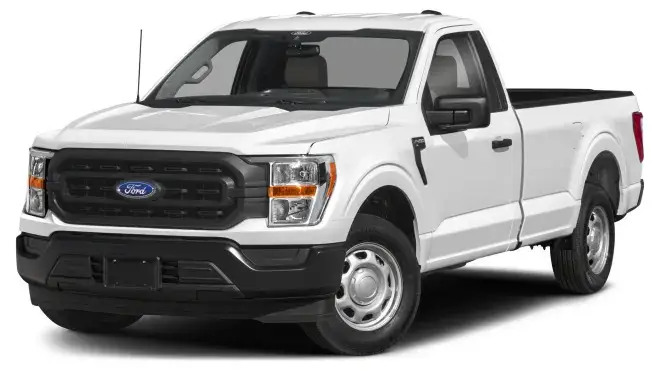
How to Change a Battery in a 2026 Ford F-150: A Trim-Specific Walkthrough
Your 2026 F-150 turns over slowly on a cold morning. The dash lights flicker, and the auto start-stop system quits working. You know the battery is on its way out. The dealer wants a few hundred dollars just for the install, and you’d rather do it yourself.
Good news: swapping the battery in a 2026 F-150 is a straightforward job. It takes about 30 to 45 minutes with basic hand tools. The tricky part isn’t the physical swap. It’s the battery management system (BMS) reset that most guides skip over. Get that wrong, and your new battery won’t charge correctly.
ACDelco
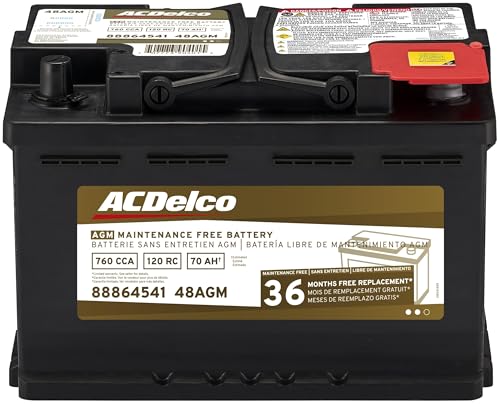
ACDelco Gold Automotive Battery 48AGM | PN…
- High density negative paste, improves performance and increases battery life
- Enhanced life alloy or Silver Calcium stamped alloy increases cycle life and improves performance
- Calcium lead positive grid, maximizes conductivity and allows for low resistance
This walkthrough covers every trim, from the 2.7L EcoBoost to the 5.0L V8 and the PowerBoost hybrid. You’ll get exact torque specs, the correct disconnect order, and the BMS reset steps for both manual and Forscan methods.
Before you start, consider the battery itself. The ACDelco Gold 48AGM (88864541) is an AGM Group 48 battery with a 36-month warranty. It uses high-density negative paste and a calcium lead positive grid for better conductivity. The vent cap design resists acid leakage, which matters when the battery sits under the hood at an angle. Check the current price on Amazon if you want a solid OEM alternative.
What You Need Before You Start
Gather your tools first. You’ll need a 10mm socket, a 13mm socket, a ratchet, and a torque wrench. A terminal puller helps if the posts are stuck. Wear safety glasses and nitrile gloves. Battery acid is nasty stuff.
Your 2026 F-150 takes a Group 48 H6 battery. That’s the same as BCI Group 48. Most trims use an AGM battery from the factory. Check your current battery label to confirm. If your truck has auto start-stop, you need an AGM battery. A flooded battery will fail early in that application because start-stop cycles drain it hard.
Cold cranking amps matter too. The 2.7L and 3.5L EcoBoost engines want at least 760 CCA. The 5.0L V8 is similar. The PowerBoost hybrid has a different setup, which I’ll cover next.
One more thing: a memory saver. This small device plugs into your OBD-II port or a 12V outlet and keeps radio presets, seat positions, and BCM settings alive while the main battery is disconnected. It’s not mandatory, but it saves you 10 minutes of reconfiguration. If you don’t have one, you can use a jump box with an OBD-II adapter.
Locating the Battery in Your 2026 F-150
Pop the hood. The battery sits on the passenger side, near the firewall, in most gas models. You’ll see a plastic cover over the positive terminal. Remove it with a flathead screwdriver or your fingers.
The hold-down clamp is a metal bracket across the battery base. Two bolts secure it. On some trims, a plastic shroud covers the whole battery. Remove that first.
Hood struts make this easier. The 2026 F-150 uses gas struts instead of a prop rod on most trims. If yours has a prop rod, secure it properly before you lean in.
Gas models vs. PowerBoost hybrid differences
The 2.7L, 3.5L, and 5.0L gas engines all use a standard Group 48 battery in the same location. The PowerBoost hybrid is different. It has a 12V battery under the hood plus a high-voltage hybrid battery under the rear seat. The 12V battery still powers the starter and electronics. Its location is similar, but the underhood layout is tighter because of the hybrid components.
On the PowerBoost, disconnect the 12V battery exactly like a gas model. Do not touch the high-voltage system. That’s a dealer-only job. The orange cables under the hood are high-voltage. Leave them alone.
Also, the PowerBoost has a different BMS calibration. After a battery swap, the truck may need a few drive cycles to relearn the state of charge. Don’t panic if auto start-stop doesn’t work immediately.
Step-by-Step Battery Removal
Park on a level surface. Turn off the engine and all accessories. Wait at least 5 minutes. This lets the modules go to sleep. The F-150 has many computers, and they can stay awake for a bit after shutdown.
If you’re using a memory saver, plug it in now. Connect it to the OBD-II port under the dash. The device will keep the radio and seat memory alive.
Disconnecting terminals in the correct order
Always disconnect the negative terminal first. That’s the one with the black cable and the minus sign. Use a 10mm socket. Loosen the nut and pull the cable away from the post. Tuck it aside so it can’t touch metal.
Then disconnect the positive terminal. That’s the red cable with the plus sign. Same 10mm socket. Once both cables are off, you can remove the battery.
Why negative first? If your wrench touches metal while loosening the positive, you’ll create a short circuit. With the negative disconnected, the whole chassis is no longer grounded to the battery. That makes positive work safe.
Removing the hold-down clamp and bracket
Now remove the hold-down clamp. It’s a metal bar across the battery base. Two 13mm bolts hold it. Loosen both, then lift the clamp away. On some 2026 F-150s, there’s also a plastic bracket at the base. It pops off with a firm tug.
The battery weighs about 45 pounds. Lift it straight up and out. Don’t tilt it. AGM batteries are sealed, but tilting can still spill acid if the case is damaged.
Inspect the battery tray while it’s empty. Look for corrosion or debris. Clean it with a wire brush and a baking soda solution. Rinse with water and dry it completely.
Installing the New Battery
Set the new battery in the tray. The positive post should be on the same side as the original. Group 48 batteries have the posts in a specific orientation. If it doesn’t drop in easily, you have it backwards.
Reinstall the hold-down clamp. Tighten the two 13mm bolts to 18 lb-ft (25 Nm). Don’t overtighten. The plastic battery case can crack.
Now connect the positive terminal first. That’s the opposite of removal. Tighten the 10mm nut to 62 lb-in (7 Nm). Then connect the negative terminal. Same torque spec.
Apply a thin layer of dielectric grease to both posts. This prevents terminal corrosion. The white fuzzy stuff you see on old batteries is corrosion, and it causes resistance. A clean connection matters more than most people think.
Terminal torque specs and corrosion prevention
Torque specs for the 2026 F-150 battery terminals are 62 lb-in (7 Nm). That’s about 5 lb-ft. It’s not much. Use a torque wrench if you have one. If you don’t, snug the nut and then give it a tiny extra turn. Don’t crank on it.
The hold-down bracket bolts are 18 lb-ft (25 Nm). The battery tray bolts, if you removed them, are 15 lb-ft (20 Nm).
For corrosion prevention, felt washers help. So does dielectric grease. Reapply every six months if you live in a humid climate.
Resetting the Battery Management System (BMS)
This is the step most guides gloss over. The 2026 F-150 has a battery management system that monitors battery state of charge, temperature, and current flow. When you install a new battery, the BMS still thinks the old battery is there. It will undercharge or overcharge the new one. That shortens battery life.
You have two options: a manual BMS reset or a Forscan/dealer registration.
Manual BMS reset vs. Forscan/dealer registration
The manual reset works on many 2026 F-150s. Here’s the procedure:
- Turn the ignition on. Don’t start the engine.
- Flash the high beams five times. Pull the stalk toward you and release. Do it five times within 10 seconds.
- Press the brake pedal three times within 10 seconds.
- Watch the battery light on the dash. It should flash three times.
- Turn the ignition off.
If the battery light flashes, the BMS is reset. If it doesn’t, your truck may need a scan tool.
Forscan is a software tool that lets you access the BMS module. You need a Windows laptop and an OBD-II adapter. The process takes about 10 minutes. You go into the BMS service function and select ‘Reset Battery Monitoring System.’
A dealer can also do this with their IDS tool. Some dealers charge a half-hour of labor. It’s worth it if you don’t want to mess with Forscan.
Does the 2026 F-150 require battery registration? Strictly speaking, no. The manual reset usually works. But if you want the BMS to learn the new battery’s exact characteristics, Forscan or a dealer tool is better. The truck will still run without it, but you may see charging system warnings.
Restoring Memory Settings and Clearing Warning Lights
If you used a memory saver, your radio presets and seat positions should be intact. If not, you’ll need to reset them. The BCM may also forget some settings, like auto-up windows and the clock.
Start the truck. Let it idle for a minute. Check for warning lights. You might see a battery light, a check engine light, or a charging system message. These often clear after a few drive cycles.
Drive the truck for 10 to 15 minutes. Include some stops and starts. This lets the BMS relearn the battery. Auto start-stop may not work right away. Give it a day or two.
If warning lights persist, check your terminal connections. A loose negative cable can cause all sorts of electrical gremlins. Re-torque to 62 lb-in and try again.
Troubleshooting Common Post-Swap Issues
Truck won’t start after swap. Check the terminals. The negative cable might not be tight. Also check the battery voltage. A new battery should read 12.6 volts or higher. If it’s below 12.4, it needs charging.
Auto start-stop doesn’t work. This is normal for the first few drive cycles. The BMS needs to see the battery’s state of charge climb. If it still doesn’t work after a week, the BMS reset didn’t take. Try the manual procedure again or use Forscan.
Radio asks for a code. Some F-150s have a radio security code. If you didn’t use a memory saver, you may need to enter it. Check your owner’s manual for the code. If you don’t have it, a dealer can retrieve it.
Warning lights stay on. Disconnect the negative terminal for 10 minutes, then reconnect. This hard-resets most modules. If the check engine light remains, scan for codes. A loose ground or a bad battery cable can trigger codes.
Battery drains overnight. You may have a parasitic draw. That’s a separate issue from the battery itself. A dealer or a good independent shop can test for it. Don’t just replace the battery again.
FAQ
What group size battery does a 2026 Ford F-150 take?
Most 2026 F-150s take a Group 48 H6 battery. That’s the BCI group size. It’s an AGM battery from the factory on trims with auto start-stop. Check your current battery label to confirm. The PowerBoost hybrid also uses a Group 48 for its 12V system.
Do I need to register a new battery in a 2026 F-150?
Ford doesn’t require registration in the same way BMW or Audi does. But you should reset the BMS. The manual reset (high beams and brake pedal) works on many trucks. Forscan or a dealer tool is more reliable. Without a reset, the BMS may not charge the new battery correctly.
Can I use a flooded battery instead of AGM?
No. If your truck has auto start-stop, you need an AGM battery. Flooded batteries can’t handle the frequent cycling. They’ll fail early. AGM batteries also handle vibration better, which matters in a truck.
How long does a 2026 F-150 battery last?
Most last 3 to 5 years. Heat kills batteries faster than cold. If you live in Arizona or Texas, expect closer to 3 years. In cooler climates, you might get 5. The ACDelco Gold 48AGM has a 36-month warranty, which is a good baseline.
What happens if I don’t reset the BMS?
The truck will still run. But the charging system may not fully charge the new battery. It might overcharge it, too. Both shorten battery life. You might also see a battery light or a charging system warning. The reset takes two minutes, so do it.
What to Do After the Swap
- Double-check terminal torque: 62 lb-in (7 Nm) for both posts.
- Confirm the hold-down clamp is tight at 18 lb-ft (25 Nm).
- Perform the BMS reset with the high-beam and brake-pedal method.
- Drive for 10 to 15 minutes with a few stops to let the BMS relearn.
- Reapply dielectric grease to the terminals every six months.
- Keep your receipt. The ACDelco Gold 48AGM has a 36-month warranty.
- If warning lights persist after a week, scan for codes or visit a dealer.
Changing the battery in your 2026 F-150 isn’t hard. The physical swap takes 30 minutes. The BMS reset is the part that matters for long-term battery life. Get that right, and your new battery will last as long as it should. For a deeper look at the process, see this F-150 battery guide. If you’re also dealing with key fob issues, here’s how to change the key fob battery. And if your truck needs other maintenance, this front rotor replacement guide covers the 4×4 models.