
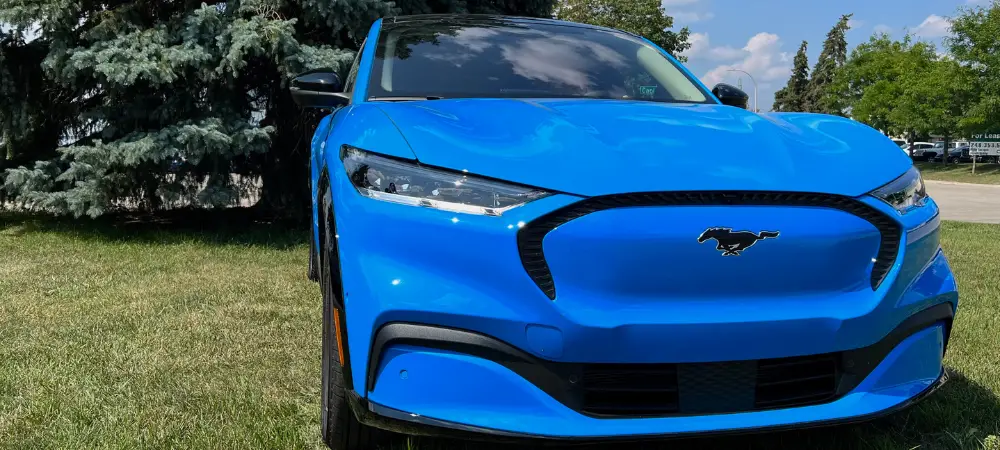
How to Get BlueCruise on F-150: Compatibility, Cost & Activation
To get Blue Cruise on an F150, you can activate it at any point during your vehicle ownership journey, whether it’s at purchase, annually, or even monthly. You can also experience Blue Cruise through a complimentary trial if you choose not to activate it at purchase. What matters most is whether your truck was built with the right hardware: a 2021 or newer F-150 equipped with Co-Pilot360 Active 2.0, which bundles the camera, radar, and driver monitoring system BlueCruise needs.
Verify your vehicle’s Blue Cruise availability and status on your Ford Account under the Connected Services tile. Ensure that your FordPass Connect modem is activated, and your Vehicle Connectivity Settings are set to On. Once your vehicle is eligible and you have subscribed, you can enjoy the benefits of Blue Cruise on your F150. If the Connected Services tile shows no BlueCruise entry at all, your truck is missing the required hardware rather than simply being unsubscribed.

Credit: www.facebook.com
Activating Ford Bluecruise
Ready to experience the convenience of hands-free highway driving with Ford BlueCruise? Activating this innovative feature on your F150 is simple and can be done at purchase or at any point during your vehicle ownership journey. In this section, we’ll guide you through the process of verifying BlueCruise availability, activating it at purchase, as well as activating it annually or monthly.
Verifying Bluecruise Availability
Before you can activate Ford BlueCruise, it’s important to ensure that your vehicle is equipped with this feature. To verify BlueCruise availability, follow these steps:
- Sign in to your Ford Account at ford.com and open the Connected Services tile.
- Find the BlueCruise section, which shows your vehicle’s status and the date your service began.
- Confirm the truck is listed with Co-Pilot360 Active 2.0, the package that includes the hands-free hardware.
- Check that your FordPass Connect modem is activated and Vehicle Connectivity Settings are switched On in Sync 4.
- If BlueCruise does not appear, your F-150 was not built with the necessary hardware and cannot be upgraded later.
By checking your Ford Account, you can easily confirm whether your F150 has the necessary hardware to support BlueCruise, giving you the green light to proceed with activation.
Model Year And Trim Compatibility
BlueCruise hardware arrived on the F-150 for the 2021 model year and is offered on 2021 and newer trucks, most commonly on Lariat, King Ranch, Platinum, and Limited trims when Co-Pilot360 Active 2.0 is selected. Lower trims can qualify if the package was ordered as an option. The quickest check is your window sticker or build sheet: if Co-Pilot360 Active 2.0 is not listed, the truck cannot run BlueCruise regardless of subscription status.
Activating Bluecruise At Purchase
If you’re ready to hit the road with BlueCruise right from the start, activation at purchase is the way to go. Here’s what you need to do:
- Tell your Ford dealership during the purchase process that you want BlueCruise activated.
- Confirm the truck is equipped with Co-Pilot360 Active 2.0, since BlueCruise cannot be added to a vehicle built without it.
- Choose your plan and complete the paperwork with the dealership.
- Accept the Connected Services terms in the FordPass app or on your Ford Account.
- Confirm the subscription shows as Active under the Connected Services tile before you drive away.
By activating BlueCruise at purchase, you can skip the hassle and start enjoying the benefits of this advanced driving assistance system right away.
Activating Bluecruise Annually Or Monthly
If you didn’t opt for BlueCruise activation at purchase or prefer greater flexibility, you can still activate it annually or monthly. Follow these steps:
- Open the FordPass app or log in to your Ford Account and select the Connected Services tile.
- Open the BlueCruise section and choose the plan you want, either annual or monthly.
- Enter your payment details and confirm the purchase.
- Wait for the activation to sync to the vehicle, which can take a few minutes to a few hours.
- Start the truck so Sync 4 can pull the updated entitlement, then check that the status reads Active.
By activating BlueCruise annually or monthly, you have the freedom to adapt to your driving preferences and explore the benefits of this cutting-edge technology whenever it best fits your lifestyle.
Whether you choose to activate BlueCruise at purchase or decide to do so annually or monthly, Ford BlueCruise unlocks a new level of convenience and ease during your highway journeys. Get ready to experience a hands-free driving experience like never before.
Cost And Subscription Options
BlueCruise is sold as a connected service rather than a one-time feature. Ford has offered monthly and annual plans, and many trucks include a complimentary trial period that starts when the service is first activated. Exact pricing changes over time and varies by plan length, so confirm the current rate in the FordPass app or on your Ford Account before you buy. The hardware itself is not sold separately after purchase, which is why the Co-Pilot360 Active 2.0 requirement matters more than the subscription price.

Credit: www.facebook.com
Using Ford Bluecruise
If you own an F150 and want to experience the convenience of self-driving technology, Ford BlueCruise is here to enhance your driving experience. With advanced features like Adaptive Cruise Control and Lane-Keeping System, Ford BlueCruise takes your F150 to the next level. In this section, we will guide you on how to set up Ford’s self-driving system and explore its powerful features.
Setting Up Ford’s Self-driving System
If you are eager to activate Ford BlueCruise on your F150, follow these simple steps:
- Ensure your vehicle is equipped with the Ford BlueCruise technology.
- Verify your vehicle’s Ford BlueCruise availability and status on your Ford Account under the Connected Services tile.
- If your vehicle is eligible, activate it by choosing to activate at purchase or through a complimentary trial.
- Activating your Ford BlueCruise requires you to have your FordPass Connect modem activated and Vehicle Connectivity Settings set to On.
Features Of Ford Bluecruise
Once you have successfully set up Ford BlueCruise on your F150, you will gain access to an array of remarkable features. Let’s take a closer look at these features:
1. Adaptive Cruise Control
Ford BlueCruise’s Adaptive Cruise Control allows you to maintain a safe distance from the vehicle ahead, automatically adjusting your F150’s speed. This intelligent feature takes the stress out of highway driving, offering a smoother and more enjoyable journey.
2. Lane-Keeping System
The Lane-Keeping System in Ford BlueCruise helps you stay in your lane by providing gentle steering assistance. It uses advanced cameras and sensors to detect lane markings and keeps your F150 centered on the road, enhancing safety and reducing driver fatigue.
With Ford BlueCruise, you can experience a newfound freedom behind the wheel of your F150. Activate this self-driving system and enjoy the convenience and advanced technology it brings to your driving experience.

Credit: www.allensamuelshutch.com
Blue Zone Coverage And Software Updates
BlueCruise only engages on divided, limited-access highways that Ford has mapped as Blue Zones. Coverage is displayed in the FordPass app and in the vehicle’s navigation, so check your route before a long drive if hands-free driving is the reason you subscribed. Ford expands the mapped network over time through over-the-air updates. To confirm you have the latest software, open Settings in Sync 4, go to the updates menu, and check the version and last update date. Keeping automatic updates enabled is the simplest way to stay current.
Frequently Asked Questions Of How To Get Blue Cruise On F150
How Do I Enable Bluecruise On My F150?
To enable BlueCruise on your F-150: 1. Check your vehicle’s BlueCruise availability and status on your Ford Account under the Connected Services tile. 2. Activate your FordPass Connect modem and ensure your Vehicle Connectivity Settings are turned on. 3. Make sure Sync 4 has the latest software update and subscribe to BlueCruise. 4. Once subscribed, select Adaptive Cruise Control on the steering wheel and confirm Lane Centering is on. 5. Watch for the hands-free icon to appear on the instrument cluster, which only happens inside a Blue Zone.
4. Once subscribed, you can use BlueCruise by selecting the Adaptive Cruise Control button on your steering wheel and ensuring the Lane-Keeping System is activated. Note: Always remain attentive and prepared to resume control of the vehicle while using BlueCruise.
Troubleshooting: Why BlueCruise Won’t Activate
- No BlueCruise option in Connected Services: the truck was not built with Co-Pilot360 Active 2.0 and cannot be retrofitted.
- Subscription shows Active but the hands-free icon never appears: you are outside a Blue Zone, or Lane Centering and Adaptive Cruise Control are not both engaged.
- Activation pending for hours: the FordPass Connect modem is offline or Vehicle Connectivity Settings are off. Toggle them on and restart the truck.
- Feature stopped working after a software update: check the Sync 4 update menu for a pending install and let it complete on Wi-Fi.
- Driver monitoring warnings: the cabin camera needs a clear view of your face. Remove obstructions and keep your eyes on the road.
Can You Add Bluecruise After Purchase?
Yes, BlueCruise can be added after the initial purchase. Customers can activate BlueCruise at any time during their vehicle ownership journey, including monthly or annually, and even have a complimentary trial if they choose not to activate it at purchase.
How Do I Know If My F150 Has Bluecruise?
To determine if your F150 has BlueCruise, check your Ford Account under the Connected Services tile. It will show if your vehicle is equipped with BlueCruise and the date the service began. You can also look for the Co-Pilot360 Active 2.0 listing on the window sticker or in your build details, since that package is what supplies the hardware. Activate your FordPass Connect modem and ensure your Vehicle Connectivity Settings are set to On to use BlueCruise.
Can You Add Bluecruise To Any F150?
You can add BlueCruise to a 2021 or newer F-150 only if it was built with Co-Pilot360 Active 2.0. Trucks without that package lack the camera, radar, and driver monitoring hardware, and Ford does not offer a retrofit. If your truck has the hardware, you can subscribe at any point during ownership or use the complimentary trial. Verify availability and status on your Ford Account.
Conclusion
To get Blue Cruise on your F150, you have the flexibility to activate it at any point during your vehicle ownership journey. Whether you choose to activate it at purchase, annually, or even monthly, Ford offers a complimentary trial for you to experience this hands-free highway driving feature.
To check your vehicle’s Blue Cruise availability and status, simply log in to your Ford Account under the Connected Services tile. Activate your Ford Blue Cruise and enjoy a safer and more convenient driving experience on the road.
Related posts:
 How Far Can You Drive Without an Alternator? Real Distances
 What Color Is Avalanche for Ford? The Definitive 2026 Guide
 How to Disengage 4WD in Ford F150: Easy Steps to 2H
 Ford F150 Power Steering Assist Fault: Fix by Year, Codes & Cost
 What Lug Pattern is a Ford F150: Unveiling the Perfect Fit for Your Ride
 Does My F150 Have Remote Start? 3 Easy Ways to Check
How Much is a Windshield for a Ford F150: Find the Best Price Now!
 Best Aftermarket Radio For 2013 Ford F150: Expert Picks
 Best Floor Jack for F150
 How to Get a Spare Tire off a Ford F150
 5 Best Ford F150 Bed Covers: Expert Picks & Quality Tested
 Best Tuners for Ford F150 EcoBoost to Boost Performance