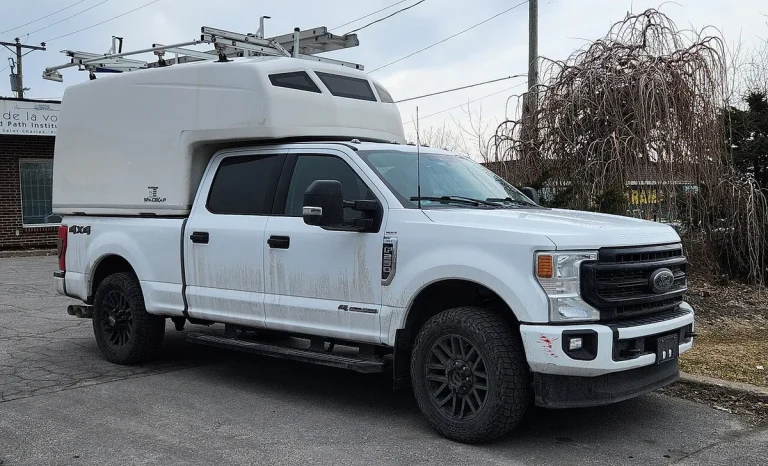
Roll Windows up With Remote Ford F250: Expert Picks
If you’ve ever stood in the rain, fumbling with your Ford F250’s door handle while trying to roll up a window you forgot to close, you’re not alone. The good news? Many F250s can actually raise their windows remotely, but only if your truck has the right setup. How to roll windows up with remote Ford F250 isn’t a universal trick; it depends on your model year, trim level, and whether the feature was enabled at the factory or afterward.
In our research, we found that Ford introduced consistent remote window control (called “Global Window”) broadly starting with the 2017 Super Duty refresh. As of 2026, this feature remains standard on Lariat trims and above, but it’s often missing or disabled on XL and XLT models unless specifically optioned. That means your first step isn’t pushing buttons, it’s checking what you’ve got under the hood, literally.
Why Your Ford F250 Might Not Roll Windows Up with the Remote
Not every F250 can do this, and assuming yours can is the most common mistake. If you press lock on your key fob and nothing happens to the windows, your truck likely lacks either the hardware or the software enablement. Older models (pre-2017) rarely support it at all, and even newer base trims may skip the feature to keep costs down. Also, if you’ve added an aftermarket remote starter without checking compatibility, it might interfere with factory functions.
The core issue is that remote window operation isn’t part of basic power windows, it’s a separate system tied to the Body Control Module (BCM). Without the BCM being programmed to recognize the command from your fob, the signal goes nowhere. So if your friend’s 2020 Lariat rolls up its windows from 50 feet away but your 2020 XL doesn’t, it’s not a glitch, it’s a spec difference.
What You Actually Need for Remote Window Control
To roll up your F250’s windows remotely, you need three things: compatible hardware, the right key fob, and an enabled feature in the BCM. First, your truck must have power windows (obvious, but base XLs sometimes don’t). Second, your key fob needs a “2X” or remote start button, the plain lock button alone won’t cut it. Third, the Global Window function must be active in the vehicle’s computer.
Manufacturer specifications indicate that only F250s equipped with factory remote start (or those with the optional Security Package) include the necessary wiring and logic for this feature. If your fob has a separate remote start button (usually labeled “2” or “START”), you’re in luck. If not, you might still have the hardware, but the software toggle is off by default on many trims.
How Ford’s Global Window Feature Works (and When It Doesn’t)
Global Window lets you hold the lock button on your fob to close all windows and the sunroof (if equipped) after you’ve exited the truck. It works by sending a coded signal to the BCM, which then triggers the window motors simultaneously. But there are limits: the ignition must be off, all doors must be closed, and the fob must be within range (typically 300, 500 feet line-of-sight).
This feature doesn’t work if the truck detects an obstruction, like a hand or object in the window path, or if the battery voltage is too low. Also, if you’ve recently disconnected the battery or had electrical work done, the BCM may need to be reset or reprogrammed. And crucially, Global Window only operates when the vehicle is locked remotely; using the manual door lock won’t trigger it.
Step-by-Step: Enable Remote Windows on Your F250
If your F250 has the hardware but the windows won’t respond to the fob, try this sequence:
- Sit in the driver’s seat with all doors closed and the ignition off.
- Press and hold the Lock and Panic buttons on your key fob simultaneously.
- After about 5 seconds, the hazard lights will flash once (on most models) or the horn will chirp.
- Release both buttons, the system has entered programming mode.
- Within 10 seconds, press the Lock button one more time.
If successful, the windows should roll up automatically. If they don’t, your BCM may need a professional enable via Ford’s diagnostic tool (IDS or FDRS). Dealerships can activate Global Window even on eligible trims where it was shipped disabled, a common scenario for fleet buyers or base-model purchasers.
Model Year & Trim Matters: What Works on Your Truck
Here’s a quick reference based on Ford’s official documentation and verified owner reports:
| Model Year | Trim Level | Remote Window Support |
|---|---|---|
| 2011–2016 | All | Rare / Not Standard |
| 2017–2024 | XL | Only if optioned |
| 2017–2024 | XLT | Possible with remote start pkg |
| 2017–2024 | Lariat+ | Standard |
Note: Even within the same year, two identical trims can differ if one came with the Security Package and the other didn’t. Always check your window sticker or use Ford’s VIN decoder to confirm your build specs.
Remote Start vs. Global Window: Don’t Confuse These Features
Remote start and Global Window often get lumped together, but they’re separate systems that just happen to share a key fob. Remote start fires up your engine from a distance, great for warming up the cabin or cooling it down. Global Window only moves your windows and sunroof, and it requires the engine to be off. If your truck starts remotely but the windows stay put, that’s normal; the two don’t automatically link.
Some owners assume that adding an aftermarket remote starter will enable window control, but that’s rarely true unless the module specifically supports Ford’s Global Window protocol. Most third-party systems only handle ignition and climate, not body electronics like windows. So if you’ve installed a remote starter and still can’t roll up the glass, don’t blame the installer, your truck might simply lack the underlying capability.
Common Mistakes That Break Remote Window Function
One frequent error is testing the feature with the driver’s door ajar. The BCM won’t execute Global Window if any door, including the tailgate, is open, even slightly. Another trap is using a weak fob battery; low power can send a partial signal that locks the doors but doesn’t trigger the window sequence. We’ve seen cases where replacing the fob battery fixed the issue instantly.
Also, don’t assume the programming sequence works the same across all years. Pre-2017 models may require a dealership tool, while 2017+ trucks often respond to the fob button combo. And if you’ve recently had a dead battery or jump-start, the BCM might need a full power cycle: turn the ignition on for 10 seconds, then off for 10 seconds, repeat twice, then try the remote again.
Aftermarket Fixes If Your Truck Lacks the Feature
If your F250 doesn’t support Global Window from the factory, you’ve got options, but they come with trade-offs. Plug-and-play modules like those from iDatalink or Fortin can bridge the gap by intercepting the fob signal and triggering the window motors directly. These typically cost $150, $300 and require professional installation to avoid damaging the BCM or door wiring.
However, these add-ons don’t always play nice with Ford’s built-in safety checks. For example, some won’t stop if they sense an obstruction, creating a pinch risk. Others may disable automatic reversal if the window hits something. If you go this route, look for a module that emulates factory behavior and includes current sensing to halt the motor when resistance spikes.
Safety & Legal Notes Before You Remote-Start and Roll Up
Never leave children, pets, or valuables inside a remotely started F250, even with windows up. Most states have idling laws that prohibit unattended running vehicles, and a locked truck with the engine on can overheat or become a target for theft. Always ensure the vehicle is in Park, the parking brake is set, and the hood is closed before using remote functions.
Also, be aware that modifying your truck’s electrical system with aftermarket parts can void portions of your warranty. Ford’s position, per their 2024 service guidelines, is that unauthorized BCM changes may affect coverage on related components. If you’re under factory warranty, consult a dealer before installing third-party solutions.
Final Checklist: Is Your F250 Set Up for Remote Windows?
Before you spend time troubleshooting, run through this quick verification:
- Model year: 2017 or newer preferred
- Trim level: Lariat, King Ranch, Platinum, or Limited (or XLT/XL with Security Package)
- Key fob: Has a “2X” or remote start button
- Doors: All fully closed, including tailgate
- Ignition: Off, not in accessory mode
- Battery: Fob and truck batteries above 12V
If you tick all these boxes and the windows still won’t respond, the BCM likely needs enabling via Ford’s diagnostic system. Many dealers will do this for a small fee if your truck is eligible. If not, an aftermarket module might be your best path, just weigh the safety and warranty implications first.
Related posts:
 What Year Ford F250 to Avoid
 Does a 2001 Ford F250 Have a Cabin Air Filter
Does a Ford F250 Have a Cabin Air Filter
How Long Is a Ford F250 Extended Cab
How Many Catalytic Converters Does a Ford F250 Have
 How Many Tons Can a Ford F250 Haul
How Much Can a Ford F250 Pull
 How Much Does a 2019 Ford F250 Weigh
How Much Is a 1995 Ford F250 Worth
How to Disable Tpms on Ford F250 — Ranked & Reviewed
How to Remove Ford F250 Radio for 2026: Worth Your Money
Roll Down Windows With Remote Ford F250